UX Tools: Wireframing and Prototyping Tools

• 6 min read

659 Shares

Today, let's look at some great value options for developing wireframes and prototypes for your project. If you’re not sure what these are; let’s refresh your memory.

What is a Wireframe?
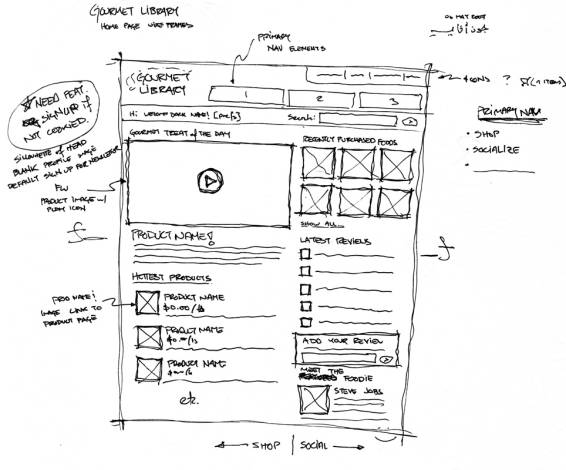


A wireframe is a model of your site without the coding and design. It can be used to test ideas for your UX project before you deploy expensive design and development resources. In general this tends to be a low-fidelity approach and won’t look too much like the end project.

What is a Prototype?

Similarly, a prototype is also a model of your site/app but often some of the design elements are already developed and a high-fidelity prototype will include visual mock-ups and even some of the functionality that you intend to test.

Pencil
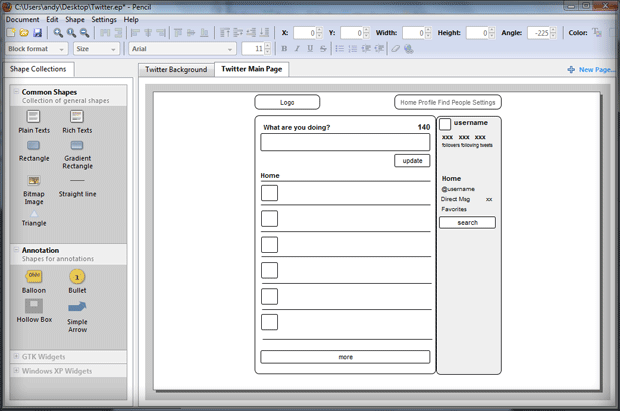

It’s hard to beat free as a price point for a tool and Pencil is a fully open source prototyping tool. It’s easy to use and has a good support community too. There are a number of stencils and templates available that help you mock up an app in the correct environment. The drag and drop interface makes building prototypes easy.

FileSquare

FileSquare is a free to use, community based online product for developing simple prototypes that work on a click-through basis. You just upload some mocked up images and then connect them using the software. There are premium options available which add functionality too.

Handcraft

For those who want a bit more oomph from their prototyping tools; they might want to consider Handcraft which is a paid for tool (though there is a 30 day free trial) starting at just under $20 a month to use. You can develop your prototypes using HTML, JavaScript and CSS. The website is not the prettiest though and you’ll need to use the trial to gain some appreciation for the features.

PowerMockup
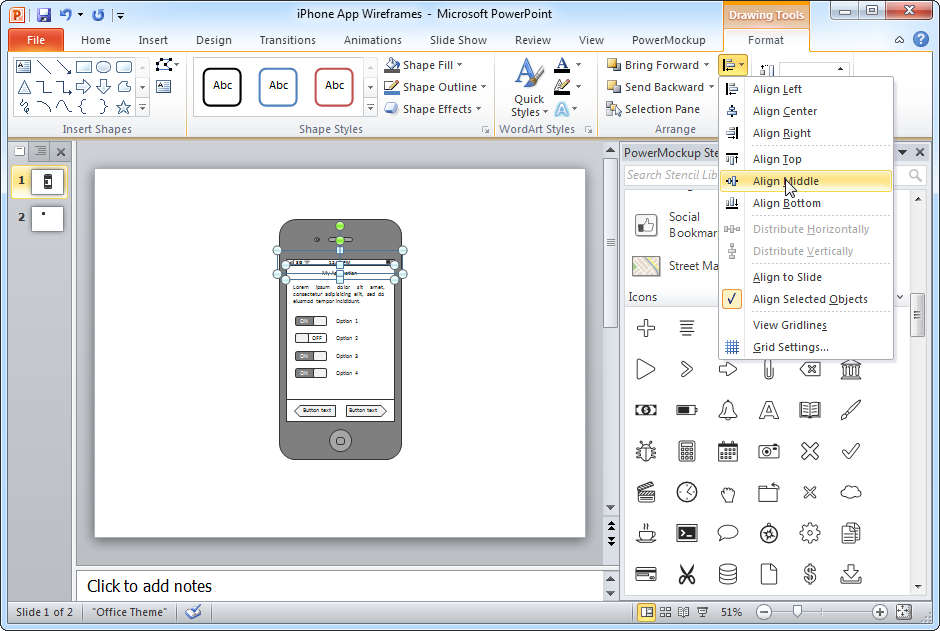

PowerMockup is focused on turning PowerPoint into a wireframing and prototyping tool; they supply templates and tools to do just that. The price point is not extortionate starting at about $60 for a permanent license but there are always going to be limits to just how much you can do from within PowerPoint.

Moqups

Moqups is a completely online tool and won’t be a favorite of UX folks working in areas with dodgy internet connections. It is however incredibly simple to use and there’s no mucking around – as soon as you land on the Moqups page – you’ll be starting to create that first mockup. It is a paid for product and licenses start at less than $10 a month.

JustInMind
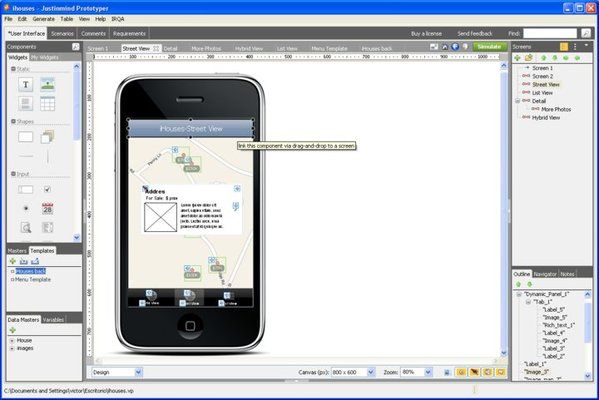

JustInMind has a free trial and after that it has a monthly subscription cost of around $20. It works on Windows and Mac OS and is designed for web and mobile application prototypes. It’s pleasing on the eye too.

One More Thing

As usual IxDF does not recommend any specific tool for your project; you need to decide which tool is the right one for your team. 

Header Image: Author/Copyright holder: Unknown. Copyright terms and licence: Unknown. Img

Image Source:

ZURB (link to image)

Best Vendor (link to image)

PowerMockup (link to image)

Graphic Rating (link to image)

Kim Bieler (link to image)

Learn More in This Course:

AI for Designers

10 days
18 % booked
View Course

What You Should Read Next

  • Read full article
    Use Circular Design To Reverse Harm - Article hero image
    Interaction Design Foundation logo

    Use Circular Design To Reverse Harm

    Nature is circular. Nothing ever goes to waste. The banana peel we discard degrades into nutritious compost for plants. Even the remains of deceased animals and humans disintegrate into the soil. Human engineering and design, on the other hand, are linear processes. And that has put us on a one-way

    Social shares
    425
    Published
    Read Article
  • Read full article
    Recycling is Not Enough. Let's Design for Reuse - Article hero image
    Interaction Design Foundation logo

    Recycling is Not Enough. Let's Design for Reuse

    “We live in the age of technology and luxury, but we also live in the age of waste,” Don Norman explains. In this video, the grandfather of User Experience Design, Don Norman unpacks the world of waste we have collectively generated. He examines aspects of our daily lives that we take for granted an

    Social shares
    458
    Published
    Read Article
  • Read full article
    Tree Testing: A Complete Guide - Article hero image
    Interaction Design Foundation logo

    Tree Testing: A Complete Guide

    Tree Testing reveals where users lose their way in your navigation. It’s a focused approach to evaluate a site's navigational structure. But it’s more useful in certain scenarios—so, you need to understand where you’ll benefit from tree testing the most. Learn about the pros and cons of testing tool

    Social shares
    687
    Published
    Read Article
  • Read full article
    How to Design Ethically: Expert Advice from Guthrie Weinschenk - Article hero image
    Interaction Design Foundation logo

    How to Design Ethically: Expert Advice from Guthrie Weinschenk

    As UX designers, we wield immense power to influence our users’ lives. We have the dual responsibility of catering to the interests of our users, as well as that of our sponsors (employers, clients and other business stakeholders). This can sometimes put designers in uncomfortable situations and rai

    Social shares
    546
    Published
    Read Article
  • Read full article
    Anything Artificial We Can Design Better - Article hero image
    Interaction Design Foundation logo

    Anything Artificial We Can Design Better

    If you look out the window, you’ll realize many things you see are artificial—buildings, cars, parks, electricity posts, water pipes, etc.—and most of those things were designed by humans. Founding father of UX, Don Norman introduces you to artificiality and how designers shape the world.[[video:142

    Social shares
    410
    Published
    Read Article
  • Read full article
    Stop the Generic Portfolio Trap! Design a Stand-Out Portfolio for Your UX/UI Niche - Article hero image
    Interaction Design Foundation logo

    Stop the Generic Portfolio Trap! Design a Stand-Out Portfolio for Your UX/UI Niche

    Your UX/UI portfolio is your ticket to your dream job, brief or client. It’s your opportunity to show off your expertise, creativity, and the tangible impact of your work. No matter your niche, your portfolio should be as innovative and polished as the projects it represents.Think of your portfolio

    Social shares
    291
    Published
    Read Article
  • Read full article
    Enter the World of Social VR - Article hero image
    Interaction Design Foundation logo

    Enter the World of Social VR

    Our metaverse is big—as in massive and expanding, to be more exact—and there’s plenty of room to trailblaze inside of all of that digital space, so if virtual reality (VR) can teleport, catapult, and integrate human users into brand-new worlds of excitement, discovery, and learning (which it can, by

    Social shares
    561
    Published
    Read Article
  • Read full article
    8 Talks by Women to Inspire UX Designers - Article hero image
    Interaction Design Foundation logo

    8 Talks by Women to Inspire UX Designers

    User Experience design, like so many other disciplines, has a lower representation of women as compared to men. Things are changing now, though. Slowly, but surely. From strategy to tactics and from ideas to actionable tips, here is a curated playlist of talks by, and stories of just some of the mos

    Social shares
    658
    Published
    Read Article
  • Read full article
    UX Storyboards: Ultimate Guide - Article hero image
    Interaction Design Foundation logo

    UX Storyboards: Ultimate Guide

    In user experience design, we use techniques like workshops and interviews to understand users. We turn our research into user stories and process flows. We use personas and wireframes to share our ideas with our teams.But it’s important to remember the real people we design for. We need to know wha

    Social shares
    782
    Published
    Read Article
  • Read full article
    Top 6 Tips to Make Your UX Portfolio Stand Out - Article hero image
    Interaction Design Foundation logo

    Top 6 Tips to Make Your UX Portfolio Stand Out

    Whether you’re a UX designer looking for your first UX job or a seasoned designer looking to further your career, your UX portfolio is arguably one of the most important projects you’ll work on. Your portfolio is the first touchpoint you have with the recruiters; it’s your chance to make an impactfu

    Social shares
    708
    Published
    Read Article

Top Articles

Top Topic Definitions

Feel Stuck?
Want Better Job Options?

AI is replacing jobs everywhere, yet design jobs are booming with a projected 45% job growth. With design skills, you can create products and services people love. More love means more impact and greater salary potential.

At IxDF, we help you from your first course to your next job, all in one place.

See How Design Skills Turn Into Job Options
Privacy Settings
By using this site, you accept our Cookie Policy and Terms of Use.
Customize
Accept all

Be the One Who Inspires

People remember who shares great ideas.

Share on:

Academic Credibility — On Autopilot

Don't waste time googling citation formats. Just copy, paste and look legit in seconds.

Feel stuck? Want Freedom?

Get one powerful email each week, like 322,597 others.

Learn to design a life you love.

Next email in: