Hand-drawn diagram labeled Microcopy, featuring a free trial with no credit card required and a checklist

What is Micro-copy and How do We Deliver Good UX with it?

• 5 min read

568 Shares
Save

Copywriting’s a pretty good gig if you can get it. In fact, it’s one of the most popular digital professions going. That’s because everyone knows how vital the content of a website or application is. What many people don’t pay attention to though is the micro-copy.

What is Micro-copy?

Micro-copy’s the ubiquitous text that turns up in tiny chunks (hence “micro”) when you need it. It can be the label on a field, a quick set of instructions on what button to push, etc. It’s this tiny text on which much of the UX of a product hinges.
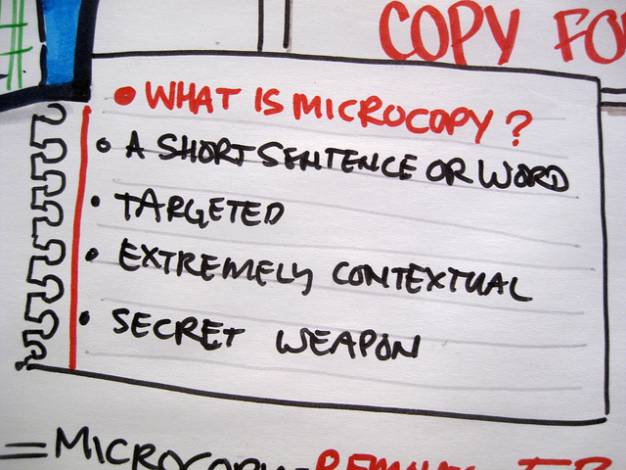

Author/Copyright holder: visualpun.ch. Copyright terms and licence: CC BY-SA 2.0

It’s been shown in studies that most of skim read real content. Yet, when we want to know what we have to do – we need clear instructions. That’s what micro-copy does for us; it provides those just-in-time clear instructions.

How do You Get Micro-copy Right?

As you might expect getting the micro-copy to support the user experience begins with us talking to our users. One of the best places to generate micro-copy is during usability testing. You can talk to your users and find out exactly how they describe the actions that you expect them to take. That can help you with the language and tone of the micro-copy. If you use the language your users do with your micro-copy - they’re bound to find it easier to use your micro-copy.

Make Things Clear to Your Users

It’s all too easy to get lazy with micro-copy. We just grab something that we’ve seen elsewhere in a similar situation but in fact we need to make sure that our users understand what’s expected of them. If your field is called “Educational History”, for example, and all you ever get is where they went to college or university but what you really want is their professional qualifications – you have a mismatch between the user’s expectations and your own. You can fix something like this easily; change the text to “please list your professional qualifications NOT your academic qualifications”.

Keep Things Short


Author/Copyright holder: Nozbe. Copyright terms and licence: All rights reserved Img source

While most users aren’t idiots – like all of us they have moments of idiocy. The shorter you can keep explanatory text – the better. If you’re writing micro-copy for readability then that probably means you want to keep it to 10 words or less. In most cases it should be much less. “Click here” is an instruction that can’t be made much simpler.

Keep it in Your Voice

If you have a youthful brand; make sure your micro-copy is youthful. It’s very easy for micro-copy to read like a bad 1980s instruction manual from Japan. It doesn’t have to be robotic unless that’s what your users expect from you. If you have a brand style or tone guide then you want to make sure that as much as possible your micro-copy sticks to it.

Keep it Consistent


Author/Copyright holder: Crystal. Copyright terms and licence: CC BY 2.0

If you use a certain explanation of a field and its data on one part of your site – you need to use the same explanation elsewhere too. If you’re constantly retitling and changing micro-copy all over the site – it will just become confusing to your readers.

Header Image: Author/Copyright holder: visualpun.ch Copyright terms and licence: CC BY-SA 2.0


Learn More in This Course:

Learn Design and AI From the Best

Get one powerful email each week, like 308,941 others.

Next email in:

What You Should Read Next

  • Read full article
    What Does a User Interface (UI) Designer Do? - Article hero image

    What Does a User Interface (UI) Designer Do?

    What’s in every memorable digital experience is a seamlessly navigable website or an app that feels like second nature—and what lies behind those are user interface (UI) designers; they’re the ones who shape the aesthetics and functionality of any digital interface. But what does a user interface de

    Social shares
    614
    Published
    Read Article
  • Read full article
    Should You Choose between Responsive and Adaptive Design? - Article hero image

    Should You Choose between Responsive and Adaptive Design?

    Designers can choose between adaptive and responsive design to bridge the gap between devices and changing user contexts. Here you’ll learn the merits of each approach, so you’re in a great position to select an approach for your project.  What Are the Main Differences Between Responsive a

    Social shares
    565
    Published
    Read Article
  • Read full article
    System Usability Scale for Data-Driven UX - Article hero image

    System Usability Scale for Data-Driven UX

    Ever wondered how the top designers, researchers, and product developers manage to create products that are user-friendly, efficient, and enjoyable—consistently? One of the key things there is what’s called the System Usability Scale (SUS), a vital tool and questionnaire-based method that profession

    Social shares
    967
    Published
    Read Article
  • Read full article
    Don Norman’s Top Tips from the Design for the 21st Century Course - Article hero image

    Don Norman’s Top Tips from the Design for the 21st Century Course

    The design field is evolving. It’s been proven that aside from driving business success and delivering beautiful and successful products, design can be pivotal to solving complex human issues. For instance, GE Healthcare used Design Thinking to improve the MR scanner experience for children—which is

    Social shares
    592
    Published
    Read Article
  • Read full article
    Sustainability Is Not Enough - Article hero image

    Sustainability Is Not Enough

    Sustainable design. Sustainable fashion. Sustainable living. We often hear these terms in marketing campaigns and popular media. But what does sustainability mean and why does pioneer of User Experience Design Don Norman think that sustainability shouldn’t be our goal when we design?In this video, D

    Social shares
    485
    Published
    Read Article
  • Read full article
    Black Friday 2024: Invest in UX Design Education - Article hero image

    Black Friday 2024: Invest in UX Design Education

    “The best investment you can make, is an investment in yourself... The more you learn, the more you'll earn.”—Warren Buffett, Chairman and CEO of Berkshire HathawayHow many items have you added to your Black Friday shopping wishlist? This year, instead of short-term deals on products, why not take a

    Social shares
    564
    Published
    Read Article
  • Read full article
    Why Is AI so Important and How Is It Changing the World? - Article hero image

    Why Is AI so Important and How Is It Changing the World?

    You've heard about AI and all the wonderful (and sometimes scary) possibilities. But unlike sci-fi apocalyptic movies, AI isn't out to destroy humanity. Let's take a look at the challenges and opportunities we face as AI meets design.In this video, Ioana Teleanu, Founder of UX Goodies and former Lea

    Social shares
    487
    Published
    Read Article
  • Read full article
    Who, What, and How: Design Maps Show You the Way for Implementation - Article hero image

    Who, What, and How: Design Maps Show You the Way for Implementation

    For something called a “team project,” it’s amazing how often everyone’s on a different page. Design maps connect the dots. They organize your research, stories of use, and design artifacts into clear, user-centered interfaces that your team can actually build fast. No more “Wait, what did you mean

    Social shares
    403
    Published
    Read Article
  • Read full article
    How Can Designers Adapt to New Technologies? The Future of Technology in Design - Article hero image

    How Can Designers Adapt to New Technologies? The Future of Technology in Design

    The design industry is rapidly evolving with the integration of technologies such as artificial intelligence (AI) and 3D printing. While there may be concerns about job displacement, history has demonstrated that new technologies typically create more job opportunities. Don Norman, author of The Des

    Social shares
    691
    Published
    Read Article
  • Read full article
    Conceptual Models: The Hidden Structure Behind Your Next Great Interface - Article hero image

    Conceptual Models: The Hidden Structure Behind Your Next Great Interface

    Ever wondered why some interfaces feel effortless: like they already know what you’re trying to do, while others leave you guessing? The difference often lies in how well a product’s design matches the way users think. When your interface reflects their mental model, every action feels intuitive, an

    Social shares
    480
    Published
    Read Article

Top Articles

Top Topic Definitions

39% of Today's Skills Will Change by 2030

The World Economic Forum expects 39% of today's skills to be transformed or become outdated by 2030.

The good news is that jobs in UX / UI design and AI are among the fastest-growing professions globally.

Build Skills That Keep You Relevant

Privacy Settings

By using this site, you accept our Cookie Policy and Terms of Use.
Customize
Accept all

Be the One Who Inspires

People remember who shares great ideas.

Share on:

Academic Credibility — On Autopilot

Don't waste time googling citation formats. Just copy, paste and look legit in seconds.

Learn Design and AI From the Best

Get one powerful email each week, like 308,941 others.

Next email in: