The first image is a mobile display of a dark room and a with the caption "Lighting. Make sure light is not too bright or too dim." The second mobile display shows a carpet and a table surface and is captioned "Surface. Choose a rough or textured surface.

AR Heuristics to Avoid Common UX Pitfalls

by Riley Hunt • 13 min read

514 Shares
Save

User testing may be the final word in usability, but usability guidelines, or "heuristics," are rubrics designers use to evaluate their designs. These guidelines are the product of decades of research and experience. They have traditionally been applied to mobile or desktop interfaces but were updated to allow AR designers to make the most of their AR experiences.

Frank Spillers is an accomplished AR designer and the founder of award-winning UX consultancy Experience Dynamics. In this video, Frank introduces the adapted heuristics used for AR design and provides examples for you to practice the use of heuristics on.

Copyright
Transcript

Audrey Labrie and Jinghui Cheng adapted the original heuristics guidelines—initially created by Jakob Nielsen and Rolf Molich—for a mobile AR context. These guidelines are more than just suggestions; they can be used as a scorecard to evaluate how an AR app performs on each criterion and where to improve the UX.

Heuristics for AR Experiences (Labrie & Cheng 2020)

  • Visibility of system status. The system should keep the user informed during the interaction. When scanning surfaces, for example, the user should be informed when the physical surfaces are difficult to detect (for example, if they are too reflective or too dark). After successful surface detection, the system should notify the user that the object can be placed. If it takes time to load an object, the system should inform the user. 

  • Match between the system and the real world. Virtual objects should appear and behave as realistically as possible. Their sizes should be proportional to the physical environment and fixed to surfaces, as in the real world. Objects should not overlap, and the system should detect collisions between objects. 

  • User control and freedom. It is possible that the user places a virtual object in an unwanted location or selects, deletes, or rotates it by mistake. Therefore, the system should support undo, redo, and confirm with the user when the deletion is selected.

  • Consistency and standards. Gestures used to translate and rotate an object should be intuitive. It is particularly important to indicate how the user can manipulate the object. If an object's height is required, it should be done by an extra UI component (like a vertical slider). Directly moving the object on the vertical dimension can be easily confused with object translation.

  • Error prevention. Possible errors include placing or deleting an object by mistake. The system should ask for confirmation for these error-prone actions that can lead to consequences and inconveniences. If the user does not confirm, the object will return to its original location.

  • Recognition rather than recall. Possible actions regarding interaction with virtual objects should always be visible. When adding an object to the scene, the system should display an image of the selected object to avoid recall (like remembering what object is to be added). When an object is selected, all possible actions should be shown on the screen (functions like undo/redo, delete, and change color); useful gestures for translating and rotating the object should also be indicated. When no object is selected, the system should show the possible actions related to the entire scene (take a photo, favorites, reset scene). 

  • Aesthetic and minimalist design. The system should not show irrelevant or rarely used information to the user. Extra information could be shown when the user makes the corresponding selection. Examples of the common relevant information during the different stages of interaction are: 

    • (1) when placing an object, there should be a placement shape indicating the position and the size of the object; and 

    • (2) an indicator of selection and options for object operations should be displayed when selecting an object. 

  • Help users recognize, diagnose, and recover from errors. Help for error recovery is important. For example, the moment the system has trouble detecting surfaces, the user should be informed of the reason and help the user correct the error. If the user is moving a virtual object on an undetected surface, the user should have the option to re-activate surface detection. 

  • Help and documentation. Such a system usually should not have explicit documentation because it should be intuitive. However, they should have a brief tutorial for first-time users. Particularly, surface detection is an action that most users are unfamiliar with. So a brief tutorial and explicit indication should tell the user how to detect surfaces. The possibility of translating and rotating the objects should also be clearly communicated to the user.

We’ve included the heuristic scorecard below, which you can use to evaluate and improve your AR apps.
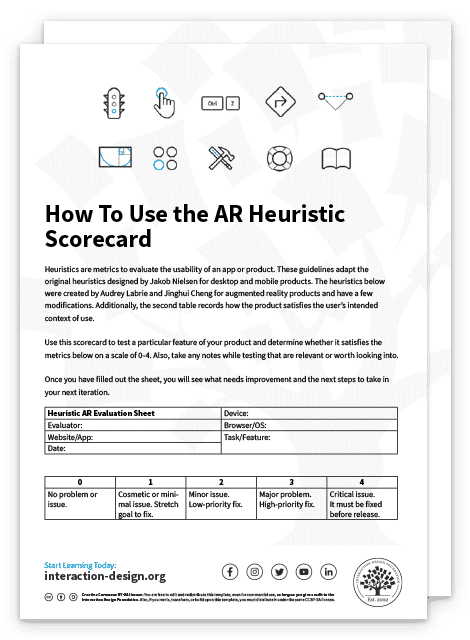
Advance Your Career With This Free Template for “AR Heuristic Scorecard”
AR Heuristic Scorecard
Optional
Optional
We respect your privacy
Get 1 powerful email each week: Learn Design and AI From the Best.

The Take Away

Usability in AR can be tricky, but AR heuristics are a tried and true method to evaluate your designs before even starting user testing.

You can identify common pitfalls leading to wasted time and money by continually evaluating your designs with heuristic scorecards. While usability tests are invaluable, they are much less valuable when they identify an obvious UX error or an easily avoidable issue.

You can use these heuristics to eliminate ideas early on that may sound good on paper but can't be user-friendly. This puts designers in a much stronger position before going into prototypes. The heuristics also provide guidance to improve existing designs. They are guiding principles that ensure each iteration moves closer toward the ultimate goal of a user-friendly interface.

References and Where to Learn More

Explore the definitive heuristic guidelines for AR for mobile, Adapting Usability Heuristics to the Context of Mobile Augmented Reality.
Read the original Nielsen Heuristics or the more readable version from UX Planet.

See how Google uses AR to improve Google Maps and an overview of Google's plans for AR and VR.

Hero Image: © SN Digital LLC. Fair Use

Learn More in This Course:

Learn Design and AI From the Best

Get one powerful email each week, like 315,229 others.

Next email in:

What You Should Read Next

  • Read full article
    15 Inspiring UX Quotes for Innovation and Design - Article hero image

    15 Inspiring UX Quotes for Innovation and Design

    In design—and anywhere else that innovation is involved—words can often paint a picture far more vividly than strokes on a canvas ever could, and that’s true in UX design (user experience design), where inspiration often comes from straightforward phrases. These brief quotes are way more than just w

    Social shares
    822
    Published
    Read Article
  • Read full article
    Graphic Artist vs. Graphic Designer: What's the difference? - Article hero image

    Graphic Artist vs. Graphic Designer: What's the difference?

    Graphic art versus graphic design is pretty much still a bone of contention, and that’s after a long-standing debate that just keeps going on and on—more a source of intrigue than anything negative. Some believe the two overlap with a great deal of things that are interchangeable between them—but, f

    Social shares
    881
    Published
    Read Article
  • Read full article
    Spatial UI Design: Tips and Best Practices - Article hero image

    Spatial UI Design: Tips and Best Practices

    UX design for Augmented Reality (AR) has some different guidelines than what is used for screen-based UX. Designers must consider the space and the physical limits of what is comfortable for the human body. Also, as AR overlays physical space, you must be very aware of the cognitive load because you

    Social shares
    657
    Published
    Read Article
  • Read full article
    Object-Oriented UI Design: How You Can Collaborate Seamlessly with Developers and Build Better Products - Article hero image

    Object-Oriented UI Design: How You Can Collaborate Seamlessly with Developers and Build Better Products

    You’re at your routine health checkup, sipping an iced coffee on a hot day. Suddenly, you get a sharp pain in your head. The doctor looks up from her notes, a sympathetic expression on her face. “You’re experiencing sphenopalatine ganglioneuralgia.” Your heart sinks. The coffee cup drops to the floo

    Social shares
    116
    Published
    Read Article
  • Read full article
    Copy These 3 Industry-Leading Apps and Turn Object-Oriented Design into Your Secret Career Advantage - Article hero image

    Copy These 3 Industry-Leading Apps and Turn Object-Oriented Design into Your Secret Career Advantage

    Which apps do you use throughout your day? Maybe you manage your projects on Trello, use Notion as an internal docs site, and maybe, just maybe, you do some swiping on Tinder during your lunch break. Despite looking nothing alike, these three highly successful apps are organized around the same idea

    Social shares
    111
    Published
    Read Article
  • Read full article
    7 Reasons Object-Oriented UI Design Will Grow Your Career - Article hero image

    7 Reasons Object-Oriented UI Design Will Grow Your Career

    Vacation time! You book your flight. You have a reservation. It's real. You paid for it. And yet, when you open the airline's app to look at it, it's surprisingly elusive. You don't want to check in, you don't want to change it, you just want to find it and check the details. It's not on the home sc

    Social shares
    112
    Published
    Read Article
  • Read full article
    Should UX Designers Learn to Code? - Article hero image

    Should UX Designers Learn to Code?

    As with every design decision, the answer to the question “Should UX designers learn to code?” is: “It depends.” When you work with digital products, you may not always need to write lines of code, but it is an added advantage to know how to build the product that you design.In the early days of web

    Social shares
    671
    Published
    Read Article
  • Read full article
    What are the Stages of Creativity? - Article hero image

    What are the Stages of Creativity?

    Let’s explore the various stages of creativity so you can get a firmer idea of its true nature as such a powerful human resource. Graham Wallas was the first to create an overview of a creative process back in 1926. As you can imagine, lots of iterations have emerged since then. Some of these theori

    Social shares
    1.1k
    Published
    Read Article
  • Read full article
    Plug, Play, Persona: Your Free Template and Step-by-Step Guide - Article hero image

    Plug, Play, Persona: Your Free Template and Step-by-Step Guide

    You've searched for the perfect persona template, downloaded dozens, yet none quite hit the mark. Here's the problem: Most templates fail you because they focus on demographics, fancy sliders, and irrelevant details. None of these things help drive decisions or create solutions that improve lives. B

    Social shares
    137
    Published
    Read Article
  • Read full article
    Keyboard Navigation and Data Entry - Article hero image

    Keyboard Navigation and Data Entry

    Forms are an essential part of many interactions, but good form layout and clear labels are only part of the picture. Forms also need to work in all the ways users interact with them. Not everyone uses a mouse. Many users rely on keyboards, whether by preference, motor impairments, or because they u

    Social shares
    164
    Published
    Read Article

Top Articles

Top Topic Definitions

39% of Today's Skills Will Change by 2030

The World Economic Forum expects 39% of today's skills to be transformed or become outdated by 2030.

The good news is that jobs in UX / UI design and AI are among the fastest-growing professions globally.

Build Skills That Keep You Relevant

Privacy Settings

By using this site, you accept our Cookie Policy and Terms of Use.
Customize
Accept all

Be the One Who Inspires

People remember who shares great ideas.

Share on:

Academic Credibility — On Autopilot

Don't waste time googling citation formats. Just copy, paste and look legit in seconds.

Learn Design and AI From the Best

Get one powerful email each week, like 315,229 others.

Next email in: