Use Cases In UX And UI Design

Your constantly-updated definition of Use Cases In UX And UI Design and collection of videos and articles.
Be a conversation starter: Share this page and inspire others!

0 Shares
Save

Get 1 Powerful Email Each Week

Join 315,236 subscribers.

What are Use Cases In UX And UI Design?

A use case documents how someone achieves their goal through interaction with your product. Use cases convert generic requirements into concrete scenarios, which means you make design decisions based on documented interactions rather than abstract feature lists.

Use cases began in software development, where they focus on system functionality with generic actors like "User" or "Administrator." In UX design, you inform your use cases with user research by studying the real behaviors, motivations, and contextual factors that shape how people interact with products.

An ideal approach builds use cases around research-backed personas. This solves a core problem: teams often build features that seem logical from technical or business perspectives but fail to serve actual user needs. When you ground use cases in user research, you stay focused on real people accomplishing real goals under real-world constraints, rather than relying on assumptions or what sounds impressive.

In this video, William Hudson, User Experience Strategist and Founder of Syntagm Ltd, explains how use cases bridge the requirements-to-design gap by documenting all interactions between a system and the outside world.

Transcript

How Use Cases Give You a Bigger Picture of Your Users and Their Needs

Use cases reveal user interactions through a two-part structure: diagrams and narratives. These components serve different purposes at different stages of your design process. This ensures you never lose sight of the big picture while you work through detailed requirements.

Use Case Diagrams Show All Major Interactions at a Glance

Use case diagrams show an overview of actors and the goals they can accomplish through your system. A basic diagram contains three core components:

  1. Actors appear as stick figures outside your system boundary. Actors aren't limited to humans; they can be any external entity that interacts with your system, including other systems, devices, or external events. The key is that actors exist outside the system boundary.

  2. Your system appears as a box that contains all the use cases. Ovals inside the box represent each use case.

  3. Lines connect actors to the use cases they participate in, with arrows that show the direction of communication: Inward arrows represent input from the actor to your system (the stimulus), and outward arrows represent output from your system to the actor (the response).
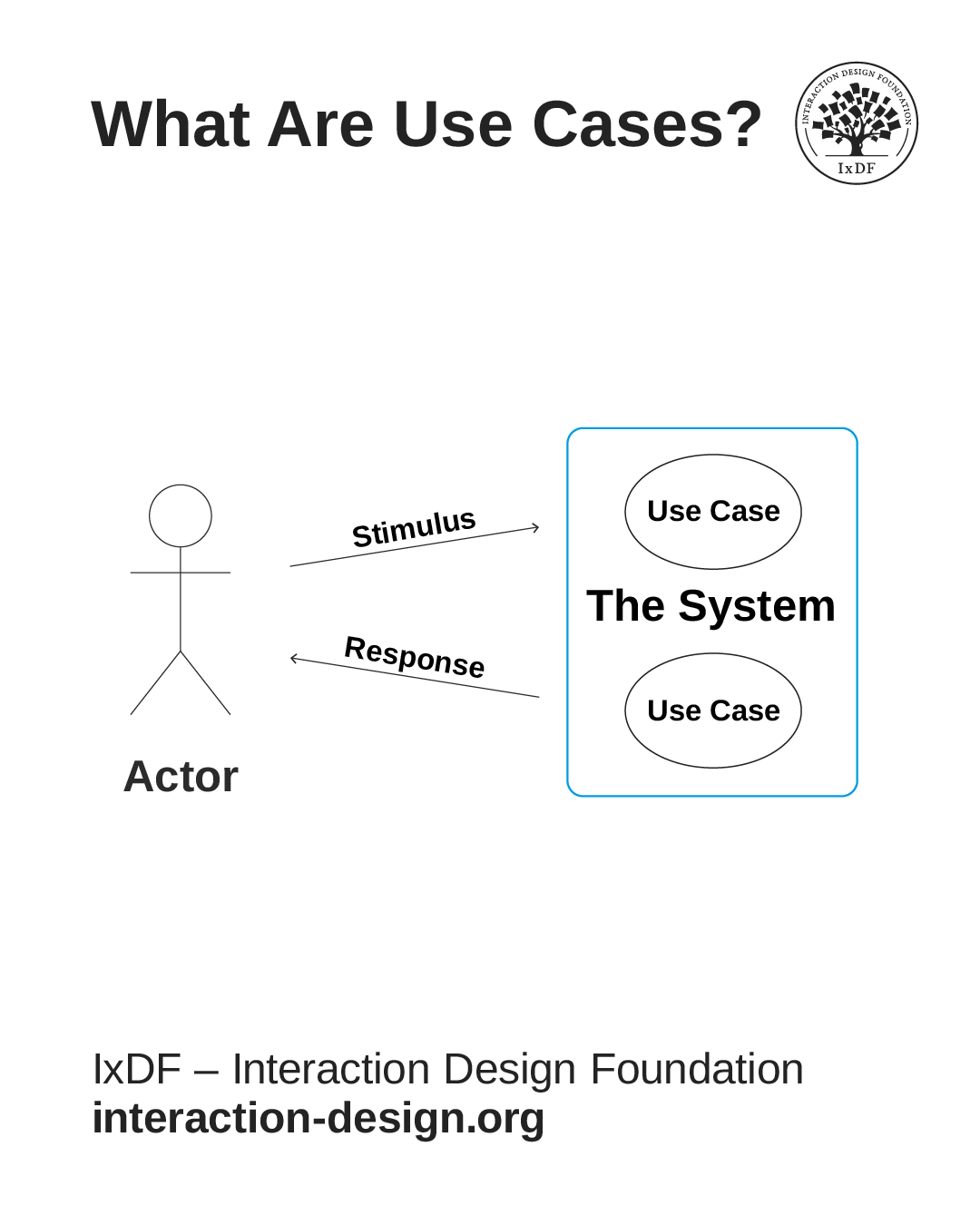
The basic components of a use case: The actor (who uses the system), the system boundary (what you're building), the use cases inside (goals the actor can achieve), and arrows that show communication between actor and system.

© Interaction Design Foundation, CC BY-SA 4.0

Diagrams help you see all major interactions at a glance. You identify which users interact with which parts of your system, spot gaps where functionality might be absent, and communicate scope to stakeholders who need the big picture without detailed specifications. They help you map the breadth of what you build before you explore how each interaction works.

Use Case Narratives Provide the Step-by-Step Details

Use case narratives describe in detail how each interaction unfolds. While diagrams show what's possible, narratives explain how it happens from the user’s perspective.

Narratives follow a structured format. This includes:

  • The user’s goal and why it matters.

  • Conditions that must be true before the interaction starts.

  • The sequence of actions and system responses (called the basic flow).

  • Variations that handle exceptions (called alternative flows).

  • Outcomes that confirm success.

For example, a narrative for "Reserve Seat Online" would document that Sandra (a business traveler) wants to select an aisle seat near the front for quick exits. It describes how Sandra logs in, views available seats, selects her preference, and receives confirmation. It also covers what happens if her selected seat becomes unavailable. Perhaps she receives an alert within 30 seconds and can select an alternative seat without re-entering her information.

This structure reveals design requirements that diagrams cannot show. You discover what information users need to make decisions, where they encounter friction, what happens when things go wrong, and which steps matter most to achieve their goals. This detail guides your interface design, helps developers understand what to build, and gives QA testers clear scenarios to verify.

Why You Need Both Formats to Design Effectively

Diagrams and narratives give you the complete picture.

  • Diagrams ensure you don't lose track of how pieces fit together as you work through details.

  • Narratives ensure you don't make decisions based on vague requirements that leave critical questions unanswered.

You need both: diagrams for planning and stakeholder alignment, narratives for detailed design and implementation. This two-part structure lets you zoom in and out between big picture and details and maintain context at either level.

Why Use Cases Matter in Your Design Process

Use cases ground your design decisions in user behavior rather than guesses. When you work from concrete scenarios, you catch problems before they reach users.
© Interaction Design Foundation, CC BY-SA 4.0

Create Shared Understanding and Uncover Hidden Requirements

Different team members like product managers, designers, developers, and QA testers often have different mental models of how a feature should work. A detailed use case gives everyone the same reference point. When someone asks, "What happens if the user's session expires mid-flow?", point to the documented alternative flow instead of debating hypotheticals.

Use cases also force you to address edge cases early: What happens when they have no payment method on file? What happens when they try to submit a form with blank fields? You need design solutions for these scenarios.

A significant problem for usability is how systems behave when things go wrong. Use cases help you plan for these scenarios instead of leaving error handling to chance.

Prevent Feature Bloat and Validate Designs Before You Build

When someone suggests a new feature, ask: "Which use case requires this?" If the answer is none, you probably don't need it. This keeps interfaces lean and learnable.

Use cases reveal whether your designs work. Walk through use cases with prototypes, check that every step has interface support, and verify that users can complete their goals without confusion or dead ends. These gaps hide in design reviews but become obvious when you validate against documented use cases.

Document Details Developers and QA Need

Developers need to know exactly what happens at each step, what data moves between systems, and how you should handle errors. Use cases provide this detail in a format developers can reference while they code. QA testers use the same use cases to create test scenarios, which ensures the team validates the same requirements designers documented.

When to Create Use Cases for Maximum Results

Create use case diagrams early but write detailed narratives just before implementation.

Which Projects Need Use Cases

Use cases work best for new features that involve multi-step interactions. A simple button might not need one, but a checkout flow, onboarding sequence, or data import process does.

Apply use cases when you:

  • Redesign existing features where users struggle. Map the current interaction first, identify pain points, then write use cases for the improved version. This before-and-after comparison helps you demonstrate the value of your design changes.

  • Build complex systems with many integration points. If your interface connects to payment processors, inventory systems, CRM tools, or other services, use cases document these dependencies.

  • Serve multiple roles that interact differently with the same feature. An expense approval system, for example, works differently for employees, managers, and finance teams. Separate use cases prevent you from designing for one group while you break the experience for others.

When to Create Them in Your Timeline

Create diagrams during early planning to map the scope of your system. Diagrams show which actors you serve, which goals you support, and what the boundaries of your system are.

These diagrams help you:

  • Scope the project and get stakeholder alignment.

  • Identify integration points with other systems.

  • Estimate effort across major feature areas.

Create detailed narratives just before implementation for each feature. When your team picks up a feature for the next sprint, write the detailed use case that week with current information about user needs, technical constraints, and research findings. This just-in-time approach prevents wasted effort on documentation that becomes outdated: Requirements change, technical constraints shift, and user research reveals new insights.

Match your detail level to your design stage. In early stages, narratives shouldn't include specific interface components. Write "Sandra provides her departure date" rather than "Sandra taps the calendar icon to open a modal dialog, scrolls through a month-view calendar to March, and taps the 15th." The first version leaves room to explore different approaches. The second version commits you to a solution before you validate whether it's the best approach.

As you validate approaches through prototypes and user tests, add implementation details right before development starts. This timing keeps use cases relevant without premature commitment to solutions you haven't validated.

The Secret to Effective Use Cases? Replace Generic Roles with Research-Based Personas

Traditional use cases use generic roles like "Customer" or "User" that tell you almost nothing about needs and behaviors. You can't make good design decisions with this limited information. Should the interface be simple or feature-rich? Fast or comprehensive? Generic roles give you no basis to answer these questions.
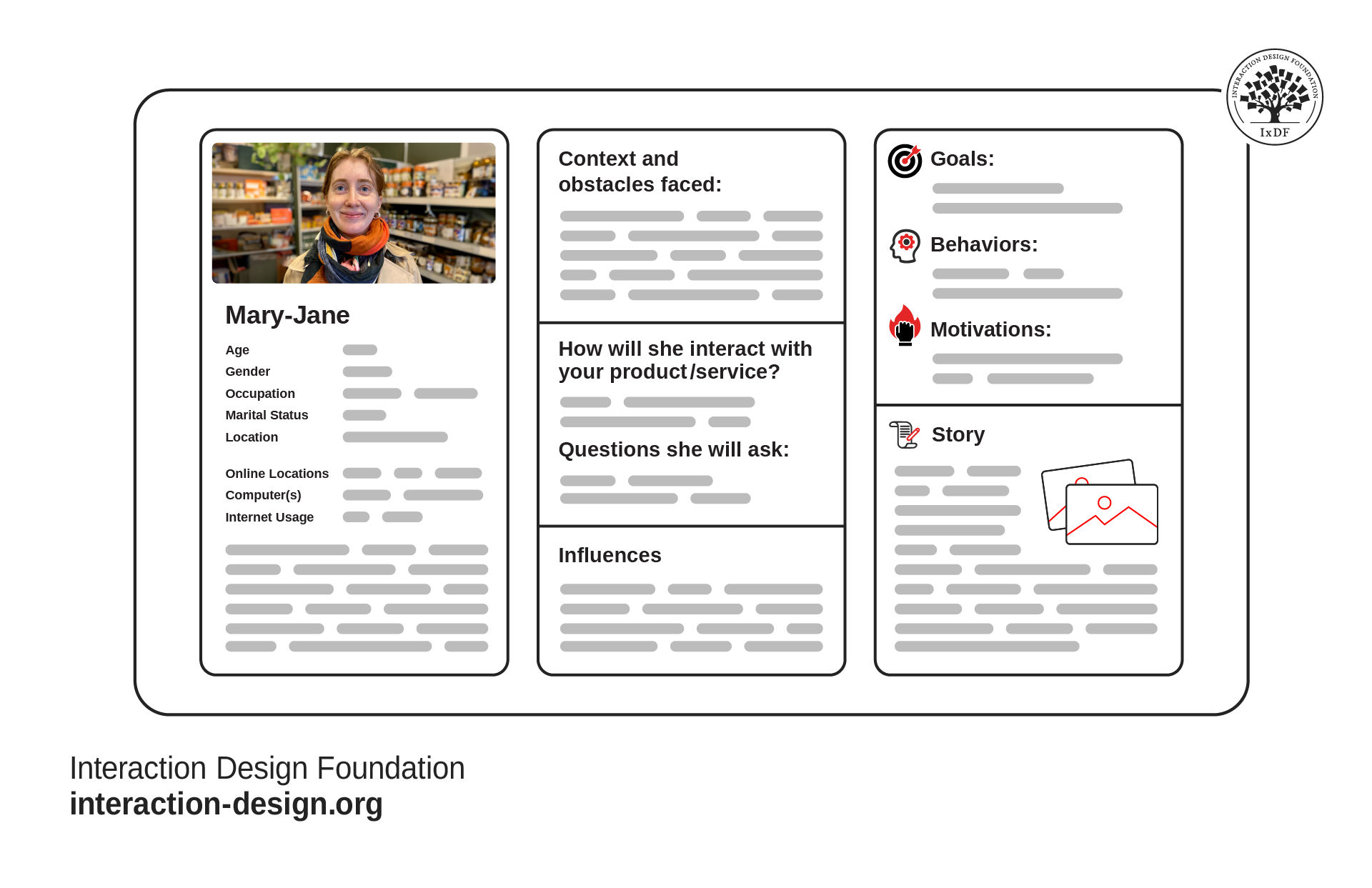
Effective personas capture user goals, behaviors, and pain points in a single view so your team can make design decisions based on real people, not guesswork.

© Interaction Design Foundation, CC BY-SA 4.0

Research-based personas solve this problem. "Alan, a mobile-first traveler who books last-minute business trips from his phone during commutes and values speed over options" tells you exactly what to prioritize: mobile optimization, fast load times, simplified choices, and the ability to complete bookings in just a few taps.

In this video, William Hudson explains how persona stories, another type of story of use, transform abstract user data into design decisions that serve real people.

Transcript

Replace generic roles with personas entirely when the role adds no meaningful information. In most consumer-facing products, teams label actors as "User," "Customer," or "Visitor.” Use personas instead: "Elena, a budget-conscious parent who compares prices across five sites before she buys and shops primarily on mobile" provides clear design direction that "Customer" cannot.

In this video, William Hudson explains how designing for specific individuals rather than generic user groups transforms team decision-making and why persona-centered use cases create stronger empathy and better design outcomes than abstract roles ever could.

Transcript

Append roles to persona names with formats like "Sarah::Content Manager" only when the role affects permissions, responsibilities, or workflows. "Sarah::Content Manager" needs approval workflows and schedule capabilities that "Sarah::Content Viewer" doesn't require.

Use role specifications when one person might act in multiple distinct roles at different times, or when different people perform the roles with different needs.

Common Mistakes That Undermine Use Cases

Several pitfalls can decrease the value of use cases. Avoid these to keep your use cases useful.

Avoid Generic Roles Instead of Personas

"User completes checkout" provides almost no design direction. "Judy, a mobile shopper who abandons carts when checkout requires too many form fields, completes purchase" reveals requirements around form length and mobile optimization. The difference affects dozens of design decisions.

Don't Create Detailed Narratives Too Early

Big Design Up Front wastes effort. Documentation becomes outdated quickly. Write diagrams early but save detailed narratives until just before implementation. You'll make better decisions with current information than with predictions from three months ago.

Keep Early Narratives Focused on What Happens and Why

Premature implementation details limit your options. Add these details later after you validate your approach through prototypes and tests.

Document Alternative Flows for Realistic Scenarios

Real users don't always follow the happy path. They make mistakes, change their minds, and encounter problems. Skip alternative flows and you miss where many usability problems hide. Alternative flows ensure you design for these scenarios.

Base Personas on Research, Not Assumptions

Personas must represent real user research, not assumptions or stereotypes. Without interviews, workflow observations, or behavior analysis, your personas provide no more value than generic roles and may mislead you with false confidence.

Reference Use Cases Regularly

Use cases work best when you integrate them into team conversations. Reference them in sprint planning, design reviews, and retrospectives. When use cases sit in a folder nobody opens, they provide no value.

Design For Real-world Constraints

Real users work under constraints, face interruptions, and deal with imperfect conditions. Design for these contexts and challenges, not just perfect circumstances where everything works smoothly.

Use Cases Bridge Research to Implementation

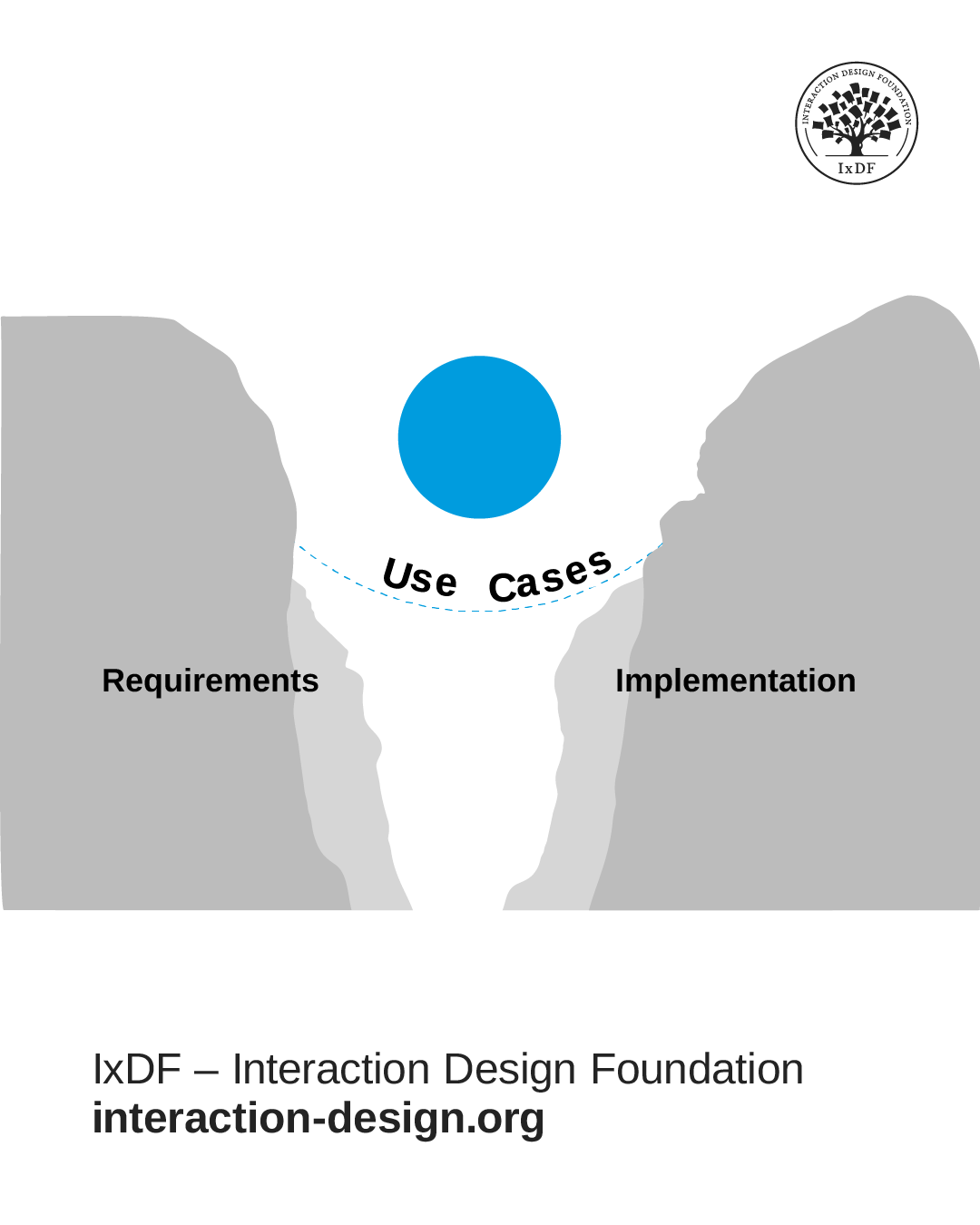
Use cases serve as bridges between user research and implementation. When you ground them in research and develop them with appropriate timing, they keep your entire team focused on user needs throughout the development process.

The combination of research-anchored diagrams for high-level planning and just-in-time narratives for implementation details provides a robust framework for human-centered design in iterative environments. This approach avoids the waste of premature documentation and maintains the clarity and direction teams need to build products that serve user needs.

Use cases don't exist in isolation. They complement other UX research methods and design tools. Your personas can inform the use cases. Use cases inform your user flows, wireframes, and prototypes. Usability tests validate whether your implementation serves the persona's goals as documented in the use cases. This feedback loop continuously improves your understanding of user needs and your ability to meet them.

When research, use cases, design, and tests work together, you build products that truly solve the problems your users face and improve their lives.

Questions About Use Cases In UX And UI Design?
We've Got Answers!

How do you create research-based personas for use cases?

Create research-based personas through user interviews, behavioral observation, and data analysis. Conduct interviews to understand goals, pain points, workflows, and decision-making processes. Observe users in their real environments to capture contextual factors like time pressure, interruptions, and device constraints. Analyze behavioral data from analytics, support tickets, and usage patterns to identify trends across user segments. Synthesize these findings into personas that represent documented patterns, not assumptions.

For example, "Andrea, a mobile-first traveler who books last-minute business trips during commutes" emerges from research that shows travelers who prioritize speed over options and primarily use mobile devices under time pressure.

The research methods, like interviews, behavioral observation, and data analysis, work best when guided by grounded theory. This approach alternates between data collection and analysis without preconceptions, allowing patterns to emerge naturally from what users actually do rather than what you expect them to do.In this video, William Hudson explains how grounded theory's iterative process helps you discover authentic user behaviors and refine your research as new insights surface, ensuring your personas represent documented reality rather than assumptions.

Transcript

How do persona-centered use cases improve team collaboration?

Persona-centered use cases give everyone a shared reference point grounded in real user needs. When teams reference the same personas, they build shared understanding of who you serve. Instead of opinion-based debates ("I think users want this"), teams evaluate decisions against documented persona goals ("Does this help Sarah accomplish her goal?").

Concrete persona details facilitate productive conversations. When developers read about how Andrew abandons checkout because forms require too many fields, they understand why mobile optimization matters. When stakeholders see how Elena compares prices across five sites, they prioritize quick comparisons over secondary features.

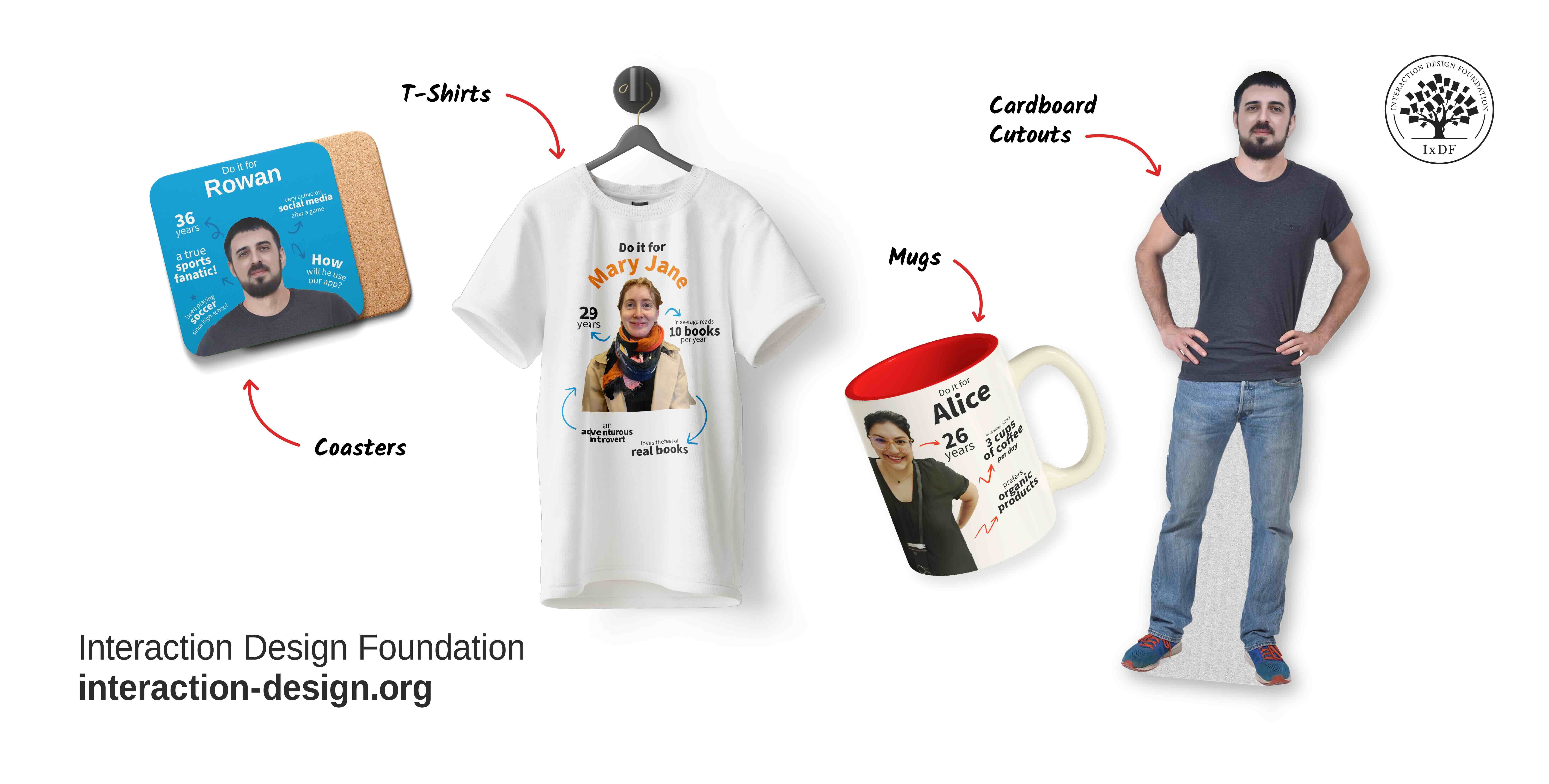
Persona merchandise, like posters, desk cards, and cardboard cutouts, keep your personas visible throughout the workspace, ensuring every team member, from developers to stakeholders, remembers exactly who they're designing for when making daily decisions.

© Interaction Design Foundation, CC BY-SA 4.0

Why do use cases need both diagrams and narratives?

Diagrams and narratives serve different purposes. Diagrams show all actors and their goals at a glance, which helps communicate scope quickly, spot gaps, and align stakeholders during planning. However, diagrams lack temporal information. You can't determine what information users need at each step or how the system should respond to errors.

Narratives provide step-by-step descriptions that capture sequence, timing, and decision points from the persona's perspective. Create diagrams early for scope and structure, then write detailed narratives just before implementation. This two-part structure lets you zoom between big picture and details while you maintain context, which prevents both premature commitment and vague requirements.

Why should use cases be built around personas instead of generic roles?

Personas provide specific details about user needs, motivations, and constraints that enable good design decisions. Generic roles like "User" or "Customer" leave critical questions unanswered: Should the interface be simple or feature-rich? Fast or comprehensive?

"Antony, a mobile-first traveler who books last-minute business trips from his phone during commutes" tells you exactly what to prioritize: mobile optimization, fast load times, simplified choices.

Traditional software roles like "Administrator" focus on system permissions rather than user context. Persona-centered use cases shift focus to what users want to accomplish, why it matters, and what constraints they face.

In this video, learn why you design for specific individuals rather than generic user groups transforms how teams make design decisions and build better products.

Transcript

What are visual alternatives to written use case narratives?

User story maps provide a visual format that shows the persona's journey horizontally and details vertically. You arrange cards to show major steps from left to right, then stack cards below each step for variations.

Design maps (developed by Tamara Adlin) contain five building blocks: titles, steps, questions, comments, and design ideas. Teams report that design maps created in a two-hour workshop often provide more value than 20 pages of written narratives.

These alternatives work well for collaborative discussions across disciplines or when documentation tends to become outdated.

The user-centered approach that makes both use cases and visual alternatives effective stems from design thinking principles. In this video, learn how design thinking helps teams understand users, challenge assumptions, and keep real user needs central to decisions.

Transcript

How are use cases different from user stories or user journeys?

Use cases differ in detail level and purpose. User stories capture high-level needs: "As Sarah, I want to schedule posts so I can manage workflow." User journeys map the complete experience across touchpoints and show emotional states throughout. Use cases provide structured step-by-step descriptions between these extremes.

A use case documents the complete sequence from start conditions through actions and responses to outcomes and includes exceptions. While a user story states the need and a journey shows the overall experience, use cases detail how one interaction unfolds: what the persona does at each step, what information they need, and how you handle exceptions.

What are the key components of a UX use case?

UX use cases consist of diagrams and narratives. Diagrams show actors (stick figures), your system (a box), and use cases (ovals inside the system). Narratives include the persona and their goal, start conditions, the sequence of actions and responses (basic flow), variations for exceptions (alternative flows), and outcomes.

Unlike traditional software engineering use cases with generic actors, UX use cases center on personas. A narrative documents not just "user reserves seat" but "Sandra, a business traveler, selects an aisle seat near the front for quick exits," which reveals what information personas need and where they encounter friction.

How detailed should a use case be for UX design purposes?

Match detail to your design stage. During early planning, create narratives that focus on what happens and why: "Sandra provides her departure date" rather than "Sandra taps the calendar icon to open a modal dialog." Early narratives leave room to explore approaches.

Add specific implementation details just before development when teams are ready to build. This just-in-time approach prevents vague requirements and premature design decisions. Use cases should be detailed enough that designers know what interfaces need to support and developers know what to build, but not so prescriptive that they prevent exploration.

Patton, J. (2014). User story mapping: Discover the whole story, build the right product. O’Reilly Media.

Jeff Patton's User Story Mapping enhances the traditional use case approach when it introduces a more visual, flexible, and user-centered framework. Rather than isolate individual features or tasks, story mapping contextualizes them within the broader narrative of a user's journey. This method helps UX and product teams identify what users try to accomplish and how different tasks support those goals. When you break work down into goals, activities, and steps, it allows for a clearer prioritization of features based on real user value. As a result, use cases become more than just static scenarios—they evolve into collaborative planning tools that guide both design and development in Agile environments.

Adlin, T., & Pruitt, J. (2010). The essential persona lifecycle: Your guide to building and using personas. Morgan Kaufmann.

The Essential Persona Lifecycle strengthens the foundation of use cases when it roots them in detailed, research-driven personas. The book outlines a lifecycle approach to create and maintain personas that accurately represent user segments and ensures they remain relevant throughout a product's development. When you craft use cases around these dynamic personas, they reflect realistic behaviors, needs, and contexts.

This integration ensures that UX decisions are grounded in authentic user perspectives, not assumptions. When you embed personas into the design workflow, Adlin and Pruitt enable more targeted, empathetic, and effective use case development that evolves with user insights over time.

What are some highly cited scientific articles about use cases in UX/UI design?

Constantine, L. L., & Lockwood, L. A. D. (2001). Structure and style in use cases for user interface design. In M. van Harmelen (Ed.), Object Modeling and User Interface Design. Addison‑Wesley.

This paper is a core reference in usage‑centered design, an approach that grounds UI/UX design in abstract use cases and task models rather than personas or high‑fidelity artifacts. Constantine and Lockwood argue that when you capture user intentions and system responsibilities in structured use cases, you support more systematic, flexible design decisions that can be adapted across contexts. Essential use cases abstract away UI specifics, which enables designers and developers to focus on user goals and interactions without premature visual assumptions. This work has informed both software engineering (which bridges use cases with HCI) and interaction design curricula, and it underpins later model‑driven UX frameworks.

Constantine, L. L., & Lockwood, L. A. D. (2003). Usage‑centered software engineering: An agile approach to integrating users, user interfaces, and usability into software engineering practice.

This paper formalizes usage‑centered design with a strong emphasis on use cases and task cases as central artifacts that drive UX and UI design. It contrasts task‑oriented modeling with traditional user‑centered methods that often rely on iterative usability cycles alone. The authors show how abstract models of user behavior (i.e., task and role profiles) can streamline design, reduce rework, and support agile practices.

Because of its integration of HCI concerns into mainstream software engineering and its influence on task modeling methods in UX research, this work is frequently discussed in HCI and design methodology literature.

Earn a Gift, Answer a Short Quiz!

1
2
3
4
1
2
3
4
Question 1
Question 2
Question 3
Get Your Gift

Question 1

What are the two parts of a use case?

1 point towards your gift

  • Diagrams and narratives
  • Personas and scenarios
  • Requirements and specifications

Question 2

Why should use cases be built around personas instead of generic roles?

1 point towards your gift

  • Generic roles are too expensive to maintain
  • Personas are easier to create than generic roles
  • Personas provide specific details about user needs and behaviors that inform design decisions

Question 3

Which projects need use cases?

1 point towards your gift

  • Only simple features with single-step interactions
  • Multi-step interactions, redesigns of struggling features, and complex systems with integrations
  • Projects that don't involve any user research

Learn More About Use Cases In UX And UI Design

Make learning as easy as watching Netflix: Learn more about Use Cases In UX And UI Design by taking the online IxDF Course Object-Oriented UI Design: Build Interfaces Users Love.

Why? Because design skills make you valuable. In any job. Any industry.

In This Course, You'll

  • Get excited about transforming messy requirements into smooth, user-centered interfaces. Object-oriented UI design is a methodology most designers haven't been formally taught, which means most teams still assemble features without a system behind them. They end up with interfaces that confuse users and cost development time. According to Forrester's research, a clear, intuitive UI can double conversion rates. Object-oriented UI design makes that achievable: You base your interface on a conceptual map of the objects (things) your users care about, so it reflects how they naturally think. This approach also bridges the gap between UX and development. Master this methodology, and you'll design interfaces that grow with your product, collaborate seamlessly with developers, and work with a systematic approach that's becoming the new standard in UX and product design.

  • Make yourself invaluable by keeping design and development in sync. You'll stop losing user-friendliness in translation, because you'll learn to speak the shared language of stories of use, epics, constraints, conceptual models, and design maps. You'll understand development constraints and technical realities, so you avoid impractical designs, bugs, and expensive redesigns and keep projects on track. Pruitt and Adlin’s persona-weighted feature and prioritization matrices will enable you to prioritize what matters most, avoid wasted effort, and guide teams toward solutions that serve users. The result? Faster workflows, better decisions, smarter collaboration. You become the go-to person everyone trusts to drive real impact on critical projects.

  • Gain confidence and credibility as the designer who cuts through complexity and delivers clarity. No more guessing, no more "just add one more feature." You’ll have a structured framework for interface design built around Cook and Daniels' three levels of detail: essential, specification, and implementation. You'll know how to analyze requirements, prevent feature creep, and scale interfaces that stay consistent, intuitive, and loved by users. And when you replace your team's abstract user stories with researched persona stories, you'll foster empathy for real users and put them at the heart of product development. This will make you a respected partner in every cross-functional collaboration.

  • Craft your personal portfolio with results that show your skills. In these optional activities, you'll write compelling user stories, create wireframes and prototypes, and deliver design maps that show how you move from requirements to implementation-ready UI. You'll integrate your new skills as you create career assets that demonstrate something most candidates can't show: You can deliver designs users love and development teams can easily build.

Learn From Industry Leaders

Master complex skills with proven best practices and toolkits directly from industry leaders. Meet your expert for this course:

  • William Hudson: User Experience Strategist and Founder of Syntagm Ltd.

Earn Industry-Recognized Certificates

Industry giants trust our courses to train their teams, and prestigious universities integrate our content into their curricula. Add your certificates to your LinkedIn profile, résumé, and job applications.

Our clients: IBM, Harvard University, University of Cambridge, NASA, Adobe, Stanford, Massachusetts Institute of Technology, LinkedIn
Course Certificate

39% of Today's Skills Will Change by 2030

The World Economic Forum expects 39% of today's skills to be transformed or become outdated by 2030.

The good news is that jobs in UX / UI design and AI are among the fastest-growing professions globally.

Build Skills That Keep You Relevant

Privacy Settings

By using this site, you accept our Cookie Policy and Terms of Use.
Customize
Accept all

Be the One Who Inspires

People remember who shares great ideas.

Share on:

Academic Credibility — On Autopilot

Don't waste time googling citation formats. Just copy, paste and look legit in seconds.