A first person perspective of playing Pokémon GO on a college campus.

How to Design for AR Experiences on the Go

by Riley Hunt • • 17 min read

526 Shares
Save

From a design perspective, UX for Augmented Reality (AR) is similar to mobile UX in that users are often on the move and use the interface in short bursts of activity. In contrast, the user experience of a virtual reality application is more similar to web or desktop UX, designed for immersive, continued use. Here we'll explore how to make the most of the kinds of interaction AR excels at and how to design for the spaces where we use AR.

Augmented reality has many applications that provide more meaning or information to specific places, but most AR experiences are not restricted to a single place. Navigation AR tools or information overlays need to adopt similar design principles from mobile UX to fit users' task load and needs on the go.

What Is Spatial Cognition?

AR activates the parts of our brains that interpret and process real environments in a process called "spatial cognition." Spatial cognition refers to the cognitive processes that perceive and understand our environment. This includes a range of abilities, like spatial perception, spatial memory, spatial reasoning, and spatial problem-solving.

Some AR experiences, like navigation apps or information overlays, need to keep up with users on the move. Frank Spillers is a veteran AR/VR designer and founder of Experience Dynamics. In this video, he will explore mobile AR experiences on the go.

Copyright
Transcript

Key Aspects of Spatial Cognition

Spatial Perception: Spatial perception is the ability to perceive and interpret spatial relationships between objects, locations, and ourselves. It allows us to recognize objects in space, understand distances, and perceive depth and perspective.

Spatial Memory: Spatial memory encodes, stores, and retrieves spatial information. It's how we remember the locations of objects, landmarks, and routes. Spatial memory plays a crucial role in navigation and wayfinding.

Spatial Reasoning: Spatial reasoning lets us make logical predictions of objects in space. This ability lets us understand geometric properties and transformations. We can use spatial reasoning to predict a ball's trajectory and catch it or visualize what a bowl might look like if it were twice as large or upside down.

Spatial Problem-Solving: Spatial problem-solving uses spatial information and reasoning to complete tasks. This can include finding the shortest route between two points, assembling objects, or interpreting maps and diagrams. 

Spatial cognition is an essential part of how we understand the world. It is particularly pertinent to AR designers, who need to understand and optimize spatial interactions and behaviors. There are few opportunities to trigger this type of cognition for desktop and traditional mobile UX. But with AR, you can activate these cognitive processes to create a user experience tailored for people on the move.

AR designs should converse with the spaces around the user. Users should feel the AR experience exists in the same world as them. To do this, we must design user interfaces (UIs) that enhance rather than cut off the world around us.

Tips and Techniques for AR in Motion
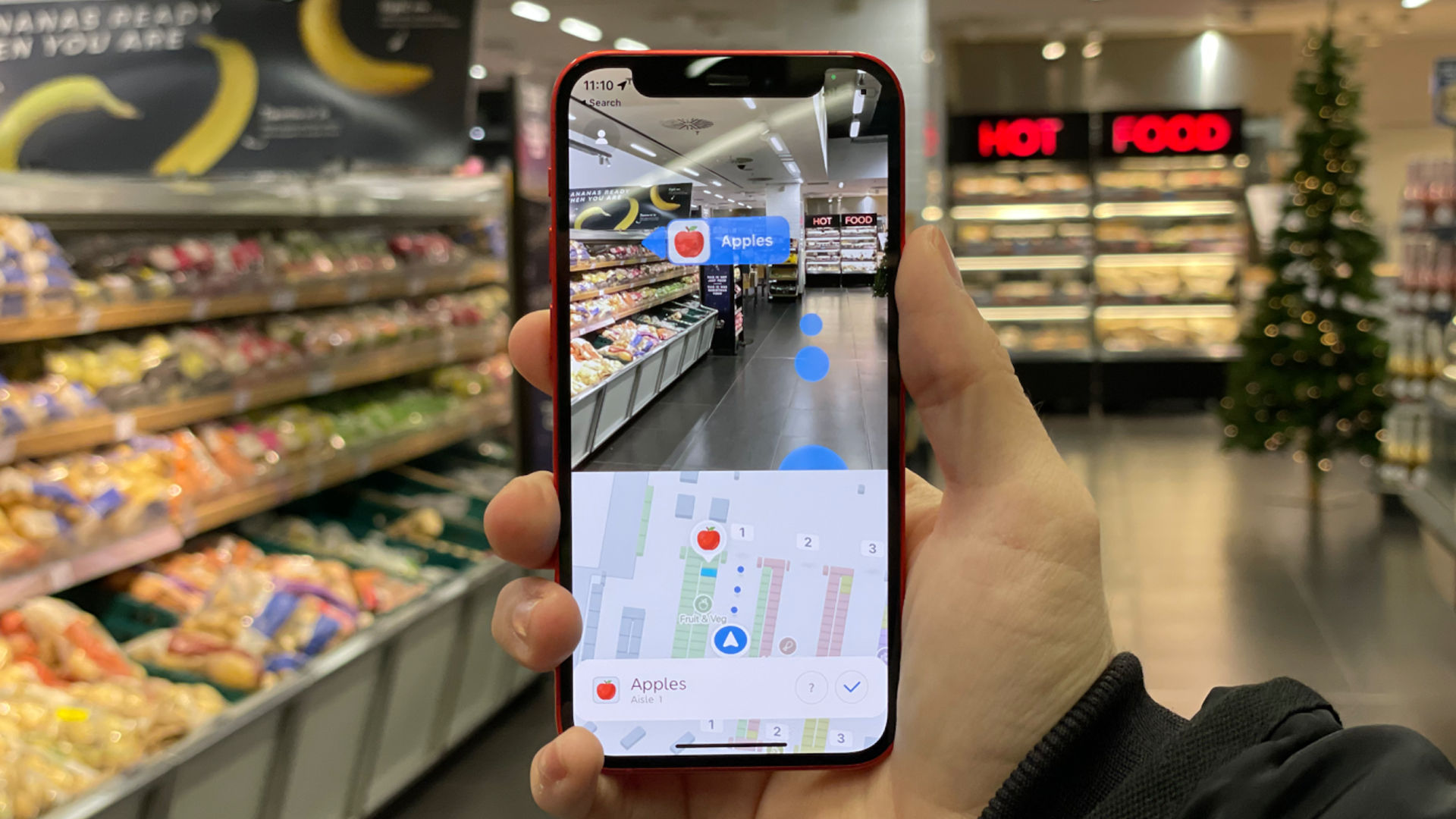
An AR HUD in a grocery store giving directions and labelling sections.

AR apps can provide guidance and assist in common tasks, like grocery shopping.

©HyperARCo, Fair Use

Find below some tips to create a great user experience on the go.

  • Walk the space: This technique is as simple as make-believe. With a vivid enough imagination, you can navigate the spaces you are designing for and visualize what an AR experience might look like. Bodystorming is a useful technique for this. Notice opportunities and constraints, like obstacles, distractions or moments where an AR interface could be beneficial or detrimental. Ensure that the field of view (FOV) is comfortable and works with the experience.

  • Use Gestural Inputs: The user interacts with AR in more ways than button clicks and key presses. They might want to move or rotate objects by turning them with their hands. They might also want to use their eyes or voice to activate certain functions. Consider the space between objects as something that might trigger new functions. You will want to limit these input types when the user is stationary.

  • Design Adaptive UI: Have the interface adjust contrast and brightness, especially in outdoor environments or when the user transitions indoors. UI elements should get darker, lighter, or more or less transparent based on lighting conditions. For 3D models, you might have to adjust the model's lighting based on actual lighting conditions.

  • Consider User Fatigue: Remember that phone-based AR is not ideal for prolonged use like desktop applications are. Don't ask users to hold their phones to their faces for extended periods; if they are wearing a headset, this is easier to manage as long as it is lightweight. The user should be able to wear it even when not using AR without an issue.

  • Limit Task Load: Try not to overload users with information or tasks. You can use NASA's Task Load Index to help evaluate your design to ensure your users receive the right information at the right time.
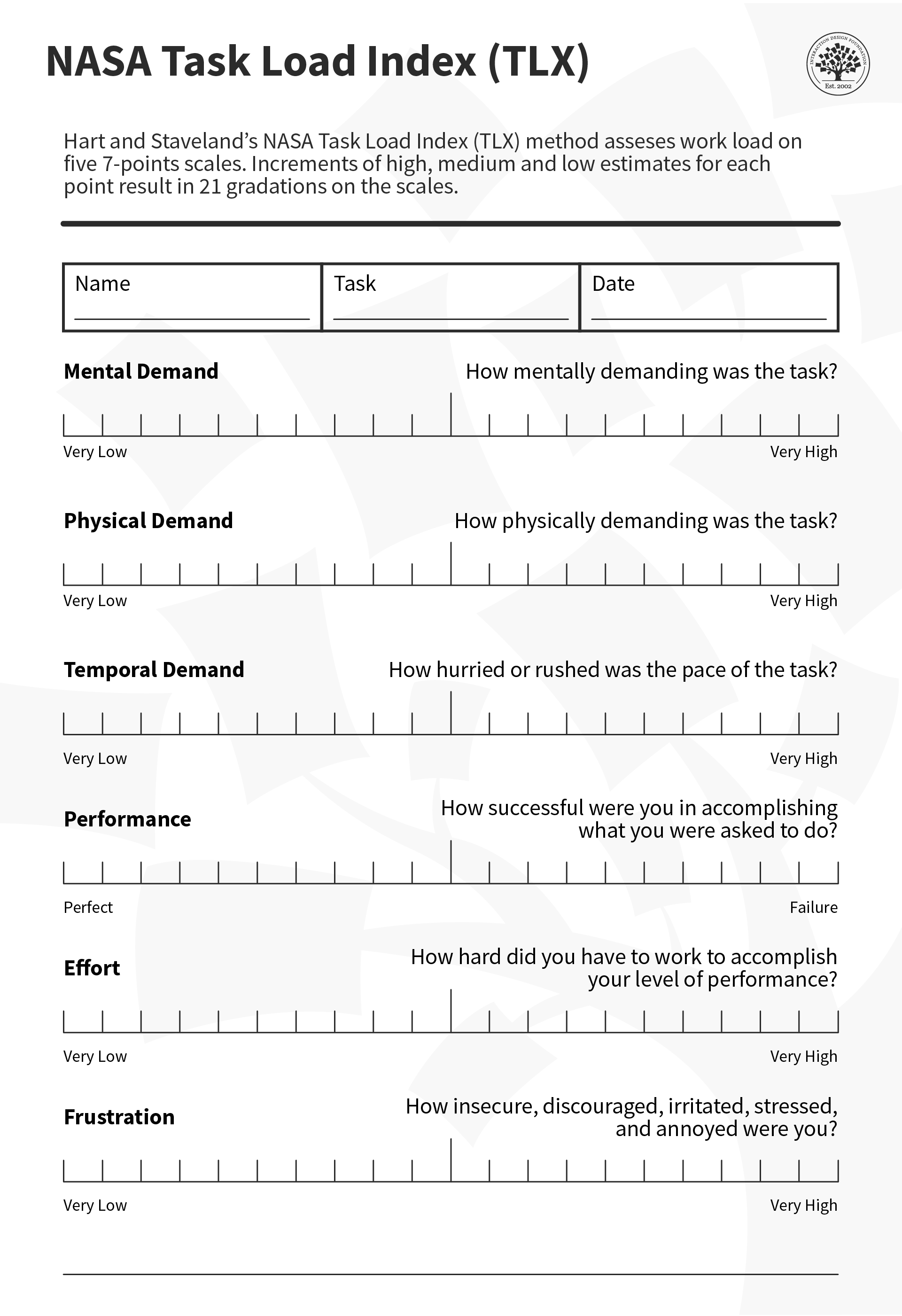
    NASA created the task load index to help identify how much physical and mental effort a task takes.

    © NASA, Fair Use

The Take Away

AR is a close cousin of mobile design and should be similarly suited for use on the go. As a designer, it's important to familiarize yourself with the space and go there if possible. Also, ensure your interface is adaptive to the environment, interacts realistically with physical space, doesn't fatigue the user with tasks that require prolonged use, and doesn't overwhelm the user with information and stimuli.

References and Where to Learn More

Read about how to limit cognitive load with NASA's Task Load Index.

Also, see the unofficial Interactive version.

For more on how AR and spatial cognition, read Augmented Reality (AR) and Spatial Cognition.

Hero Image: © Siemens Software, Fair Use

Learn More in This Course:

Learn Design and AI From the Best

Get one powerful email each week, like 313,904 others.

Next email in:

What You Should Read Next

  • Read full article
    Adaptive vs. Responsive Design - Article hero image

    Adaptive vs. Responsive Design

    The differences between responsive and adaptive design approaches spotlight important options for us as web and app designers. Choosing with insight can empower you to plan and execute your designs with better aim, purpose and results.With the pervasiveness and diversity of mobile devices, as design

    Social shares
    1.3k
    Published
    Read Article
  • Read full article
    Beyond AR vs. VR: What is the Difference between AR vs. MR vs. VR vs. XR? - Article hero image

    Beyond AR vs. VR: What is the Difference between AR vs. MR vs. VR vs. XR?

    There is a fair amount of confusion about the differences between the terms virtual reality (VR), augmented reality (AR), mixed reality (MR), and extended reality (XR). While most people have stuck with AR and VR to describe the different technologies, these terms are not enough to fully comprehend

    Social shares
    1.2k
    Published
    Read Article
  • Read full article
    How to Improve Your UX Designs with Task Analysis - Article hero image

    How to Improve Your UX Designs with Task Analysis

    One of the most important steps in the design thinking or human-centered design (HCD) methodology is to define the users' problems. This means to clearly identify and articulate problems in the UX so that you can later begin the ideation process (i.e., generate great ideas on how to solve said probl

    Social shares
    1.2k
    Published
    Read Article
  • Read full article
    Don’t Build It, Fake It First – Prototyping for Mobile Apps - Article hero image

    Don’t Build It, Fake It First – Prototyping for Mobile Apps

    The design phase for mobile applications should include a prototyping stage. It is at this point that users can “play” with your ideas and concepts and give you valuable feedback that shapes the final designs before you begin development. This can save time and money in development and create produc

    Social shares
    1.1k
    Published
    Read Article
  • Read full article
    Simple Guidelines When You Design for Mobile - Article hero image

    Simple Guidelines When You Design for Mobile

    In mobile user experience (UX) design, it’s important that we respect a user’s task and mindset, as well as the device’s limitations. Here you’ll learn about the general principles that can help you get started with your design.Josh Clark, the author of Tapworthy: Designing Great iPhone Apps, descri

    Social shares
    984
    Published
    Read Article
  • Read full article
    The Anatomy of a Smartphone – Things for Designers to Consider for Mobile Development - Article hero image

    The Anatomy of a Smartphone – Things for Designers to Consider for Mobile Development

    If you’re going to design for mobile, then it’s a good idea to have a grasp of what makes up the modern smartphone in terms of hardware and software. You can then start to think about the possibilities these offer when creating user experiences. The better you know the device, the more you can explo

    Social shares
    929
    Published
    Read Article
  • Read full article
    5 Steps for Human-Centered Mobile Design - Article hero image

    5 Steps for Human-Centered Mobile Design

    Many businesses start with the end-point in mind; “We need a mobile app or a mobile website!” They do not consider why their users would want it. Having a mobile website or app isn’t the key to success—you must provide value to your users. When you take a user- and task-centered approach to mobile (

    Social shares
    908
    Published
    Read Article
  • Read full article
    Understand the User’s Perspective through Research for Mobile UX - Article hero image

    Understand the User’s Perspective through Research for Mobile UX

    User research is crucial to design great user experiences for mobile apps. While any UX research technique can be adapted for mobile, some have proven more effective than others. Let’s look at how becoming proficient in these techniques will help you to develop mobile apps and sites that better meet

    Social shares
    885
    Published
    Read Article
  • Read full article
    Probes for Context Mapping – How to Design and Use Them - Article hero image

    Probes for Context Mapping – How to Design and Use Them

    Whether you are designing a mobile app, a professional online platform or an interactive museum exhibition, it is essential to understand users and the context in which they will use your design. Traditional methods such as interviews and observations will help you to touch the surface of their live

    Social shares
    872
    Published
    Read Article
  • Read full article
    Healthcare UX: Design that Saves Lives - Article hero image

    Healthcare UX: Design that Saves Lives

    UX (user experience) design has the potential to improve people’s everyday lives. The stakes are even higher if you work as a UX designer in the healthcare industry. The health-tech sector is among the fastest-growing in the world, with expected revenue of USD 1,305.1 billion in 2030, according to G

    Social shares
    844
    Published
    Read Article

Top Articles

Top Topic Definitions

39% of Today's Skills Will Change by 2030

The World Economic Forum expects 39% of today's skills to be transformed or become outdated by 2030.

The good news is that jobs in UX / UI design and AI are among the fastest-growing professions globally.

Build Skills That Keep You Relevant

Privacy Settings

By using this site, you accept our Cookie Policy and Terms of Use.
Customize
Accept all

Be the One Who Inspires

People remember who shares great ideas.

Share on:

Academic Credibility — On Autopilot

Don't waste time googling citation formats. Just copy, paste and look legit in seconds.

Learn Design and AI From the Best

Get one powerful email each week, like 313,904 others.

Next email in: