Origami crane folded from printed code perched on a white computer keyboard

Common Web Design Mistakes

by IxDF Instructor • • 4 min read

499 Shares
Save

The number of websites available on the internet is growing by the second, and according to internet live stats we passed 1 billion in September 2014. In this time, web designers have adopted a number of practices that have entered the many lists of 'what-not-to-do' in web design guidelines that can be found all over the net.


Author/Copyright holder: Robert Couse-Baker. Copyright terms and licence: CC BY 2.0

Jakob Nielsen, web usability consultant and inventor of several usability methods, has provided some of the more definitive collection of web design mistakes; one of which, the Top 10 Mistakes in Web Design, highlights the "ten most egregious offences against users". These mistakes are as follows:

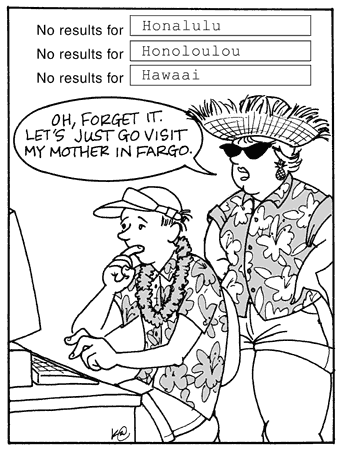
  1. Bad Search
  2. PDF Files for Online Reading
  3. Not Changing the Colour of Visited Links
  4. Non-Scannable Text
  5. Fixed Font Size
  6. Page Titles With Low Search Engine Visibility
  7. Anything That Looks Like an Advertisement
  8. Violating Design Conventions
  9. Opening New Browser Windows
  10. Not Answering Users' Questions

There are lots of other elements of web design that can be infuriating for users; even seemingly small, inconsequential design decisions can have a significant bearing on how effectively and efficiently users are able to carry out their tasks and reach their goals. For example, one of the small things that I find most annoying is when the flashing text cursor, or caret, is not within the first or only input field when you arrive on a page. To allow seamless movement from task-to-task, small design elements, such as allowing users to instantly input information/details the moment they arrive at a page, can make all the difference to the user experience.
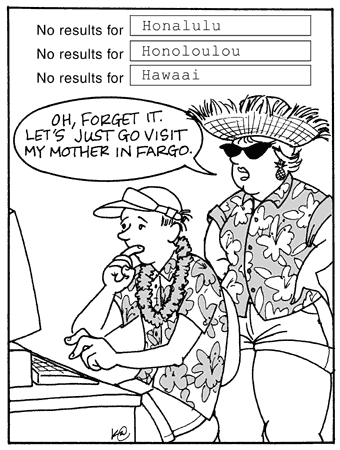


Author/Copyright holder: Nielsen Norman Group. Copyright terms and licence: All rights reserved Img source

In Summary

Web design is something of an art. Designers in this area must fit lots of information into a restricted amount of space, while providing all of the necessary interactive elements and links, without sacrificing visual appeal and effectiveness. It is by no means a guarantee for success, but avoiding common mistakes, such as those outlined by Jakob Nielsen in the Top 10 Web Design Mistakes, should at least mean your site won't appear in the litany of blogs and articles on the subject of bad website designs.

Jakob Nielsen's previous lists of web design mistakes:

Most violated homepage guidelines

Top homepage usability guidelines

Good deeds in Web design

Web design mistakes (2005)

Web design mistakes (2003)

Web design mistakes (2002)
With cartoons.

Web design mistakes (1999)

Web design mistakes (1996)

Header Image: Author/Copyright holder: Simon Pow. Copyright terms and licence: CC BY-NC-ND 2.0

Learn More in This Course:

Learn Design and AI From the Best

Get one powerful email each week, like 308,844 others.

Next email in:

What You Should Read Next

  • Read full article
    What Does a User Interface (UI) Designer Do? - Article hero image

    What Does a User Interface (UI) Designer Do?

    What’s in every memorable digital experience is a seamlessly navigable website or an app that feels like second nature—and what lies behind those are user interface (UI) designers; they’re the ones who shape the aesthetics and functionality of any digital interface. But what does a user interface de

    Social shares
    614
    Published
    Read Article
  • Read full article
    Should You Choose between Responsive and Adaptive Design? - Article hero image

    Should You Choose between Responsive and Adaptive Design?

    Designers can choose between adaptive and responsive design to bridge the gap between devices and changing user contexts. Here you’ll learn the merits of each approach, so you’re in a great position to select an approach for your project.  What Are the Main Differences Between Responsive a

    Social shares
    565
    Published
    Read Article
  • Read full article
    System Usability Scale for Data-Driven UX - Article hero image

    System Usability Scale for Data-Driven UX

    Ever wondered how the top designers, researchers, and product developers manage to create products that are user-friendly, efficient, and enjoyable—consistently? One of the key things there is what’s called the System Usability Scale (SUS), a vital tool and questionnaire-based method that profession

    Social shares
    967
    Published
    Read Article
  • Read full article
    Don Norman’s Top Tips from the Design for the 21st Century Course - Article hero image

    Don Norman’s Top Tips from the Design for the 21st Century Course

    The design field is evolving. It’s been proven that aside from driving business success and delivering beautiful and successful products, design can be pivotal to solving complex human issues. For instance, GE Healthcare used Design Thinking to improve the MR scanner experience for children—which is

    Social shares
    592
    Published
    Read Article
  • Read full article
    Sustainability Is Not Enough - Article hero image

    Sustainability Is Not Enough

    Sustainable design. Sustainable fashion. Sustainable living. We often hear these terms in marketing campaigns and popular media. But what does sustainability mean and why does pioneer of User Experience Design Don Norman think that sustainability shouldn’t be our goal when we design?In this video, D

    Social shares
    486
    Published
    Read Article
  • Read full article
    Black Friday 2024: Invest in UX Design Education - Article hero image

    Black Friday 2024: Invest in UX Design Education

    “The best investment you can make, is an investment in yourself... The more you learn, the more you'll earn.”—Warren Buffett, Chairman and CEO of Berkshire HathawayHow many items have you added to your Black Friday shopping wishlist? This year, instead of short-term deals on products, why not take a

    Social shares
    564
    Published
    Read Article
  • Read full article
    Why Is AI so Important and How Is It Changing the World? - Article hero image

    Why Is AI so Important and How Is It Changing the World?

    You've heard about AI and all the wonderful (and sometimes scary) possibilities. But unlike sci-fi apocalyptic movies, AI isn't out to destroy humanity. Let's take a look at the challenges and opportunities we face as AI meets design.In this video, Ioana Teleanu, Founder of UX Goodies and former Lea

    Social shares
    487
    Published
    Read Article
  • Read full article
    Who, What, and How: Design Maps Show You the Way for Implementation - Article hero image

    Who, What, and How: Design Maps Show You the Way for Implementation

    For something called a “team project,” it’s amazing how often everyone’s on a different page. Design maps connect the dots. They organize your research, stories of use, and design artifacts into clear, user-centered interfaces that your team can actually build fast. No more “Wait, what did you mean

    Social shares
    403
    Published
    Read Article
  • Read full article
    How Can Designers Adapt to New Technologies? The Future of Technology in Design - Article hero image

    How Can Designers Adapt to New Technologies? The Future of Technology in Design

    The design industry is rapidly evolving with the integration of technologies such as artificial intelligence (AI) and 3D printing. While there may be concerns about job displacement, history has demonstrated that new technologies typically create more job opportunities. Don Norman, author of The Des

    Social shares
    691
    Published
    Read Article
  • Read full article
    Conceptual Models: The Hidden Structure Behind Your Next Great Interface - Article hero image

    Conceptual Models: The Hidden Structure Behind Your Next Great Interface

    Ever wondered why some interfaces feel effortless: like they already know what you’re trying to do, while others leave you guessing? The difference often lies in how well a product’s design matches the way users think. When your interface reflects their mental model, every action feels intuitive, an

    Social shares
    480
    Published
    Read Article

Top Articles

Top Topic Definitions

39% of Today's Skills Will Change by 2030

The World Economic Forum expects 39% of today's skills to be transformed or become outdated by 2030.

The good news is that jobs in UX / UI design and AI are among the fastest-growing professions globally.

Build Skills That Keep You Relevant

Privacy Settings

By using this site, you accept our Cookie Policy and Terms of Use.
Customize
Accept all

Be the One Who Inspires

People remember who shares great ideas.

Share on:

Academic Credibility — On Autopilot

Don't waste time googling citation formats. Just copy, paste and look legit in seconds.

Learn Design and AI From the Best

Get one powerful email each week, like 308,844 others.

Next email in: