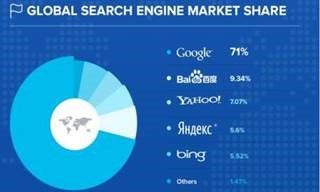
Search engine optimization (SEO) is the practice of improving a website or digital product so that it appears prominently in search engine results. When someone types a query into Google, Bing, or another search service, the results they see are shaped by how well each page is structured, written, and built. SEO is the discipline of understanding and applying those factors.
From a user experience (UX) perspective, SEO is not simply about ranking higher. It is about ensuring that the right people can find your content, that it matches what they were looking for when they searched, and that they can use it successfully after they arrive. These goals align closely with usability and accessibility: all three depend on content that is clearly structured, honestly described, and easy to navigate.
This topic definition explains how SEO works, why it matters to designers and UX professionals, and how it connects to the broader goal of creating digital products that work well for everyone.
How Search Engines Work
Search services like Google and Bing have two main components. The first is a network of automated programs called crawlers, bots, or spiders. These programs constantly visit web pages, follow links, and add content to a large index database. The second is the search interface itself, where users enter queries and receive results drawn from that index.
For a page to appear in search results, a crawler must first find it, read it, and understand what it is about. This depends heavily on how the page is built. If content is hidden inside image files, delivered only through scripts that run after the page loads, or marked up in a way that obscures its meaning, crawlers may fail to index it correctly, or at all.
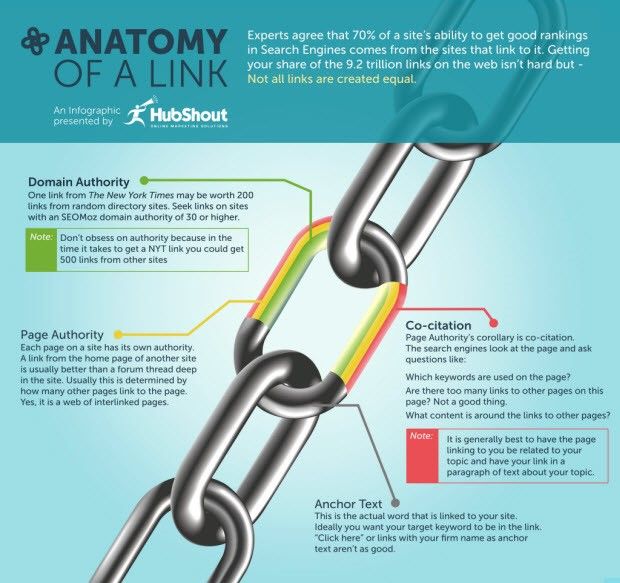
Google's original PageRank algorithm, created by Larry Page, ranked pages partly by evaluating the quality and quantity of links pointing to them. Pages linked to by authoritative sources ranked higher. The text of those links also helped crawlers understand what the linked page contained. Although search algorithms have grown far more sophisticated since then, links and page structure remain important signals.
White Hat and Black Hat SEO
SEO practice is often described using two categories:
White hat SEO focuses on improving rankings naturally through proper markup, quality content, and genuine relevance to what users are searching for.
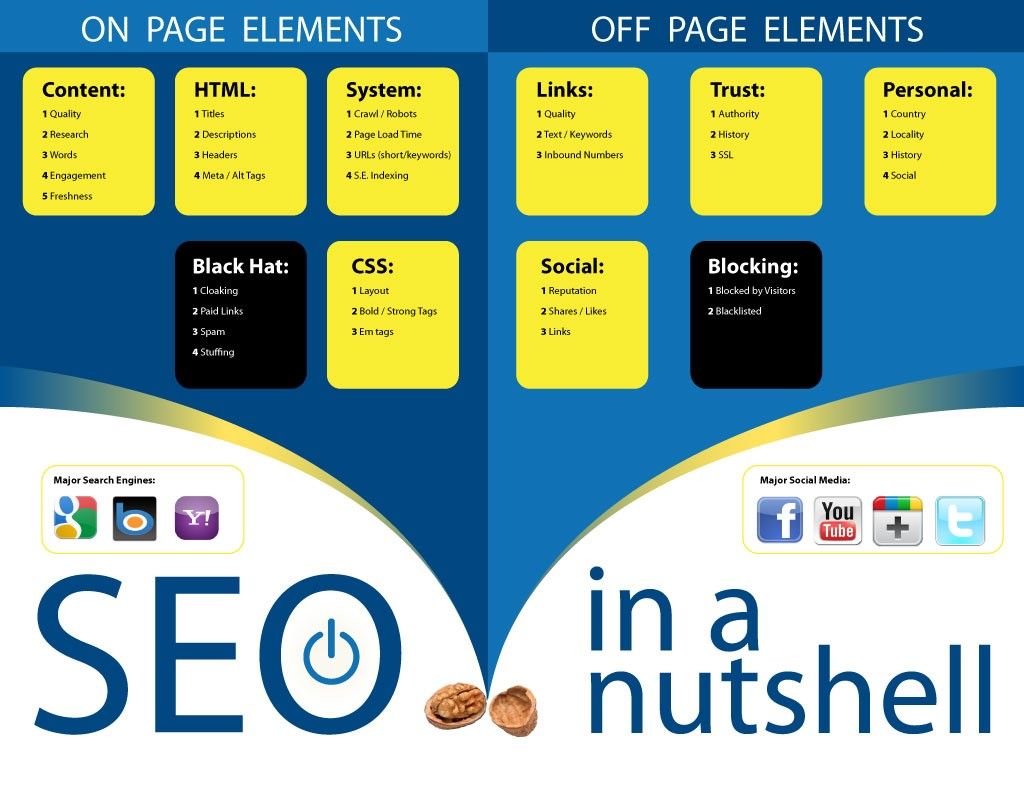
Black hat SEO uses techniques designed to manipulate rankings artificially. Examples include cloaking (showing different content to search engines and human users), link farms (buying large numbers of incoming links), and spam indexing. Search engines regularly update their algorithms to detect and penalize these practices.
This document focuses entirely on white-hat approaches that deliver sustainable results and create better user experiences.
The Connection Between SEO and User Experience
Search engines have evolved to measure what users do. When a user clicks a search result and quickly returns to the results page without engaging further, it signals that the page did not meet their needs. When a user stays, reads, and navigates further, that signals value. Google uses behavioral patterns of this kind as indirect quality signals.
This means that traditional SEO goals and UX goals have converged. A page that loads slowly, is difficult to navigate, contains misleading titles, or fails to answer the question a user was asking will perform poorly both for users and in search rankings.
Search Intent
A central concept in modern SEO is search intent: understanding not just what words someone typed but what they are trying to accomplish. Search intent is typically categorized as:
Informational: the user wants to learn about a topic ("how does a heat pump work")
Navigational: the user wants to reach a specific website ("IxDF login")
Commercial: the user is researching before making a decision ("best project management tools")
Transactional: the user is ready to take action ("buy noise-canceling headphones")
From a UX perspective, aligning content with search intent is equivalent to understanding user goals. Content that accurately reflects what the user is looking for, not just what the organization wants to say, serves both purposes.
Behavioral Signals and Rankings
Search engines observe how users interact with pages after clicking a result. Metrics such as how long users stay on a page (dwell time), whether they continue to other pages, or whether they return immediately to the search results all inform quality assessments. A poorly designed experience does not just frustrate users; it also sends negative signals that can suppress rankings over time.
Technical Foundations: Structure and Markup
Both search crawlers and assistive technologies share a fundamental requirement: they need well-formed, semantic HTML to understand what a page contains and how it is organized. This is the technical common ground between SEO and accessibility.
Semantic HTML
HTML (HyperText Markup Language) is not just about making text appear on the screen. It is a language for describing the meaning and structure of content. When you mark a piece of text as a heading using an <h2> element, you are communicating that it introduces a section of content. When you use a <nav> element, you identify a block of navigation links. This meaning, or semantics, is what both crawlers and screen readers rely on.
HTML5 introduced a set of structural elements that replaced generic containers. Using these correctly benefits both SEO and accessibility:
<header>: introductory content, typically including the site logo and primary navigation
<nav>: major navigation areas
<main>: the primary content of the page (only one per page)
<article>: self-contained content that could stand independently
<aside>: content related but secondary to the main content
<footer>: closing information about a page or section
Heading Hierarchy
Headings create a navigable outline of a page. The rules are straightforward: each page should have exactly one H1 (the main topic), followed by H2 for major sections, H3 for subsections, and so on. Levels should not be skipped.
Nearly 70% of screen reader users navigate pages by jumping between headings. A logical, unbroken heading structure makes this possible. Search engines also use heading hierarchy to understand what a page covers and which topics are most prominent. Choosing heading levels based on how text looks rather than what it means breaks both of these functions.
Page Titles and Meta Descriptions
Every page should have a unique <title> element that accurately describes its content. A good title places the most specific information first and the site name last. Aim for 50 to 60 characters. The title appears as the clickable link in search results, so it needs to be both accurate and useful to someone scanning a results page.
The meta description is a short summary that appears beneath the title in search results. It does not directly affect rankings, but it influences whether users click. A well-written meta description of 150-160 characters should tell users what they will find and why the page is relevant to their query.
Alternative Text for Images
Alternative (alt) text describes images to people who cannot see them, to search engines that cannot interpret visual content, and to users when images fail to load. For meaningful images, alt text should describe the content and, if the image is a link, its destination. For decorative images that add no information, use an empty alt attribute (alt="") so that screen readers can skip them.
Avoid redundant phrases such as "image of" or "photo of." Screen readers already announce that an element is an image. Write alt text that completes the meaning of the page as if the image were not there.
Progressive Enhancement
Modern web pages typically load in stages. The initial HTML and CSS load first, followed by scripts that may fetch additional content, and finally interactive scripts that respond to user actions. Dynamic content loaded in later stages is not reliably processed by all search crawlers or assistive technologies.
Progressive enhancement is a design strategy that addresses this: start with static HTML that works for everyone, then add dynamic features on top. The static foundation ensures crawlers can index the content and assistive technologies can parse it reliably. Dynamic enhancements such as carousels, expandable menus, and live updates are then loaded as improvements for browsers and connections that support them. Both Google and Microsoft recommend this approach.
Performance and the User Experience of Waiting
Page performance has become a measurable ranking factor through a set of metrics Google calls Core Web Vitals. These measure aspects of the loading and interaction experience that affect users directly:
Largest Contentful Paint (LCP): how long it takes for the main content of the page to become visible. A good score is under 2.5 seconds.
Interaction to Next Paint (INP): how quickly the page responds when a user clicks, taps, or types. A good score is under 200 milliseconds. This metric replaced First Input Delay in March 2024.
Cumulative Layout Shift (CLS): how much visible content moves unexpectedly while the page loads. A good score is under 0.1. Unexpected movement causes users to click the wrong element.
These metrics are measured using real user data collected through Chrome browsers, not laboratory simulations. Google uses them as a ranking signal, particularly as a tie-breaker between pages with similar content quality and relevance. Content quality and relevance remain the most important ranking factors; good Core Web Vitals scores support rather than replace them.
From a UX perspective, these metrics matter because slow, unstable, or unresponsive pages damage user trust and increase abandonment. Research from Google shows that increasing page load time from one second to three seconds increases bounce rates by 32%. Improving performance benefits users directly and supports search rankings as a secondary consequence.
Mobile-First Design
Google now uses the mobile version of a page as the primary basis for indexing and ranking. This practice is called mobile-first indexing, reflecting the reality that over 60% of searches now happen on mobile devices. A site that works well on desktop but performs poorly on mobile will rank lower overall.
For UX designers, this means that mobile is not a secondary version. Navigation, touch target sizes, text readability at smaller sizes, and the behavior of interactive elements at different screen sizes all need to be designed from the outset, not adapted afterward.
Content: Writing for People, Not Algorithms
Good content strategy for SEO and good content strategy for UX are essentially the same thing: understand what your users are looking for, provide accurate and useful information, and present it in language they will understand.
Keyword Research as User Research
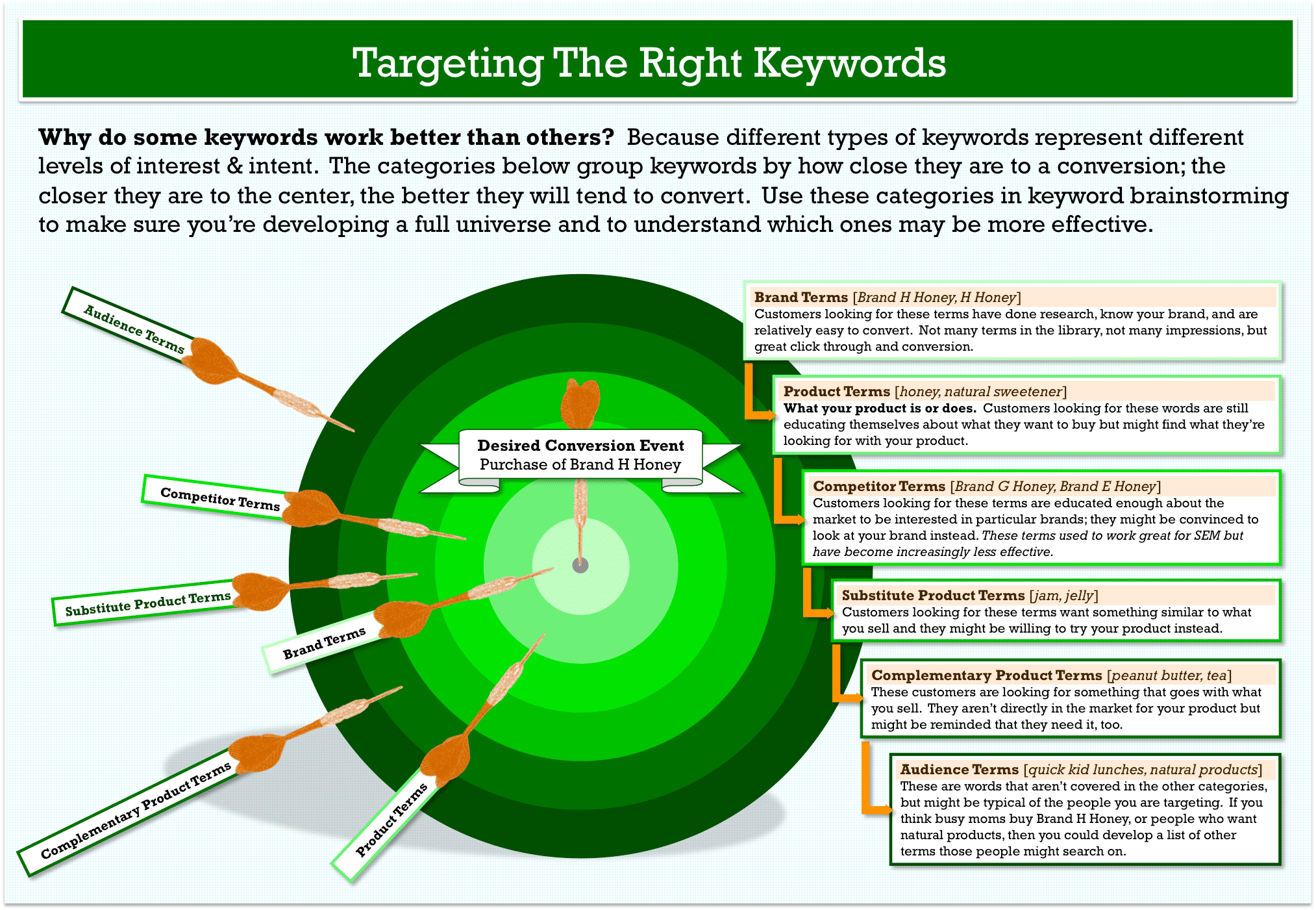
Keyword research tools such as Google Keyword Planner and Google Search Console reveal the actual words and phrases people use when searching for information in your domain. This is a form of user research. The terminology your organization uses internally may not match the terminology your users use when searching. Gaps between these two vocabularies result in content that is relevant but unfindable.
For example, a healthcare organization might refer to a service as "primary care coordination," while users search for "finding a family doctor." Understanding this gap through keyword research is the same kind of insight that informs navigation labeling, button text, and information architecture decisions in UX work.
Readability and Clear Language
Clear, well-organized writing performs better in search results because it keeps users engaged, reduces bounce rates, and is more likely to be shared or linked to by others. Short paragraphs, descriptive headings, and appropriate use of lists all help users scan and find what they need. These are also readability best practices that benefit users with cognitive disabilities, users reading in a second language, and anyone looking for a quick answer.
Language should match what the audience expects and searches for. Avoid jargon unless your audience is specialist and expects it. Use SEO tools to verify that the vocabulary you have chosen reflects how real users describe the topic.
Where SEO and Accessibility Overlap
The overlap between SEO and accessibility is substantial because both disciplines require the same thing: content that is clearly structured, correctly marked up, and honestly described. Tim Berners-Lee, the inventor of the World Wide Web, put it plainly: "The power of the Web is in its universality. Access by everyone regardless of disability is an essential aspect."
Practices that improve accessibility consistently improve SEO, and vice versa. These include:
Semantic HTML that describes the meaning of content
Heading hierarchies that create a navigable structure
Alternative text that describes image content
Unique, descriptive page titles
Clear language and consistent terminology
Captions and transcripts for audio and video content, which search engines can index
Proper language identification using the HTML lang attribute, which helps screen readers select the correct pronunciation and assists translation tools
Conversely, pages that rely on images of text, present content only through scripts, or use color as the sole means of conveying information tend to perform poorly both for users with disabilities and for search crawlers.
Accessibility Requirements Beyond SEO
Some accessibility requirements have no direct SEO equivalent but are equally important in UX practice:
Color contrast: text must meet minimum contrast ratios so that users with low vision or color blindness can read it. WCAG 2.2 requires a contrast ratio of at least 4.5:1 for standard text at Level AA.
Keyboard operability: all interactive elements must be reachable and usable with a keyboard alone, without requiring a mouse. This requirement serves users with motor impairments and is also tested as part of general usability.
Animation control: users must be able to pause, stop, or hide animated content. Auto-playing animations can disorient users with cognitive or vestibular conditions and are disruptive to many other users as well.
Avoiding color-only information: color must never be the sole means of conveying a distinction. Text labels, patterns, or icons should accompany any use of color to communicate meaning.
Touch target size: WCAG 2.2 requires interactive elements to be at least 24 by 24 CSS pixels. Small or closely spaced targets cause problems for users with motor impairments and for anyone using a mobile device while moving.
Legal Context
Disability discrimination legislation exists in virtually every country and applies to digital products and services. The key legal cases that established this in web contexts include the Sydney 2000 Olympics website case, in which a blind user successfully sued the International Olympic Committee for an inaccessible website, and the 2006 Target Corporation case in the United States, which cost Target approximately six million US dollars in legal fees and remediation.
Web accessibility lawsuits in the United States grew from 814 in 2017 to over 4,000 per year by the early 2020s. Europe recorded over 4,200 cases in 2023. The European Accessibility Act, which came into force in June 2025, requires private-sector businesses to meet accessibility standards.
The Web Content Accessibility Guidelines (WCAG) from the W3C are the accepted international standard. WCAG 2.2, published in October 2023, is now the recommended version and has been adopted as ISO/IEC 40500:2025. Most organizations target Level AA compliance, which addresses the majority of accessibility barriers.
Compliance with WCAG does not guarantee that a product is free from discrimination claims, but it demonstrates that reasonable efforts were made. Building accessibility in from the start is substantially more cost-effective than retrofitting or responding to litigation.
The Role of the UX Designer
SEO is often perceived as a technical or marketing discipline, separate from design. In practice, UX designers make decisions at every stage of a project that directly affect search performance:
Navigation structure and labeling determine which terms appear in URLs, breadcrumbs, and link text, all of which are SEO signals.
Content hierarchy, including headings and information architecture, affects how crawlers understand and index a page.
Image treatment, including whether meaningful images have alt text or are delivered as background styles, affects indexability.
Performance decisions, such as how images are loaded and how scripts are prioritized, affect Core Web Vitals scores.
Mobile design quality affects rankings directly through mobile-first indexing.
Search Experience Optimization (SXO) is an emerging term that reflects this convergence. It describes integrating SEO and UX from the start of a project rather than treating them as separate concerns applied at different stages. The goal of SXO is to create products that are both findable through search and genuinely useful once users arrive.
Key Take Aways
SEO and UX share the same foundation: both require content that is clearly structured, honestly described, and easy to navigate.
Semantic HTML serves everyone: proper markup benefits search crawlers, assistive technologies, and users in equal measure.
Content should match user intent: keyword research is a form of user research that reveals how real users describe their needs.
Performance is a UX requirement: Core Web Vitals measure user experience directly and influence search rankings as a secondary effect.
Accessibility and SEO overlap substantially: practices that remove barriers for users with disabilities consistently support better search performance.
Legal requirements are growing: accessibility legislation applies worldwide, and the costs of non-compliance are high and rising.
Design decisions affect SEO: navigation, information architecture, image treatment, and performance choices all have direct consequences for search visibility.
Further Reading
Google Search Central Documentation: Google's own guidance on how to make content findable and understandable by search engines, written in plain language for developers and designers.
Web Content Accessibility Guidelines (WCAG) 2.2: The international standard for web accessibility from the W3C. The Quick Reference is a practical starting point.
Google Search Console: A free tool for website owners that shows how Google is indexing a site, which queries are bringing users in, and how Core Web Vitals are performing.
Google Keyword Planner: A free research tool that reveals search volumes and related terms for any topic. Useful for aligning content vocabulary with user language.
WebAIM: Introduction to Web Accessibility: A clear, practical guide to accessibility principles without technical jargon.
Lighting the Road Ahead by William Hudson: A free, concise guide covering usability, accessibility, and SEO together, showing how these disciplines reinforce each other in practice.
WAVE Web Accessibility Evaluation Tool: A free browser-based tool that identifies accessibility issues on any page, with visual feedback overlaid directly on the content.