Your constantly-updated definition of Conceptual Models and collection of videos and articles. Be a conversation starter: Share this page and inspire others!
Conceptual models are abstract, psychological representations of how tasks should be carried out. People use conceptual models subconsciously and intuitively as a way of systematizing processes.
For example, a common mental model for creating appointments involves calendars and diaries. Knowing about the prevalence and power of conceptual models guides designers to tailor software that matches users’ conceptual models.
By creating interfaces and apps that echo conceptual models, designers build on existing knowledge and frameworks, making it easier for the users to learn how to use the new product.
Typically, conceptual models are identified at the beginning of the design process and are referenced to constantly for direction and inspiration throughout the design process.
Questions About Conceptual Models? We've Got Answers!
What are examples of conceptual models?
Conceptual models provide a framework for users to grasp system functionalities. In the MatchDog project, a conceptual model was developed for a matchmaking app for dog owners. It includes user profiles, dog profiles, a chat system, and event creation, simulating real-life dog meetups. This model ensures that the app mirrors real-world interactions, making it intuitive for users. For a comprehensive look into the product and benefits of the MatchDog project's conceptual model, explore the full article on Interaction Design Foundation.
Advance Your Career With This Free Template
for “Conceptual Model Templates”
What are the three types of conceptual modeling?
Conceptual modeling in UX encompasses three main types: Mental Models, based on individual users' internal cognitive processes and perceptions; Represented Models, which designers create to display the functionality and content of systems; and System Images, stemming from the system's physical and digital representation, including interfaces and documentation. These models ensure that users and designers share understanding, facilitating seamless system interactions. Dive deeper into conceptual modeling for mobile applications with Interaction Design Foundation.
What is conceptual model in UX?
In UX design, a conceptual model provides a mental framework that users rely on to predict and understand a system's functionality. It bridges the gap between user expectations and the product's functions, ensuring an intuitive user experience. The shopping cart in ecommerce sites is perhaps the most common example of a conceptual model. Users have a set of expectations on its behavior from their experience in the real world. A well-defined conceptual model aligns with users' mental models, minimizing confusion and enhancing usability. Dive deeper into the intricacies of conceptual modeling for mobile applications on Interaction Design Foundation.
What are the elements of a conceptual model?
A conceptual model in UX design consists of several key elements:
Entities: the people, places, and things that are involved in the system or product. They are the main components that users interact with or manipulate. For example, in a word processor, the entities are the documents, fonts, images, etc.
Relationships: how the entities are connected or related to each other. They define the rules and logic of the system or product. For example, in a word processor, the relationships are how the documents can be saved, opened, edited, printed, etc.
Constraints: the limitations or restrictions that apply to the entities or relationships. They define the boundaries and conditions of the system or product. For example, in a word processor, the constraints are the file formats, storage space, printing options, etc.
These elements create a mental framework for users, guiding their expectations and interactions with a system. For a deeper insight into conceptual modeling for mobile applications, visit Interaction Design Foundation.
What is a conceptual vs a theoretical model?
In the context of design and research, a Conceptual Model outlines relationships between different elements in a system, simplifying complex concepts into understandable representations. It's a visual or descriptive explanation of how things work. Conversely, a Theoretical Model builds upon established theories, often drawing from academic or scientific principles to explain or predict phenomena. While both provide frameworks, the conceptual model offers a practical understanding, while the theoretical model leans on foundational knowledge and hypotheses.
What is a conceptual vs a empirical model?
A Conceptual Model offers a visual or descriptive framework, illustrating relationships among different elements within a system. It simplifies complex ideas into an understandable representation. On the other hand, an Empirical Model is derived from data and observations, providing mathematical or statistical terms of real-world phenomena. While a conceptual model lays out a clear mental picture of a system, an empirical model is rooted in experimental evidence.
Is a flowchart a conceptual model?
A flowchart is a dynamic description of a conceptual model. It shows the detailed interaction between components of a system and its users. In software modeling it has largely been replaced by UML activity diagrams that serve the same purpose. The conceptual model itself is a static diagram that shows concepts and the relationships between them. As an example, consider the shopping cart in most ecommerce sites. The conceptual model would show the cart and the relationship it has to items being ordered, the checkout process and delivery. A flowchart or activity diagram would detail the steps involved in the interactions between these components in the system and the user.
Transcript
Transcript loading ...
Autoscroll
A flowchart can pinpoint how screen designs can intuitively support each task or feature by detailing user journeys step-by-step. This ensures the design aligns seamlessly with users' natural workflows, enhancing the overall user experience.
Is a conceptual model a mental model?
No, a conceptual model and a mental model are distinct. A conceptual model is a representation designers create to convey a system's functionality and behavior. In contrast, a mental model represents users' beliefs and assumptions about that system. While conceptual models guide design decisions, mental models shape user expectations. Aligning both models ensures intuitive user experiences.
Is a conceptual framework qualitative or quantitative?
A conceptual framework can be both qualitative and quantitative.It serves as a foundation, guiding research by clarifying concepts and relationships. Whether applied to qualitative observations or quantitative measurements, the framework aids in understanding and interpreting data. The choice between qualitative or quantitative depends on the research question and methodology.
Where to learn more about conceptual models?
Dive deep into conceptual models with our Mobile UX Strategy course for comprehensive insights and practical applications. Short on time? Gain a quick grasp with our focused masterclass on intuitive design. Both resources are tailored to provide you with expert knowledge and actionable tools. Start now and refine your design skills!
Why? Because design skills make you valuable. In any job. Any industry.
In This Course, You'll
Get excited about transforming messy requirements into smooth, user-centered interfaces. Object-oriented UI design is a methodology most designers haven't been formally taught, which means most teams still assemble features without a system behind them. They end up with interfaces that confuse users and cost development time. According to Forrester's research, a clear, intuitive UI can double conversion rates. Object-oriented UI design makes that achievable: You base your interface on a conceptual map of the objects (things) your users care about, so it reflects how they naturally think. This approach also bridges the gap between UX and development. Master this methodology, and you'll design interfaces that grow with your product, collaborate seamlessly with developers, and work with a systematic approach that's becoming the new standard in UX and product design.
Make yourself invaluable by keeping design and development in sync. You'll stop losing user-friendliness in translation, because you'll learn to speak the shared language of stories of use, epics, constraints, conceptual models, and design maps. You'll understand development constraints and technical realities, so you avoid impractical designs, bugs, and expensive redesigns and keep projects on track.Pruitt and Adlin’s persona-weighted feature and prioritization matrices will enable you to prioritize what matters most, avoid wasted effort, and guide teams toward solutions that serve users. The result? Faster workflows, better decisions, smarter collaboration. You become the go-to person everyone trusts to drive real impact on critical projects.
Gain confidence and credibility as the designer who cuts through complexity and delivers clarity. No more guessing, no more "just add one more feature." You’ll have a structured framework for interface design built around Cook and Daniels' three levels of detail: essential, specification, and implementation. You'll know how to analyze requirements, prevent feature creep, and scale interfaces that stay consistent, intuitive, and loved by users. And when youreplace your team's abstract user stories with researched persona stories, you'll foster empathy for real users and put them at the heart of product development. This will make you a respected partner in every cross-functional collaboration.
Craft your personal portfolio with results that show your skills. In these optionalactivities, you'll write compelling user stories, create wireframes and prototypes, and deliver design maps that show how you move from requirements to implementation-ready UI. You'll integrate your new skills as you create career assets that demonstrate something most candidates can't show: You can deliver designs users love and development teams can easily build.
Learn From Industry Leaders
Master complex skills with proven best practices and toolkits directly from industry leaders. Meet your expert for this course:
William Hudson: User Experience Strategist and Founder of Syntagm Ltd.
Earn Industry-Recognized Certificates
Industry giants trust our courses to train their teams, and prestigious universities integrate our content into their curricula. Add your certificates to your LinkedIn profile, résumé, and job applications.
Conceptual Models: The Hidden Structure Behind Your Next Great Interface
Ever wondered why some interfaces feel effortless: like they already know what you’re trying to do, while others leave you guessing? The difference often lies in how well a product’s design matches the way users think. When your interface reflects their mental model, every action feels intuitive, an
Social shares
461
Published
Read Article
Conceptual Models: The Hidden Structure Behind Your Next Great Interface
Ever wondered why some interfaces feel effortless: like they already know what you’re trying to do, while others leave you guessing? The difference often lies in how well a product’s design matches the way users think. When your interface reflects their mental model, every action feels intuitive, and every feature makes sense. But when it doesn’t, confusion creeps in. Master how to shape your conceptual models around users’ understanding (not the system’s inner workings), and you can design products that feel natural, familiar, and trustworthy, no matter how complex they are behind the scenes.
Your initial conceptual model is usually just a block diagram showing the main concepts and their relationships. You must explain these concepts and relationships to your users through the interface. As you move into more detailed design, you begin to consider the structure and operation of the user interface and incorporate these details into the model.
Hidden complexity doesn’t stay hidden. If important concepts exist in your system but not in your conceptual model, users will eventually discover them: usually at the worst possible moment.
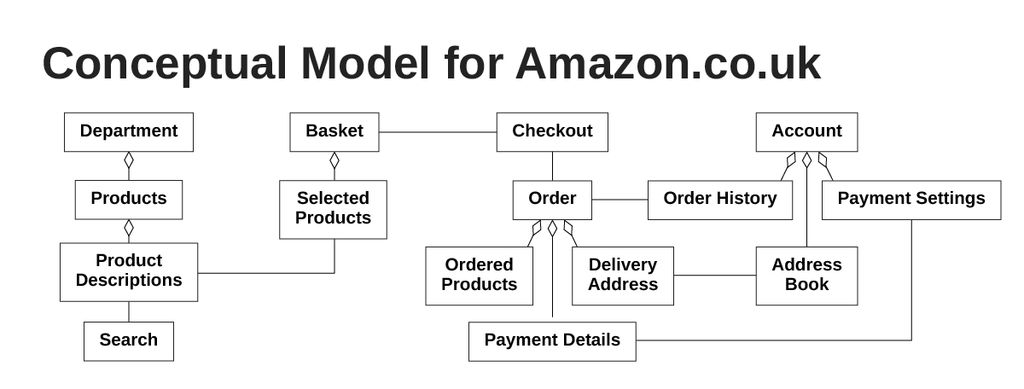
In this video, William Hudson, User Experience Strategist and Founder of Syntagm Ltd, uses examples from Amazon’s evolving interface to show how conceptual models reveal the core concepts behind a design and ensure users can easily understand how a system works.
Transcript
Transcript loading ...
Autoscroll
Amazon's Consistency Builds User Trust and Understanding
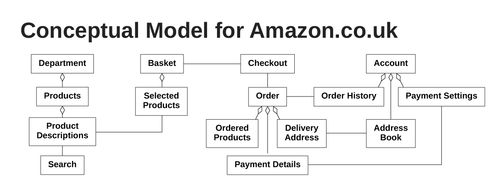
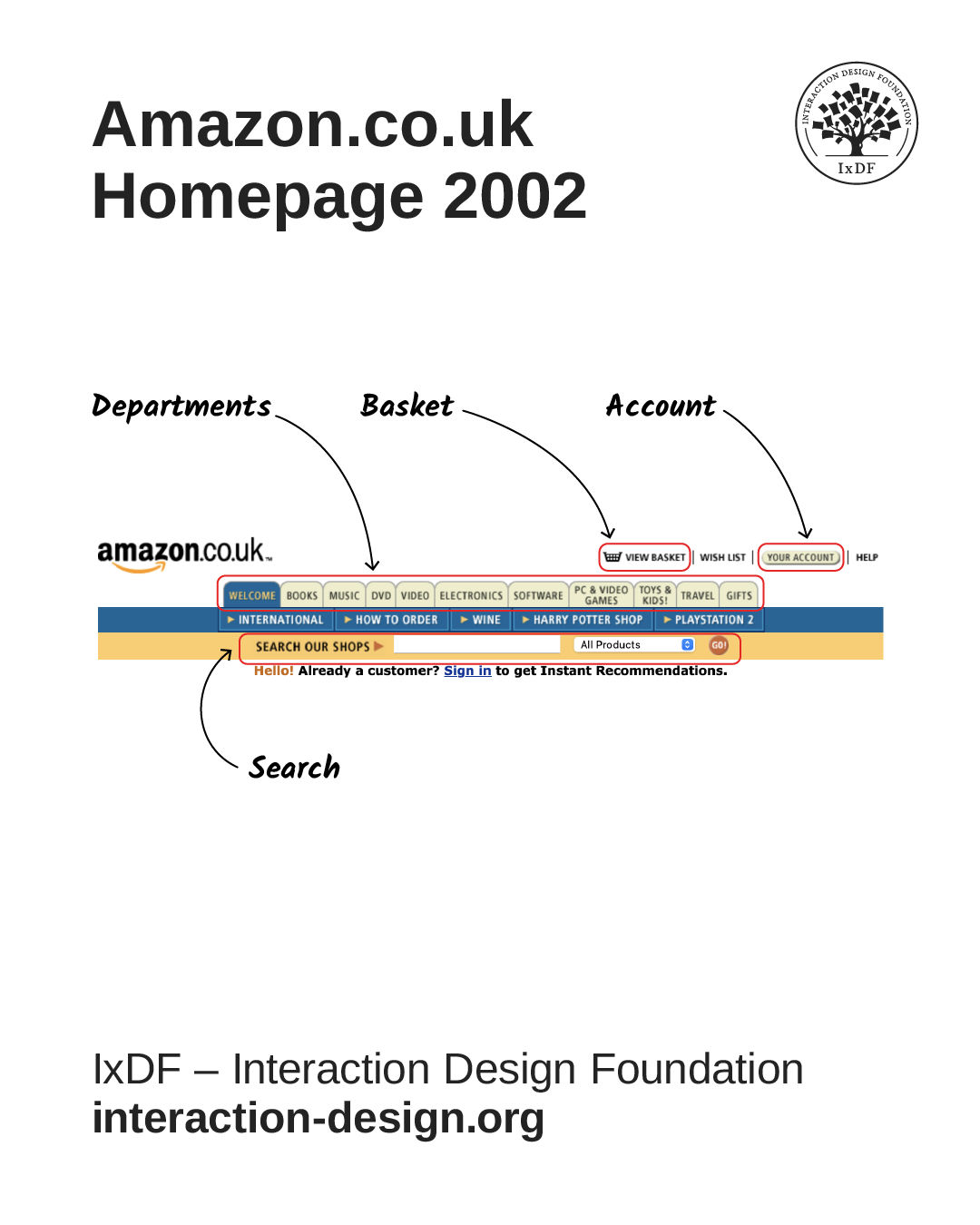
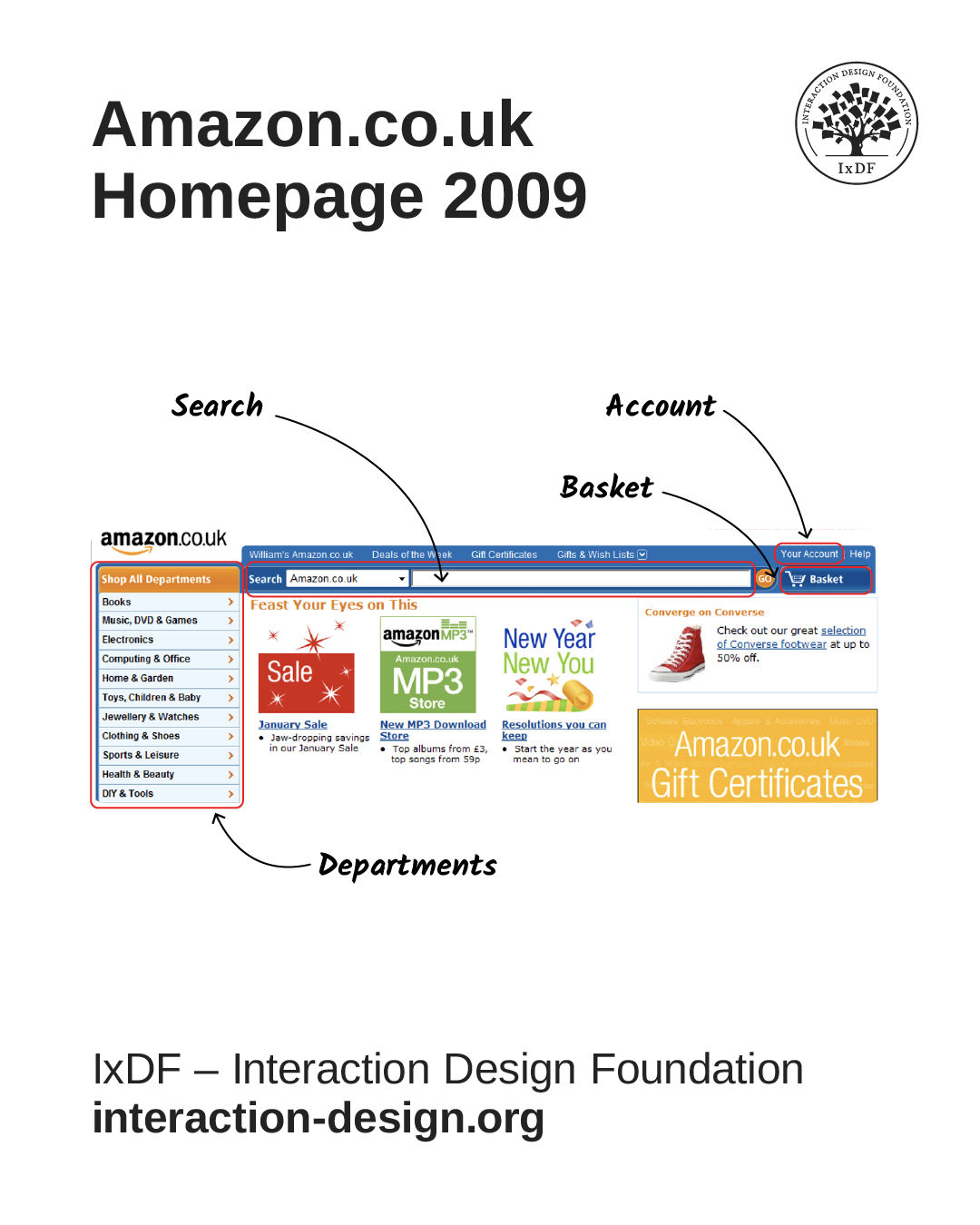
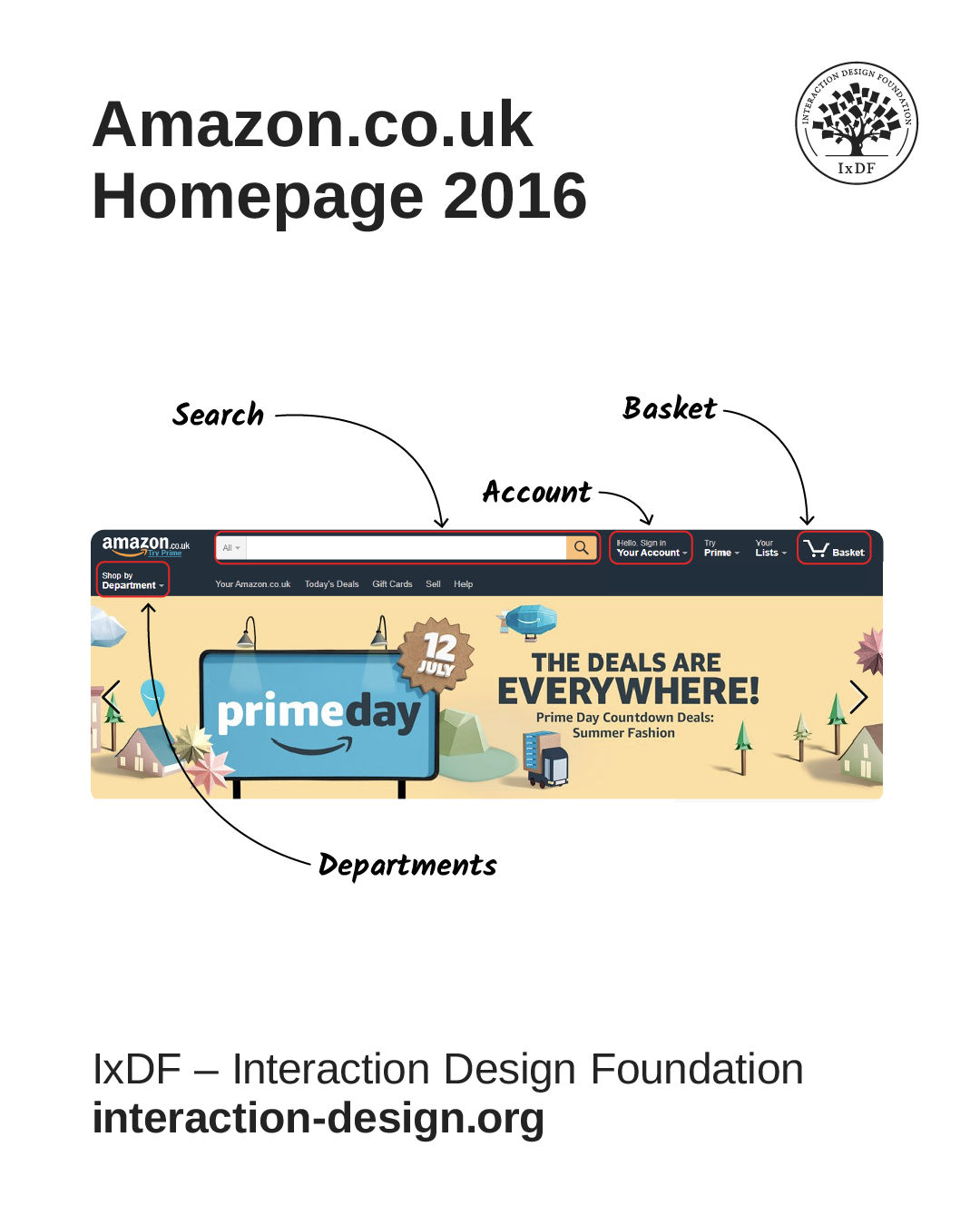
In the video, William discussed Amazon’s UK website in terms of conceptual models. The screenshots are reproduced below. One of the main points is that despite numerous changes to the visual presentation over 20 years, the conceptual model for the main e-commerce site hasn’t changed.
The model (above) and screenshots (below) clearly show the main concepts:
Shopping basket
Account
Departments
Search
This consistency is a powerful feature of a robust conceptual model, helping users remain familiar with a solution despite adjustments to its appearance.
Match Your Interface to How Users Think and Make Interfaces Feel Effortless
In this video, William explains how system and user conceptual models differ, showing why designers must align technical structures with users’ mental models and everyday terminology to create intuitive interfaces.
Transcript
Transcript loading ...
Autoscroll
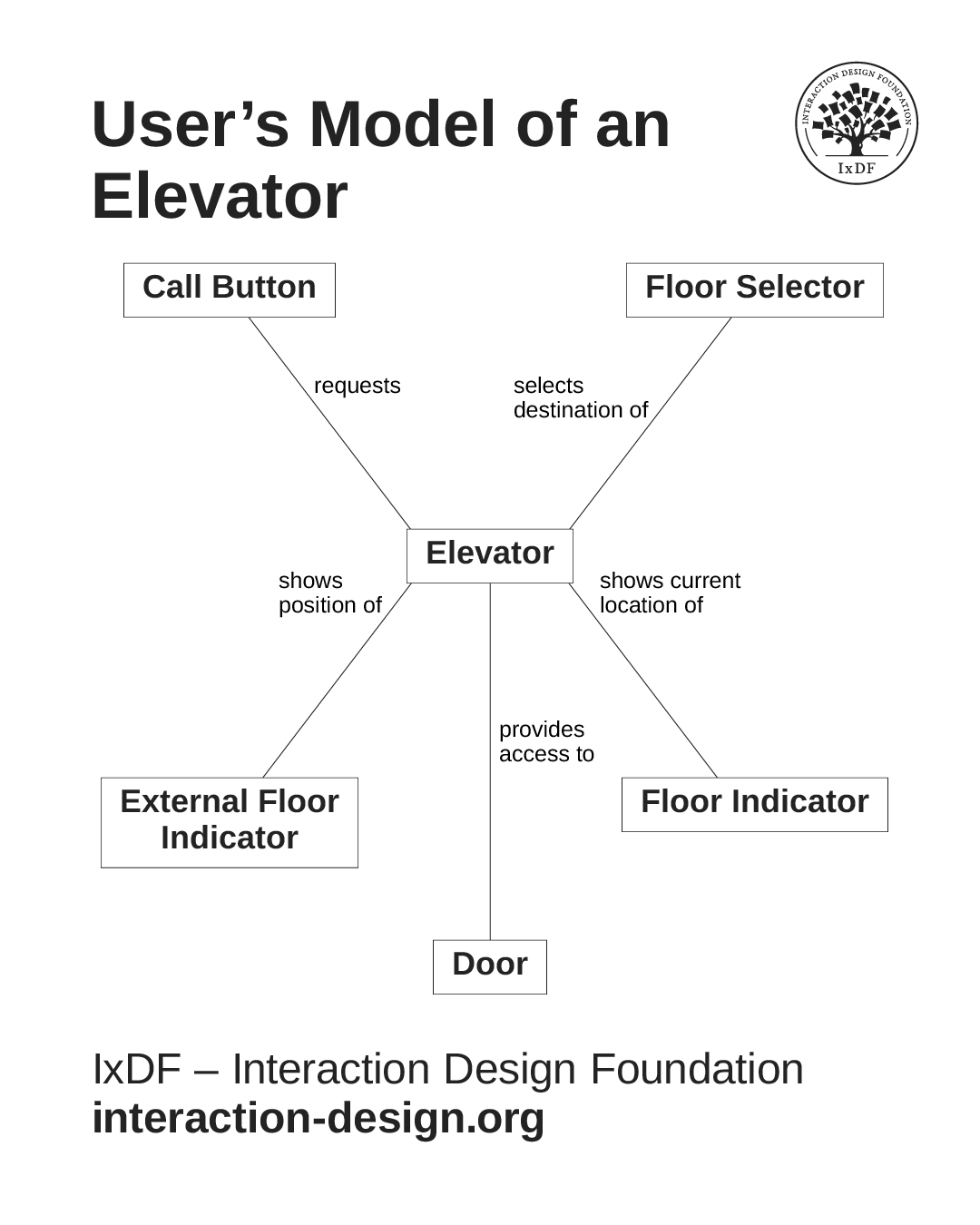
The difference between a system model and a user’s model is quite important. Here’s an example based on a familiar system: an elevator.
User's Model
The user’s model is simple:
You request an elevator with the call button.
The external floor indicator shows where the elevator is now.
The door opens when the elevator arrives.
You enter and select your destination floor with a button inside (“floor selector” in the diagram).
User’s model of an elevator. It's conceptually simple and familiar.
While many elevators work like the one above, larger buildings with numerous elevators now employ a substantially different model:
You select your destination floor at a communal panel in the elevator lobby and are told which elevator to use. (See image below.)
When the elevator arrives, you enter and wait for your floor to be shown.
There are no floor selection controls inside the elevators! While this approach is highly efficient, it is incredibly confusing to novice users. If you enter an elevator without selecting the floor in the lobby, you will have to hope it stops on your floor or get out at the next opportunity and start again. This is not a good example of introducing changes to a well-established system.
Smart elevators, technically known as "destination dispatch systems," have floor selectors outside the elevator cars.
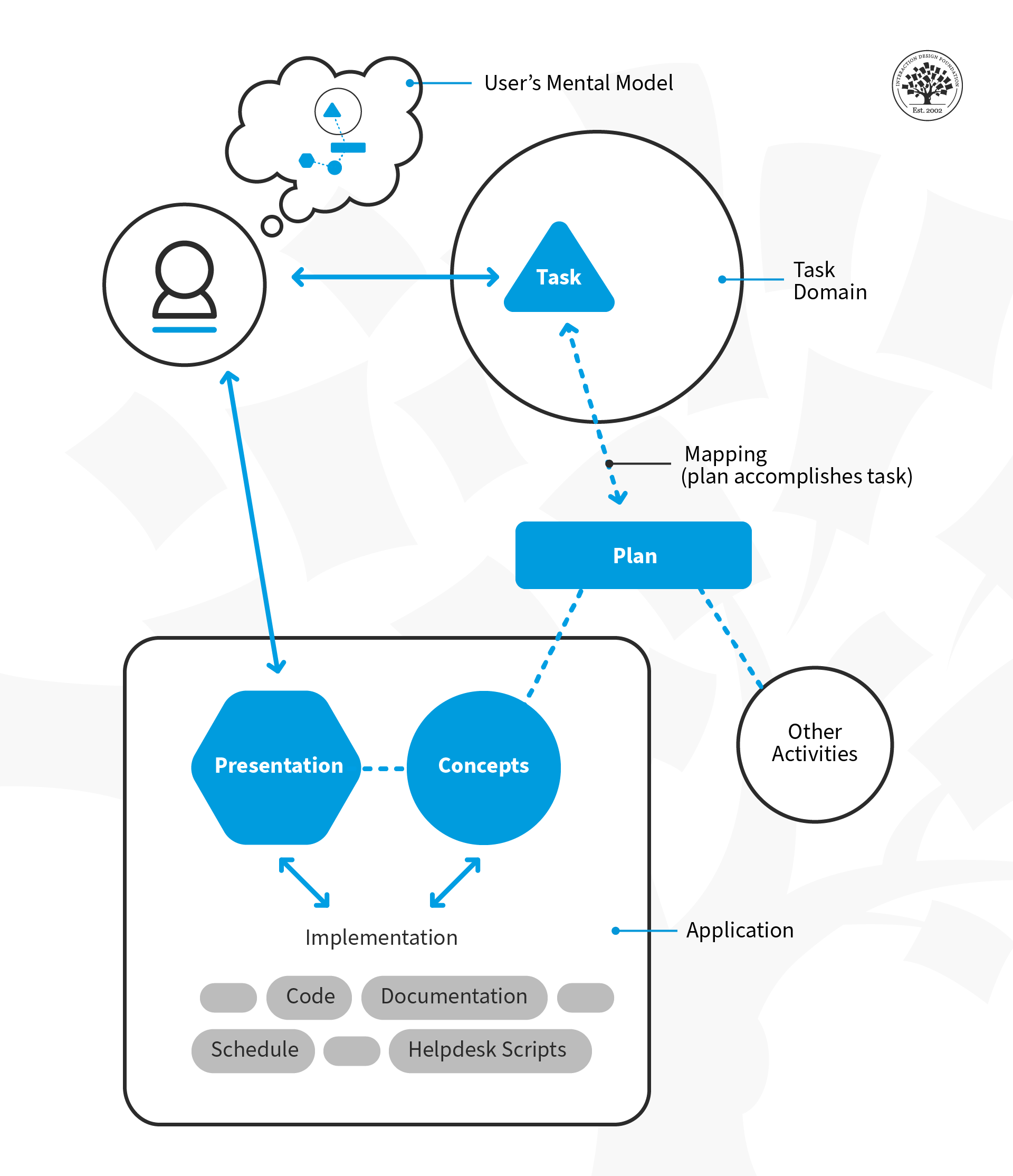
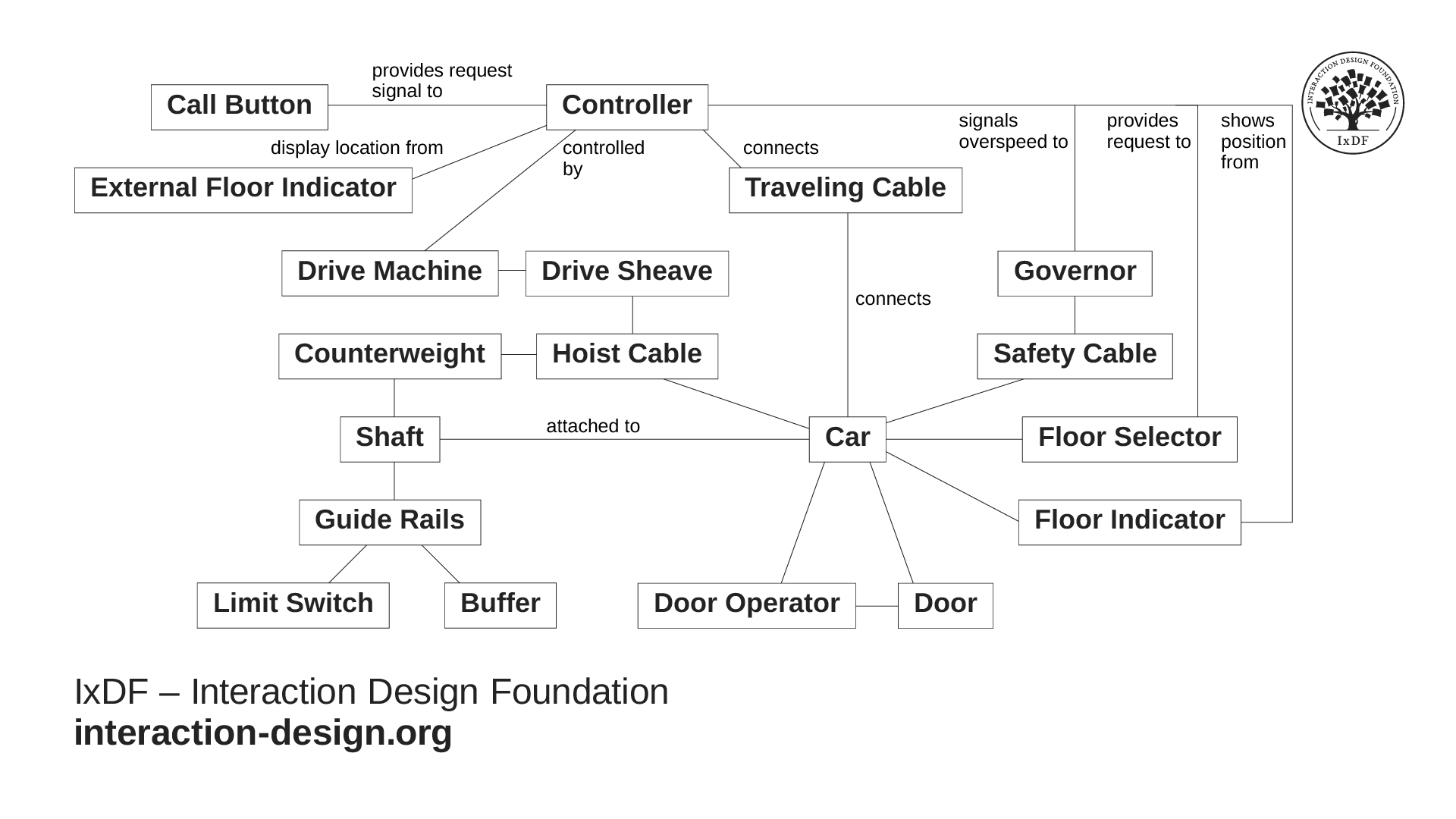
The more complex model below is a basic elevator from an engineering perspective. Some of the same concepts from the users’ model appear, but this model is oriented toward how the system works rather than how it should be used. This is effectively the same for software systems: our conceptual model of the user interface is from a user’s perspective, while the system model is from a developer's perspective.
This is a basic elevator from an engineering perspective. It shows how the complex system works, not how to use it.
When you use the same maps as engineers, just viewed from different perspectives, it helps make designer-developer communication more precise. You'll foster a shared language that aligns understanding and reduces misinterpretation, ensuring your final product remains true to both user needs and technical realities.
The Take Away
Your real power as a designer lies not in visuals, but in understanding: making technology feel human and instantly clear to the people who use it. Solid conceptual models help you do that by shaping how people interpret and interact with your solution.
As the Amazon example shows, when your conceptual model is strong, it can stay consistent for years, even as your interface evolves. This kind of stability builds familiarity, trust, and comfort for your users, no matter how much your product changes on the surface.
It’s also vital to understand the difference between a user’s model (how they think the system works) and a system model (how it actually works behind the scenes). When you align the two, you create experiences that feel natural and intuitive instead of confusing or forced.
By mastering conceptual models, you'll become the designer who bridges the gap between people and technology: someone who creates clarity where others create complexity, and products that feel instantly usable from the very first click.
References and Where to Learn More
Explore how to design for your user's mental model in more detail in our article, Conceptual Models.