Your constantly-updated definition of Extended Reality (XR) and collection of videos and articles. Be a conversation starter: Share this page and inspire others!
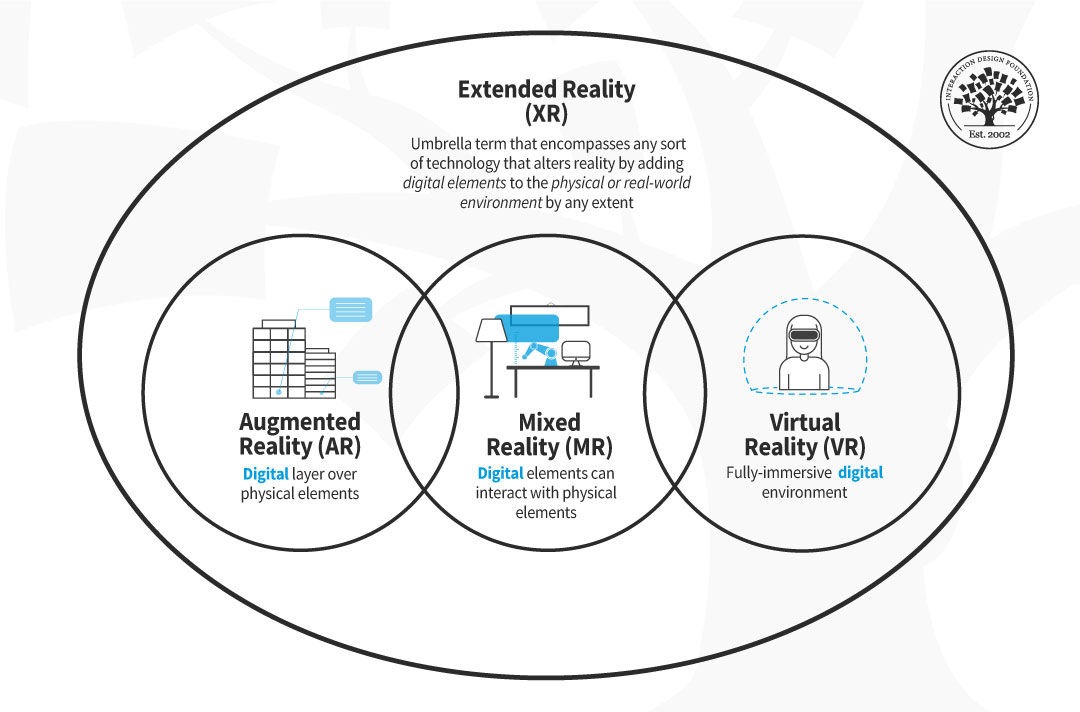
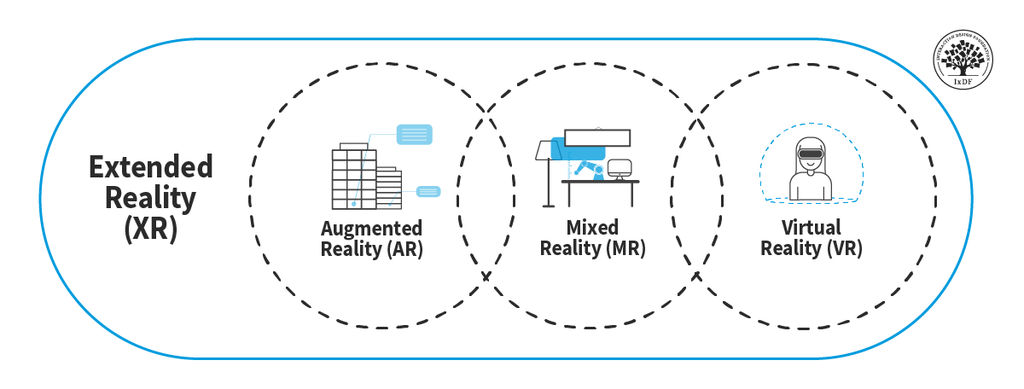
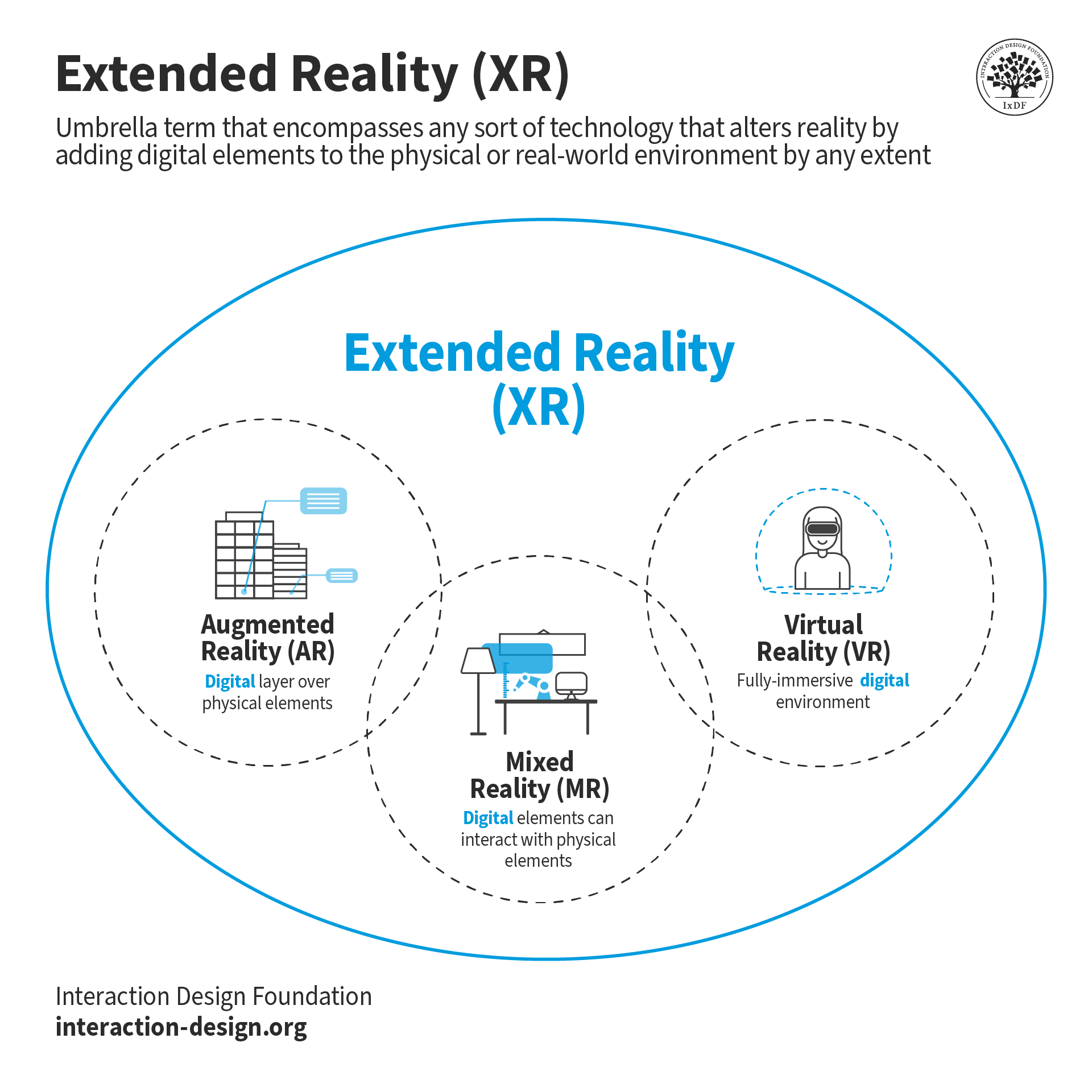
Extended reality (XR) is an umbrella term for any technology that alters reality by adding digital elements to the physical or real-world environment to any extent and includes but is not limited to, augmented reality (AR), mixed reality (MR) and virtual reality (VR).
Any new technology that blends the physical and virtual worlds will also be categorized as XR. The “X” in XR stands for any variable—any letter of the alphabet—that may be used in the future for such technologies.
The term XR includes AR, MR, VR, and any technology that blends the physical and the digital world.
Therefore, the term extended reality does not refer to any specific technology; it includes any existing or new technologies that may be created in the future that alter reality, either by blending the digital and the physical world or by creating an entirely virtual environment.
User Experience (UX) Design for Extended Reality
UX design for XR experiences vastly differs from traditional UX design. UX for XR is not screen-bound and needs to consider 3D spaces and the safety and physical comfort of the user. Although there are not a set of standardized guidelines yet, there are some proposed frameworks to set the bases for UX designers. The study Exploring User Experience Guidelines for Designing HMD Extended Reality Applications by the University of Cagliari (Vi, 2022) proposes the following guidelines:
Organize the spatial environment to improve efficiency.
Create flexible interactions and environments.
Prioritize users’ comfort.
Do not overwhelm the user.
Design around hardware capabilities and limitations.
Use cues to help users through their experience.
Create a compelling XR experience.
Build upon real-world knowledge.
Allow users to feel in control of the experience.
Allow for trial and error.
In the book UX for XR, Cornel Hillmann suggests that object-oriented UX methodology (OOUX) might be an excellent approach to solving design problems in the XR world. A typical UX process starts with user research and user flows and progresses to wireframes and mockups; therefore, it usually defines flows, interactions and features before defining the objects. OOUX first breaks down a design problem's complexity by focusing on the core content—first the objects—and then assigning actions to these objects. For example, using the OOUX design process, you would first focus on the button and then assign an action. This approach typically has four phases:
Discover objects.
Define objects.
Establish relationships.
Force rank objects.
However, more studies and research are needed to establish common standards and best practices for UX for XR.
Questions About Extended Reality (XR)? We've Got Answers!
What are some highly cited scientific research about extended reality?
Here's a revised list of highly cited scientific research within XR:
User Experience and Interaction: Alexandrovsky, D., Putze, S., Schwind, V., Mekler, E. D., Smeddinck, J. D., Kahl, D., Krüger, A., & Malaka, R. (2021). Evaluating user experiences in mixed reality.Extended Abstracts of the 2021 CHI Conference on Human Factors in Computing Systems. https://doi.org/10.1145/3411763.3441337
How does extended reality differ from VR, AR, and MR?
Extended Reality (XR) is an umbrella term that encompasses Virtual Reality (VR), Augmented Reality (AR), and Mixed Reality (MR), covering the full spectrum of real-and-virtual combined environments. Here's a concise differentiation:
VR immerses users in a fully virtual environment, disconnected from the real world.
AR overlays digital content onto the real world without creating a new environment.
MR combines elements of both AR and VR, allowing real and virtual elements to interact in real-time.
XR represents the entire spectrum, from fully real to fully virtual environments, including VR, AR, and MR technologies.
XR technologies offer innovative ways to interact with digital content, enhancing fields from education to healthcare with immersive experiences.
User Experience (UX) Design: XR provides tools for testing and refining user interfaces in virtual environments, ensuring intuitive and user-friendly interactions.
Architectural Visualization: Architects use XR to create walk-throughs of proposed buildings, allowing stakeholders to explore designs before construction.
XR technologies empower designers across various fields to innovate, create more engaging products, and improve the design process.
How is UX design for XR different from traditional UX design?
UX design for Extended Reality (XR) differs from traditional UX design primarily due to its immersive nature and the need for spatial interaction design. While traditional UX focuses on 2D interfaces and user flows on screens, XR UX design requires creating 3D environments where users can move and interact with virtual elements as if they were physical objects. This involves considerations for user movement, depth perception, and interaction with both virtual and augmented elements, ensuring a seamless and intuitive experience. Additionally, XR UX design must account for new user inputs, such as gaze, gesture, and voice, moving beyond the click-and-type interfaces common in traditional UX design. The challenge lies in crafting experiences that are not only usable and accessible but also comfortable and engaging over extended periods, addressing the unique constraints and opportunities presented by VR, AR, and MR technologies.
The key principles of UX design in Extended Reality (XR) center around immersion, interaction, and user comfort. Firstly, the design of immersive experiences requires designers to build convincing, engaging environments that leverage spatial audio and 3D visuals. Secondly, interaction design must be intuitive and utilize natural gestures, eye tracking, and voice commands to allow users to interact with virtual elements seamlessly. Lastly, user comfort is paramount, designers need to address potential issues like motion sickness through stable frame rates, ergonomic interface placement, and ensure a user's physical safety by considering their real-world surroundings. These principles ensure XR experiences are not only immersive and interactive but also accessible and enjoyable for extended periods and foster a deep sense of presence and engagement within virtual or augmented spaces.
What are common UX challenges in XR and how to overcome them?
Common UX challenges in Extended Reality (XR) include user disorientation, motion sickness (cybersickness), and ensuring intuitive interaction. To overcome these, designers should focus on consistent and clear navigational cues to help orient users within virtual environments. The prevention of motion sickness requires careful attention to movement mechanics, such as limiting the speed of movement and avoiding sudden shifts that can disorient users. For intuitive interaction, designers should leverage familiar gestures and interactions from the real world to help users adapt more quickly to XR interfaces. Additionally, designers should provide users with control over their experience, such as the ability to adjust settings for comfort or accessibility and ensure a more inclusive design.
How does user interface design differ in XR compared to traditional digital interfaces?
User interface design in Extended Reality (XR) diverges significantly from traditional digital interfaces due to its immersive and three-dimensional nature. In XR, designers must account for spatial interactions, where the user can move around and interact with elements in a 3D space, unlike the flat, 2D screens of traditional interfaces. This requires a profound understanding of depth, scale, and user ergonomics to ensure interfaces are accessible and comfortable. Additionally, XR interfaces often utilize gesture, voice, and gaze-based inputs rather than mouse clicks or touchscreen taps, demanding a more intuitive design approach that leverages natural human behaviors. Creating effective XR UIs means prioritizing clarity, simplicity, and ease of navigation in a fully immersive environment, challenging designers to think beyond the screen and consider the user's entire physical space as part of the interface.
Emerging trends in XR design focus on enhancing realism, accessibility, and user immersion. Advances in haptic feedback technologies are enabling more tactile interactions, which allows users to feel virtual objects for a more immersive experience. There's also a push towards the creation of more accessible XR environments through adaptive interfaces and voice controls, making XR more inclusive for users with different abilities.
Additionally, the integration of AI and machine learning is improving personalization and interactivity, tailoring experiences to individual user preferences and behaviors. Social XR is also gaining traction, with platforms developing shared virtual spaces for collaboration and socializing, bridging geographical gaps. What are the ethical considerations in designing for XR?
Improve your UX / UI Design skills and grow your career! Join IxDF now!
Learn More About Extended Reality (XR)
Make learning as easy as watching Netflix: Learn more about Extended Reality (XR) by taking the
online IxDF Course UX Design for Augmented Reality.
Why? Because design skills make you valuable. In any job. Any industry.
In This Course, You'll
Get excited to take on a new dimension in UX design as you create augmented reality (AR) experiences that respond to and interact with the physical world. AR adds the real world into the interface, so you can place a couch into your living room before buying it, catch Pokémon in your local park, or translate a foreign sign in real time. In this course, you'll develop skills in spatial design, collaborative experience design, AR prototyping, and usability testing, all grounded in real examples from the AR work of Apple, Google, Niantic, and more. Across industries, from healthcare and manufacturing to education and retail, the demand for AR is growing. Grand View Research values the global AR market at around $600 billion by 2030, at a compound annual growth rate of 37.9 percent. If you want to break into UX design for AR, or you're a seasoned designer who wants to add these skills to your toolkit, this course is for you.
Make yourself invaluable when you master the skills, methods, and frameworks you need to design AR interfaces that understand and respond to the real world. As AI accelerates real-time object recognition and 3D asset generation, the human design judgment about when AR overlays help users and when they distract becomes even more valuable. You'll learn to identify when AR adds meaningful value to users and how to evaluate the full context of use, such as navigating through a busy airport or working with both hands on a repair task. From there, you'll design overlays that respect the ergonomic limits of human vision, explore how affordances and signifiers work in three dimensions, and learn how to create collaborative AR experiences that feel natural, whether your usersare reviewing a shared 3D model or solving a task together.
Gain confidence and credibility as you design AR experiences that solve real problems and add value to people's lives. You'll measure your work against the Labrie and Cheng AR heuristics, ascorecard adapted from the classic ten usability heuristics, which includes new criteria like realistic physics, surface detection, and object behavior in 3D space. To make sure your AR works for real people in real environments, you'll learn how to balance immersion with situational awareness so your designs engage users safely. You'll also cover all the specifics of usability testing, from psychographic recruitment to think-aloud facilitation.
Craft a personal portfolio through optional hands-on activities. You'll define a problem AR is uniquely suited to solve, produce a customer journey map, prototype a concept on paper or in a design tool, and run a usability test, all with the help of downloadable templates like the AR Heuristic Scorecard and Usability Test Plan. At the end of the course, you'll have a complete case study you can add to your portfolio that shows you're ready to design for AR and blend the digital and physical worlds.
Learn From Industry Leaders
Master complex skills with proven best practices and toolkits directly from industry leaders. Meet your expert for this course:
Frank Spillers: Service Designer and Founder and CEO of Experience Dynamics.
Earn Industry-Recognized Certificates
Industry giants trust our courses to train their teams, and prestigious universities integrate our content into their curricula. Add your certificates to your LinkedIn profile, résumé, and job applications.
Beyond AR vs. VR: What is the Difference between AR vs. MR vs. VR vs. XR?
There is a fair amount of confusion about the differences between the terms virtual reality (VR), augmented reality (AR), mixed reality (MR), and extended reality (XR). While most people have stuck with AR and VR to describe the different technologies, these terms are not enough to fully comprehend
Social shares
1.2k
Published
Read Article
Beyond AR vs. VR: What is the Difference between AR vs. MR vs. VR vs. XR?
There is a fair amount of confusion about the differences between the terms virtual reality (VR), augmented reality (AR), mixed reality (MR), and extended reality (XR). While most people have stuck with AR and VR to describe the different technologies, these terms are not enough to fully comprehend the extent of these technologies and harness their potential. That’s why we’re going to explore them in detail now.
According to research by MarketsandMarkets, the market size of all extended reality technologies combined is expected to reach USD 125.2 billion by 2026, at a compound annual growth rate (CAGR) of 30.6% between 2021 and 2026. As a UX designer, you have the chance to contribute to this technology revolution and help define how to take user experience to the next level.
The first step is to define each technology clearly. Once you understand the possibilities each one offers, you’ll be able to adapt your UX design knowledge to these new environments.
Let’s start by looking at the word they all have in common: “reality.” What does “reality” mean in the context of AR, MR, VR and XR?
What is Reality?
Have you ever been in an argument with someone over a specific color? Did it seem dark blue to you and black to the other person? To some extent, the way we process information and construct reality is unique to each one of us—our genetics, previous experiences, etc.—and shapes how we perceive the world.
Humans tend to confuse reality with the physical world and struggle to understand why virtual reality feels so real even when they know it is not.
“We have had people literally run out of the VR room, even though they know that what they are witnessing is not real”
— Mel Slater, Distinguished Scientist and VR pioneer, Institute of Neurosciences of the University of Barcelona
To understand these technologies, you need to understand reality as a construct that each of us makes based on what we perceive from our senses, whether what we perceive comes from the digital or the physical world. The same thing happens when we watch movies. Do you remember the last time you cried or laughed while watching a movie? Were you aware that what you were watching was not real? Yes. Did it make you cry or laugh anyway? If the movie was good, absolutely! Even though you knew you were watching fiction, it felt real at the time. Extended reality technologies add another layer to this phenomenon, which makes the experiences feel even more intense.
“It’s really important to understand we’re not seeing reality. We’re seeing a story that’s being created for us.”
— Patrick Cavanagh, Research Professor, Dartmouth College
When you wear a VR headset, you can feel present in a fully digital environment. The digital information that you perceive through your senses overpowers your reasoning “this is not real.” For your body, at that moment, it is real.
And for all these technologies to work, they all need to feel real. The difference between them is how much they rely on physical or digital elements.
What is the Virtuality Continuum?
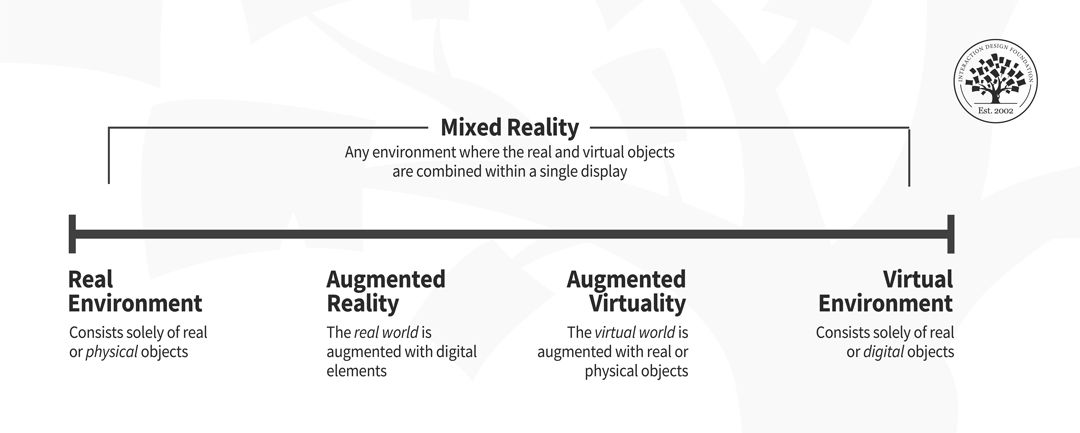
The virtuality continuum—continuum being the critical word—contains the full spectrum of possibilities between the entirely physical world or real environment and the fully digital world or virtual environment. In a continuum, adjacent parts are almost indistinguishable, but the extremes are very different. The researchers Paul Milgram and Fumio Kishino first introduced the virtuality continuum or reality-virtuality continuum concept in 1994.
Representation of the virtuality continuum (adapted from Milgram; Kishino, 1994).
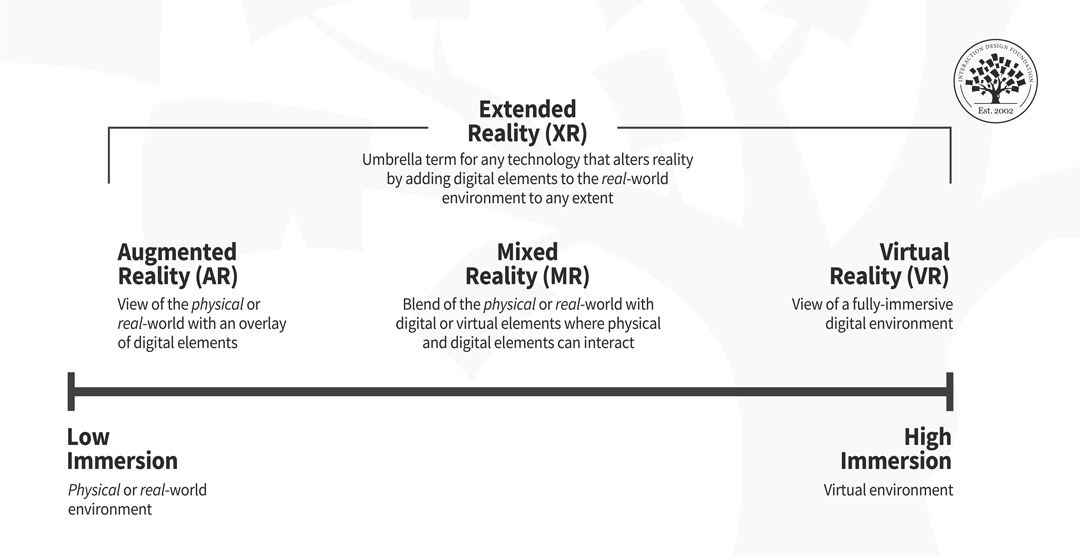
The virtuality continuum is a theoretical framework that can help you visualize and understand the differences between the various technologies that exist today and those that are yet to be invented. For example, you can simplify the concept and think of a spectrum of immersion, where one end is low immersion and the other end is high immersion. Then, you can situate the technologies according to the degree of immersion they provide.
Representation of current XR technologies according to the spectrum of immersion.
Sometimes the exact limits of the various technologies are not a hundred percent clear, and they may overlap. However, the critical part is that you understand the region they occupy in the spectrum. This exercise will help you clarify the differences between all these technologies.
What is Extended Reality (XR)?
Extended reality (XR) is an umbrella term that encompasses any sort of technology that alters reality by adding digital elements to the physical or real-world environment by any extent, blurring the line between the physical and the digital world.
XR includes AR, MR, VR, and any technology—even those that have yet to be developed—situated at any point of the virtuality continuum.
The term XR includes AR, MR, VR, and any technology that blends the physical and the digital world.
Bear in mind that XR technologies keep evolving, and their full potential remains to be seen. There are still many things to discover about how users can better interact with them and achieve the best results. For a UX designer specializing in XR experiences, the difficulty lies in the lack of defined standards. An excellent place to start is to keep experiences simple and push the envelope a little bit at a time. In the case of new technologies, usability testing will be your best friend.
What is Augmented Reality (AR)?
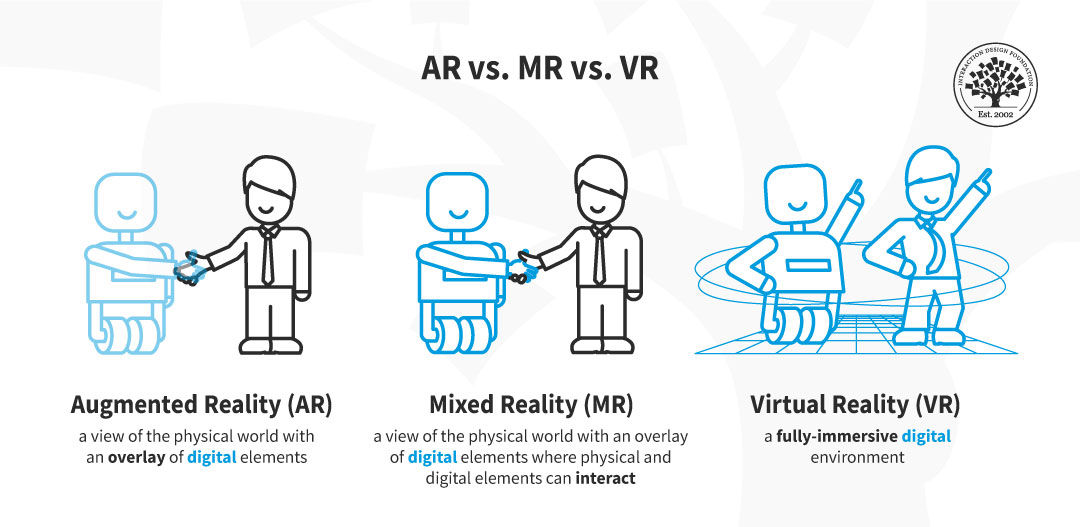
Augmented reality (AR) is a technology that allows the superposition of digital elements into the real-world environment. In the AR experience, you can see a composite view of physical or real-world elements and digital elements. While some AR experiences may offer a certain degree of interaction between physical and virtual elements, typically, there is limited to no direct interaction between the digital and physical world components.
AR experiences are close to the physical world end of the virtuality continuum. The ability to overlay digital objects onto the physical world is revolutionizing many industries such as gaming, education, healthcare, and manufacturing. For example, have you ever been to the doctor for a blood test, and the nurse couldn’t find your vein? It can be excruciating. What if AR technology could help with that?
AccuVein uses projection-based AR technology and a laser-based scanner to convert the heat signature of a patient’s veins into an image superimposed on the skin, making the veins easier for clinicians to locate. This AR technology increases the likelihood of a successful first-time injection by 350%.
As a UX designer specializing in AR experiences, you have the chance to go beyond the rectangular square of a screen and contribute to a revolution that will continue to change the way we interact with digital products. However, you’ll need to be aware of additional parameters to deliver a good UX that you may not be used to, like physical constraints and safety issues.
Advance Your Career With This Free Template
for “AR Usability Plan Example”
What is Mixed Reality (MR)?
Mixed reality (MR) is a technology that allows not only the superposition of digital elements into the real-world environment but also their interaction. In the MR experience, the user can see and interact with both the digital elements and the physical ones. Therefore, MR experiences get input from the environment and will change according to it.
In MR experiences the user can interact with both digital and physical elements. MR differs from AR—where digital and physical elements don’t interact— and VR—where the physical or real world is completely blocked out.
As a UX designer specializing in MR, you’ll have to master all the possibilities that MR technologies have to offer. Immersive experiences add a new layer to the user experience and require you to learn continuously and stay up to date to deliver an excellent user experience.
What is Virtual Reality (VR)?
Virtual reality (VR) is a technology that allows the creation of a fully-immersive digital environment. In VR experiences, the physical or real-world environment is entirely blocked out.
VR experiences are located at the fully virtual extreme of the virtuality continuum.
Many people struggle with the fact that VR experiences generate true emotional responses even if we know it’s “fake.” Keep in mind that humans construct reality from the information they receive from their senses, and this is why, even if we are aware that we have a fully digital experience, our bodies respond in the same way. Typically, VR takes advantage of the visual and auditory systems. However, there is an even greater sense of presence and immersion if you add other senses. Have you heard about the “Walk the Plank” challenge? It is a VR experience where you enter an elevator and get out at the top of a skyscraper. Then you’re asked to “walk a plank.” Just with auditory and visual stimulation, many people (especially those who suffer from a fear of heights) can’t do it, even though they are aware that what they see and hear is not real. However, if you add a physical plank to the setup and thus activate the sense of touch, even fewer people will be able to do it.
In this video, you can see how football players try the “Walk the Plank” VR experience with a physical plank and struggle to complete the experience, even though they are aware that the heights are not “real.”
The more coherent information we get through our senses, the more immersive the experience. As a UX designer, you’ll have to consider the different dimensions of the experience and the particularities of VR technology to create the best possible experience for your user.
Advance Your Career With This Free Template
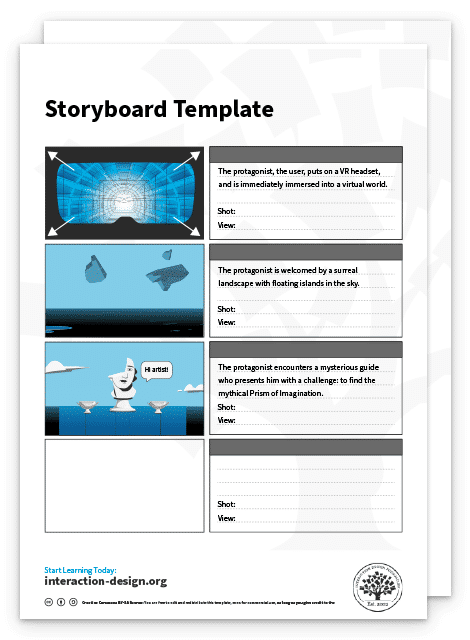
for “Storyboard for VR”
The Take Away
There are many technologies that alter our perception of reality by adding digital elements to the physical world to a greater or lesser extent. All these technologies can be situated at some point of the virtuality continuum according to the extent that the digital elements block the real-world environment and their interactive capabilities. If you have the image of the virtuality continuum in your head, you’ll be able to clearly see the difference between each type of technology.
The most important terms to learn to harness the potential of these new technologies are:
Augmented reality (AR): a view of the real world—physical world—with an overlay of digital elements.
Mixed Reality (MR): a view of the real world—physical world—with an overlay of digital elements where physical and digital elements can interact.
Virtual reality (VR): a fully-immersive digital environment.
Extended reality (XR): an umbrella term that covers all these different technologies, including AR, MR, and VR.
As all these technologies keep evolving and new ones emerge, UX designers need to keep learning and understanding the characteristics of each one to deliver the best possible user experience. If you can clearly distinguish AR, MR and VR and any other XR technology, you’ll be able to design experiences that take advantage of each technology and give an outstanding boost to your UX career!