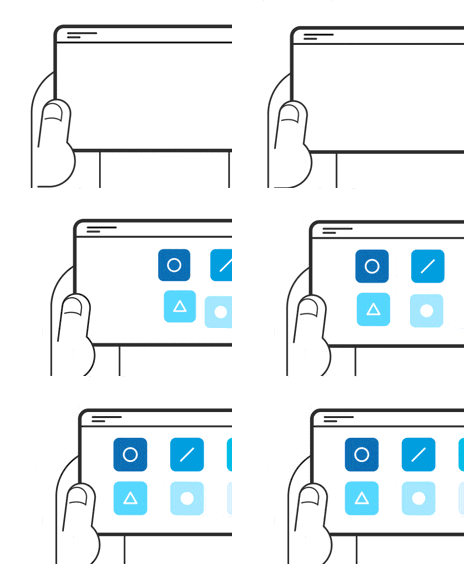
Infinite scrolling is an interaction design pattern in which a page loads content as the user scrolls down, allowing the user to explore a large amount of content with no distinct end. It is often used on social media platforms and feeds where content has no definite structure or sorting order.
Infinite scrolling removes the friction of navigating back—users can simply scroll up. This technique is well suited for mobile, where scrolling is both easy and intuitive.
How Does Infinite Scrolling Work?
When a user first visits a site, it loads only a small amount of data, similar to the first page of a series. The website tracks the user’s position on the page. If the user reaches the end of the page, the website fetches the next set of data and displays it. This sequence of actions—detect scroll, request data from the server and display it on the website—can be as quick as a fraction of a second, depending on the amount of content and the internet speed.
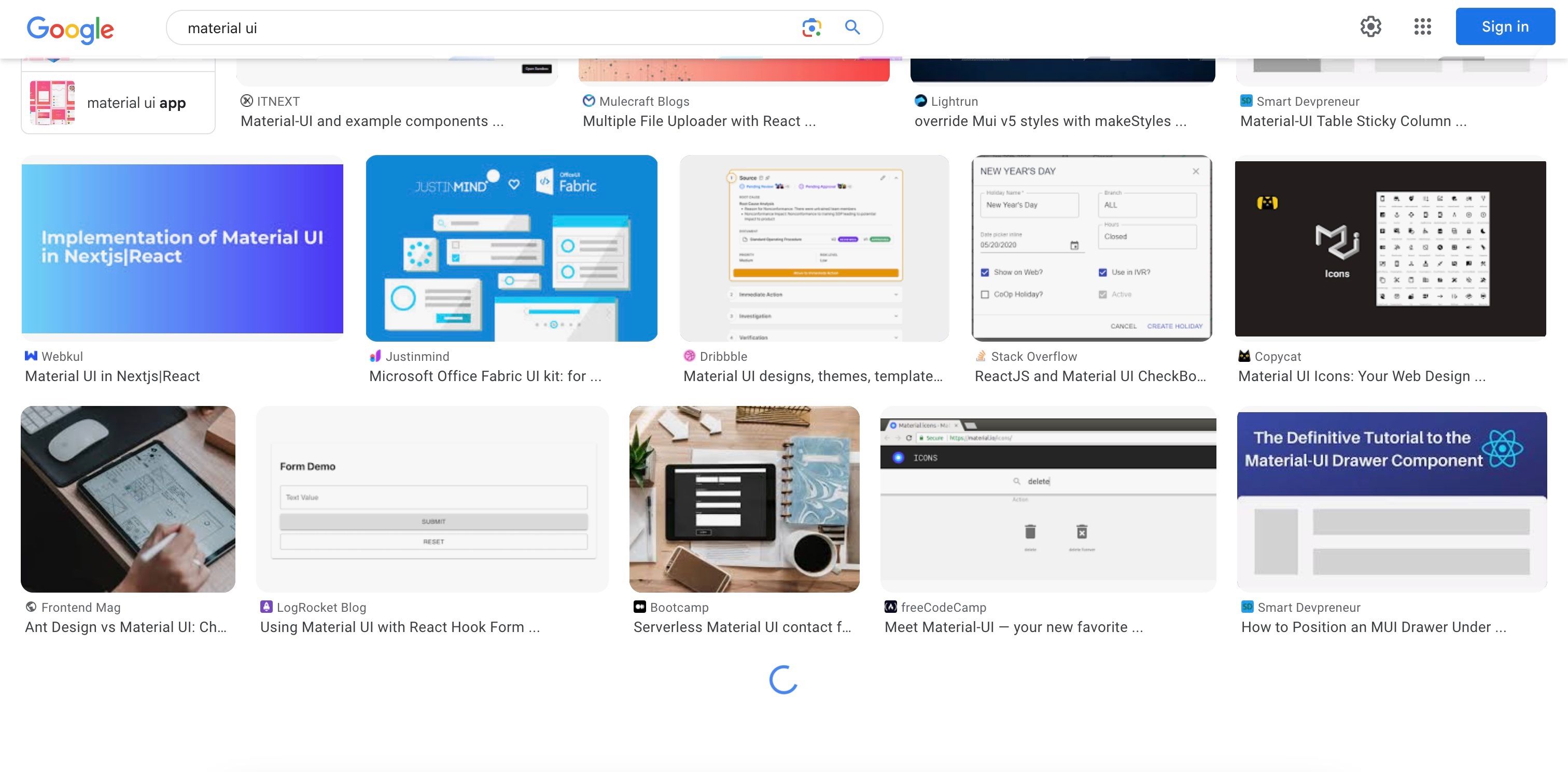
Google’s image search results page uses infinite scrolling to load more items. Notice how it shows a loading icon to inform the user that more images are coming.
© Google, Fair Use
Infinite scrolling replaces pagination. Pagination divides content into discrete pages; users must click on the navigation options to move to different pages and view more items.
When to Use Infinite Scrolling: Use Cases
Infinite scrolling can be used to:
Increase engagement and time spent on the site.
Social media and content-heavy feeds such as blogs and news sites are prime examples of infinite scrolling. These sites aim to keep users engaged and to have users spend the most time on their site. With infinite scrolling, users don’t need to click anywhere and keep receiving endless content.Facilitate organic content discovery.
Infinite scrolling is useful when users aren’t looking for something specific. When users want something specific, they will likely search for it with precise terms and expect to find it within the first few search results. In such cases, asking the user to browse endlessly is not ideal. However, infinite scrolling works well if the user is merely browsing without any specific goal.
Social media sites such as X (formerly Twitter) use infinite scrolling to increase engagement and facilitate organic content discovery.
© X (formerly Twitter), Fair Use
Ease navigation on mobile.
Infinite scrolling is well-suited for mobile users, who can easily scroll through content with simple swipes. This is more intuitive and convenient on touch-screen devices than clicking on tiny pagination links.
Disadvantages of Infinite Scrolling
Designers should be aware of the following issues and limitations of infinite scrolling:
Addiction: While infinite scrolling increases time spent on sites, it is also responsible for creating addictive experiences. After public outcry on the addictive design practices of social media applications, Instagram and YouTube have implemented settings to limit users’ time on the application.
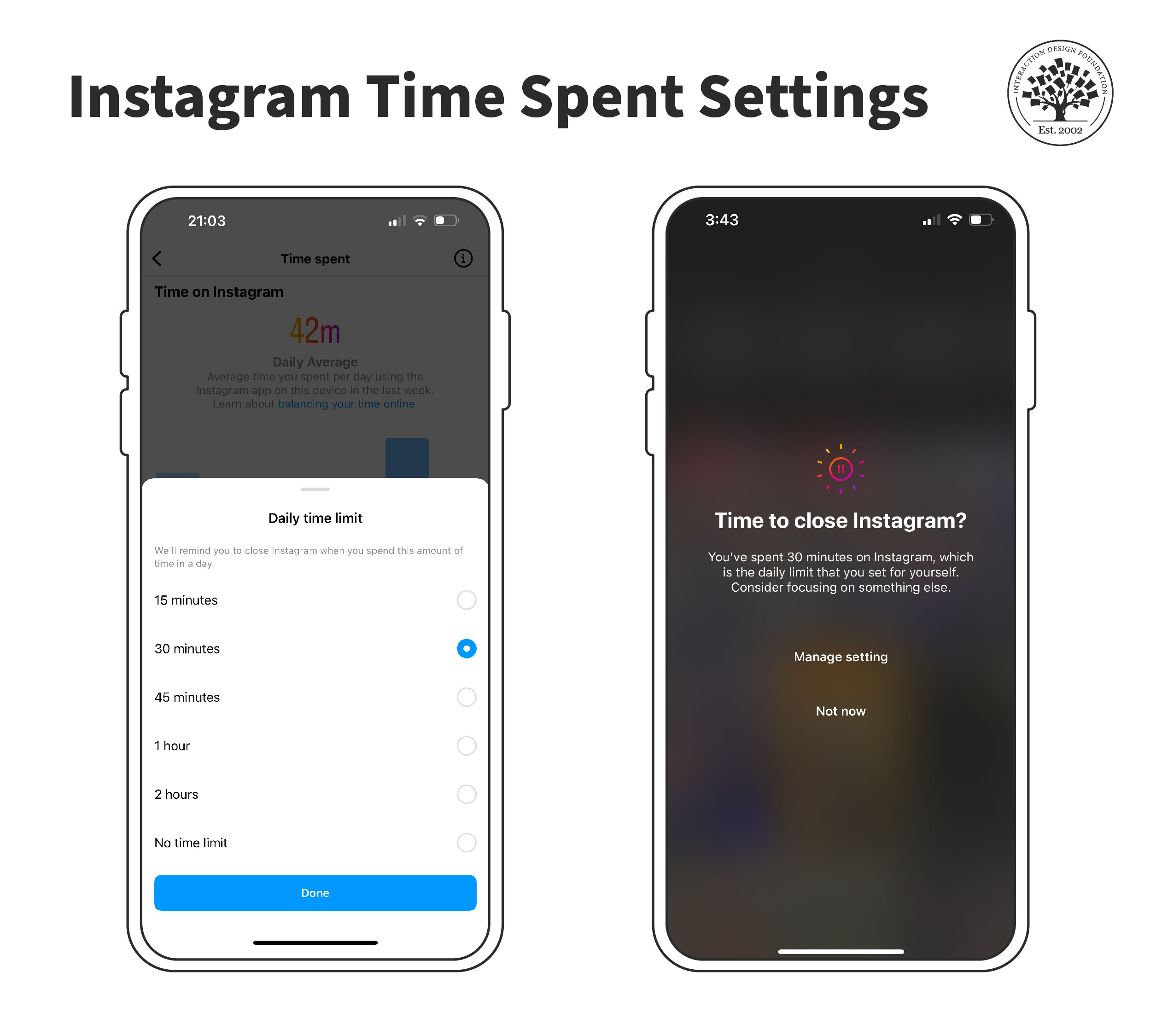
Instagram allows users to configure daily limits and reminds them to take a break when they reach the limit.
© Instagram, Fair Use
Performance issues: Continuous loading of content can lead to significant memory usage, slowing down the website or app, particularly on devices with limited resources. This can negatively impact the user experience, especially for long browsing sessions.
Navigation challenges: With infinite scrolling, users can find it difficult to locate specific items or return to a previously viewed point in the feed. Without distinct pages, users may not be able to bookmark or share specific content. Often, when a user uses the back button, they must scroll back to the top and reload all the content to reach their previous position.
Social media sites exacerbate the problem by loading new content whenever users refresh the page. For example, if you close the Instagram app and return after a few seconds, you’ll notice entirely new items in your feed. If you meant to return to your friend’s exciting post, you might have to manually search for it on their feed.
Some websites automatically update the page URL as users scroll to help them retain their position on the page.
Overwhelming content and scrolling fatigue: Infinite scrolling can sometimes overwhelm users with too much content, leading to a paradox of choice in which they struggle to decide what to focus on.
Hidden footer content: Often, websites place essential links and information in the footer, such as contact details, terms of service, and privacy policies. Infinite scrolling can make accessing these links difficult or impossible if new content keeps loading each time the user nears the bottom of the page.
Poor search engine optimization: Search engines traditionally index web pages with distinct URLs. Infinite-scrolling pages can be problematic for search engine optimization (SEO) because they may prevent search engines from crawling and indexing all available content. Until 2019, Google recommended providing a parallel paginated version of infinite scroll content, using structured link markup to help crawlers navigate it. Google withdrew that guidance when it dropped support for those markup signals, having found that its crawler could handle JavaScript-rendered content more reliably than before.
The current approach is to ensure that dynamically loaded content is accessible to crawlers from the outset. There are two main strategies designers and developers should be aware of:
Server-side rendering (SSR). Content is rendered into HTML on the server before it is sent to the browser. A crawler requesting the page receives fully formed HTML, including content that would otherwise require JavaScript to display. This is the most reliable approach for SEO.
Progressive enhancement. The page is built so that core content is available in the initial HTML response, with JavaScript used to enhance the experience for users whose browsers support it. Crawlers receive the baseline content without executing JavaScript.
In either case, the fundamental principle is the same: content that exists only within JavaScript and is never present in the HTML delivered to the browser is at risk of not being indexed. Designers specifying infinite scroll implementations should ensure developers understand this constraint and build accordingly.
Accessibility issues: Infinite scrolling can be challenging for disabled users, particularly those using screen readers or keyboard navigation. Most accessibility controls on a page appear at the top. However, these controls become ever more inaccessible on a page with infinite scroll.
Lack of control and data usage: Users have less control over the content they view, as they cannot quickly jump to a specific page or section. For users on limited data plans, infinite scrolling can lead to unexpected data usage because more content is loaded without the user taking explicit action.
No end-of-content indicator: In some cases, users may not realize when they have reached the end of available content, leading to confusion or the mistaken impression that the page is not loading more content.
Alternatives to Infinite Scrolling
Before implementing the infinite scrolling pattern to a product, designers should consider different alternatives:
Pagination

Google’s (now discontinued) iconic extended logo to depict paginated search results.
© Google, Fair Use
Pagination is the original solution to split large amounts of data across multiple pages. While it increases the number of clicks or taps needed to navigate, it prevents user fatigue, is SEO friendly, and helps people easily skip ahead or move to the first item in the list.
Infinite Scrolling with Load More Button
A common way to give users more control with infinite scroll is through a “Load More” button.
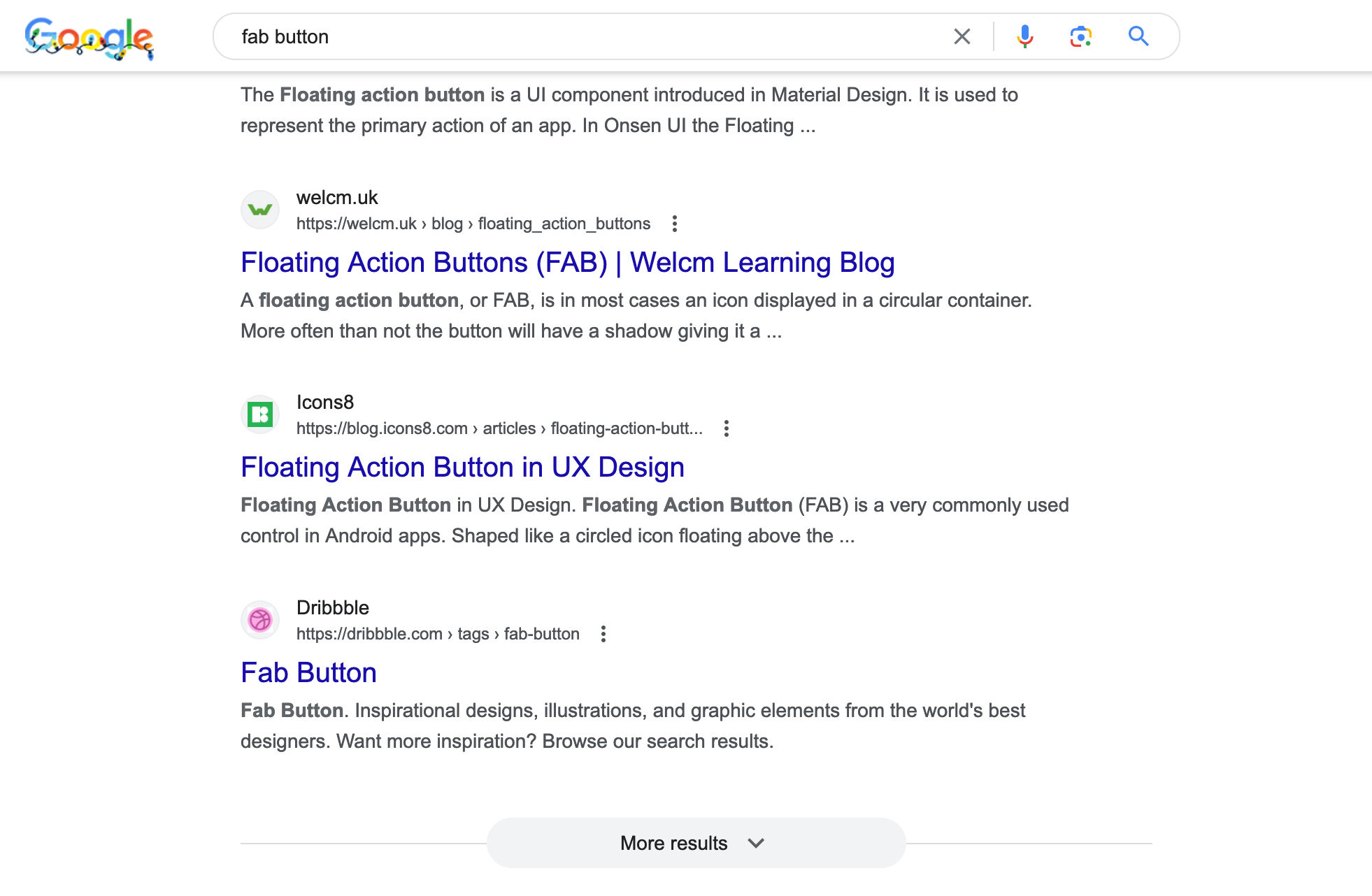
Google search results page displays a “More results” button to load additional content at the end of the page.
© Google, Fair Use
In this video, Senior UX Consultant for the European Parliament and creative lead of Smashing Magazine, Vitaly Friedman, talks about infinite scrolling and compares it with pagination and the load more button.
Infinite Scrolling with Integrated Pagination
Infinite scrolling with integrated pagination is a relatively new pattern used by the Google shopping mobile website. Much like infinite scroll, the page continues to load more data as you scroll to the bottom. However, the feed also displays page numbers at the locations where the fresh content appears. These page numbers serve as landmarks to help users navigate to specific parts of the page without scrolling back and forth.
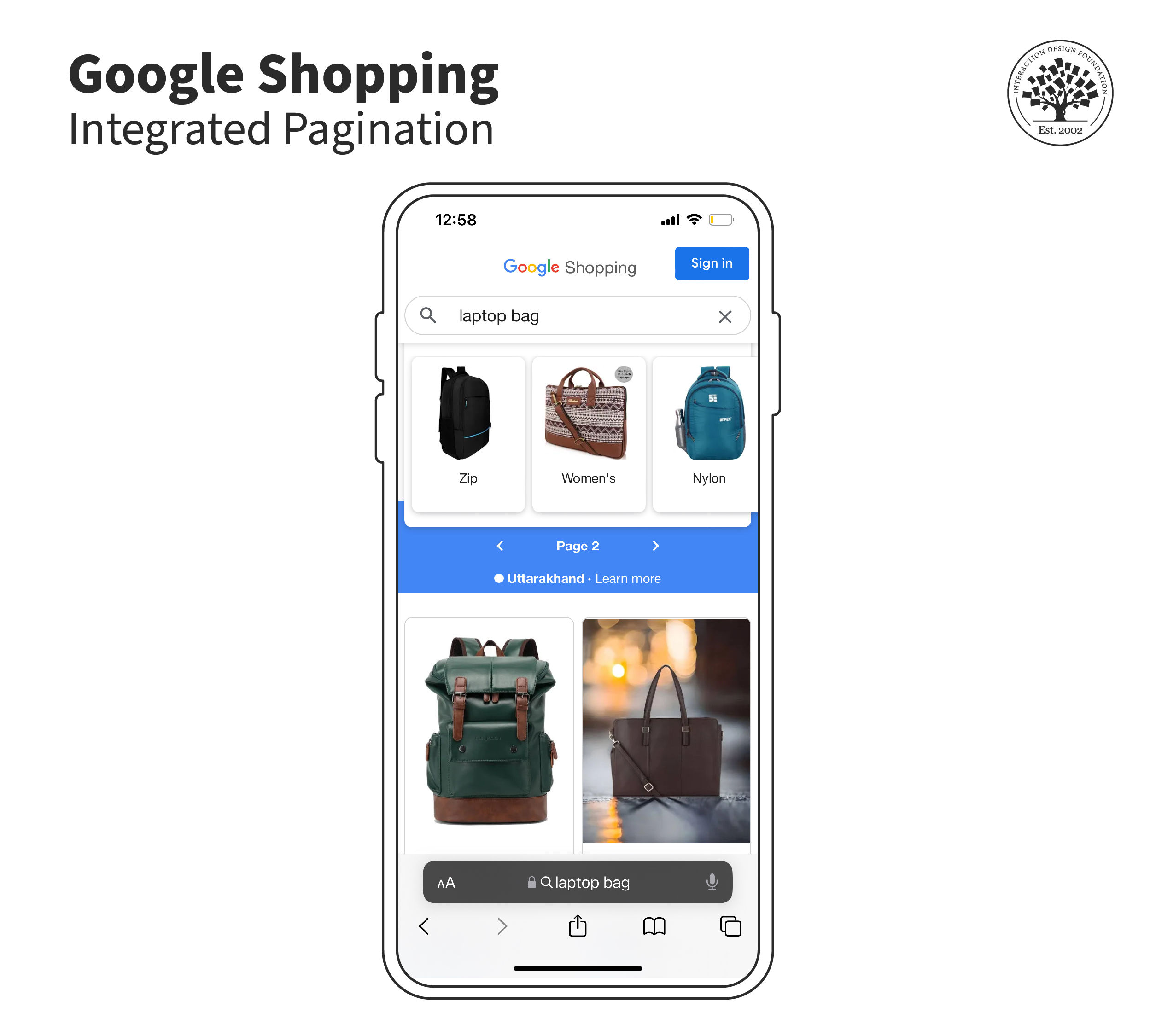
The Google shopping mobile website uses infinite scrolling with integrated pagination, where users know which “page” they’re on even as the site loads content with every scroll.
© Google, Fair Use
How to Implement Infinite Scrolling: Best Practices
Infinite scrolling has its advantages and challenges. Here are some best practices to implement infinite scrolling to achieve the most benefits:
Provide a loading indicator: Users should be able to tell when more content is loading. A clear loading indicator helps manage expectations and improves the overall user experience.
Allow bookmarking and sharing: Implement a system that lets users bookmark or share specific parts of the content. You can implement this by dynamically updating URLs or providing anchor links.
Optimize performance: Ensure that the implementation of infinite scrolling is efficient in terms of memory and data usage. Implement lazy loading, loading content only when needed (as the user scrolls closer to it), to optimize performance.
Implement a “Load More” button: For better user control, give users the option to click a “Load More” button. This can be particularly useful for users on slower connections or devices.
Accessibility considerations: Ensure the infinite scrolling feature is accessible, especially for users who rely on screen readers or keyboard navigation. See the following section on ARIA (Accessible Rich Internet Applications) roles and properties to enhance accessibility.
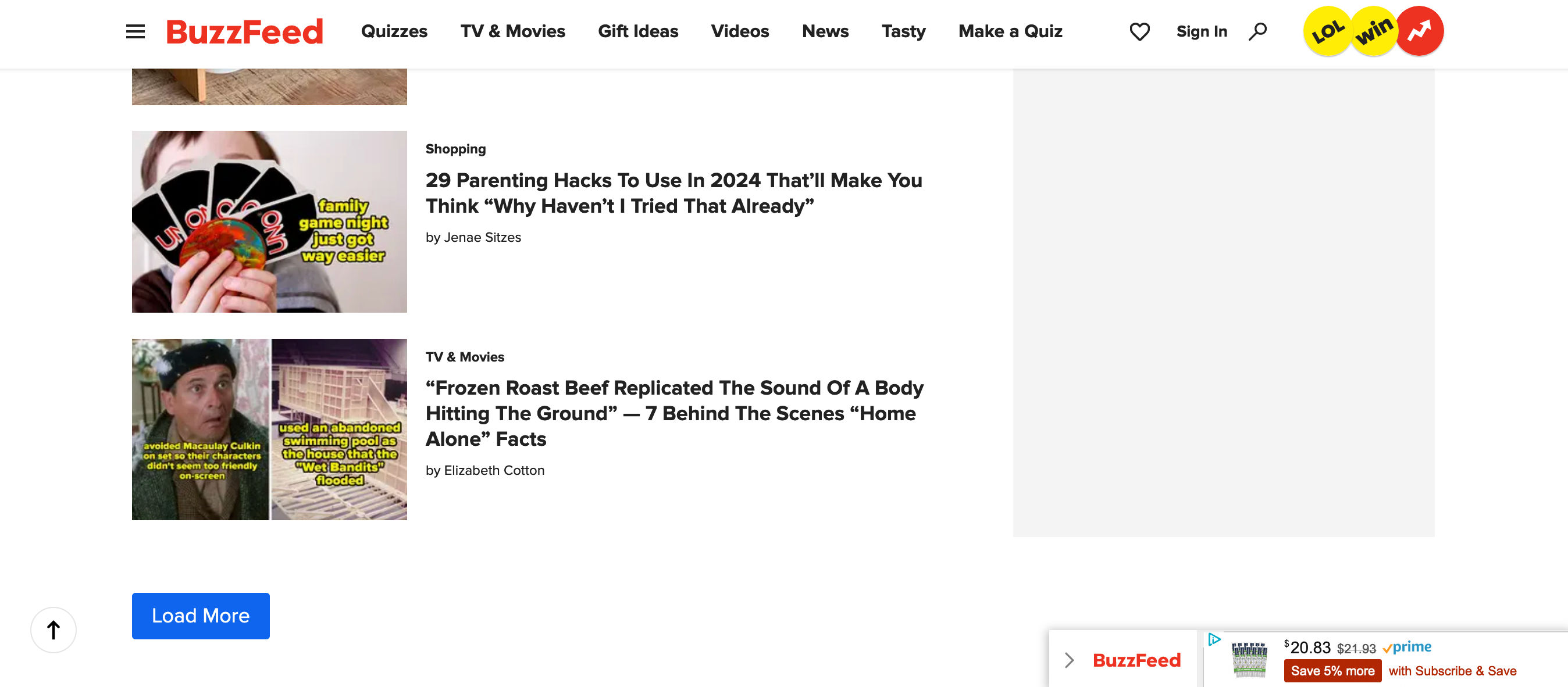
BuzzFeed implements a “Load More” button and a return-to-top navigation element on the bottom-left of the screen. The website uses a sticky header with all navigation elements and doesn’t have a footer.
© BuzzFeed, Fair Use
Provide an easy way to navigate to the top: Implement a “Back to Top” button or similar functionality so users can quickly return to the top of the page without scrolling all the way back.
SEO considerations: For web content, ensure that infinite scrolling doesn't hinder search engine indexing. You might provide a paginated version for search engines or use progressive enhancement techniques.
Manage memory efficiently: Regularly unload off-screen content or use virtual scrolling to keep memory usage low and prevent browser slowdowns or crashes.
Indicate the end of content: To avoid confusion, let users know when they have reached the end of the available content.
Test across devices: Ensure infinite scrolling performs well across devices and screen sizes, accounting for touch interfaces and varying screen resolutions. Use analytics/tracking to measure success.
Consider user preferences: Not all users prefer infinite scrolling, so give them the option to switch between infinite scrolling and traditional pagination.
Keep the footer accessible: If the footer has important links or information, ensure that users can still access them. You can pause the infinite scroll before the footer or provide a separate navigation menu.
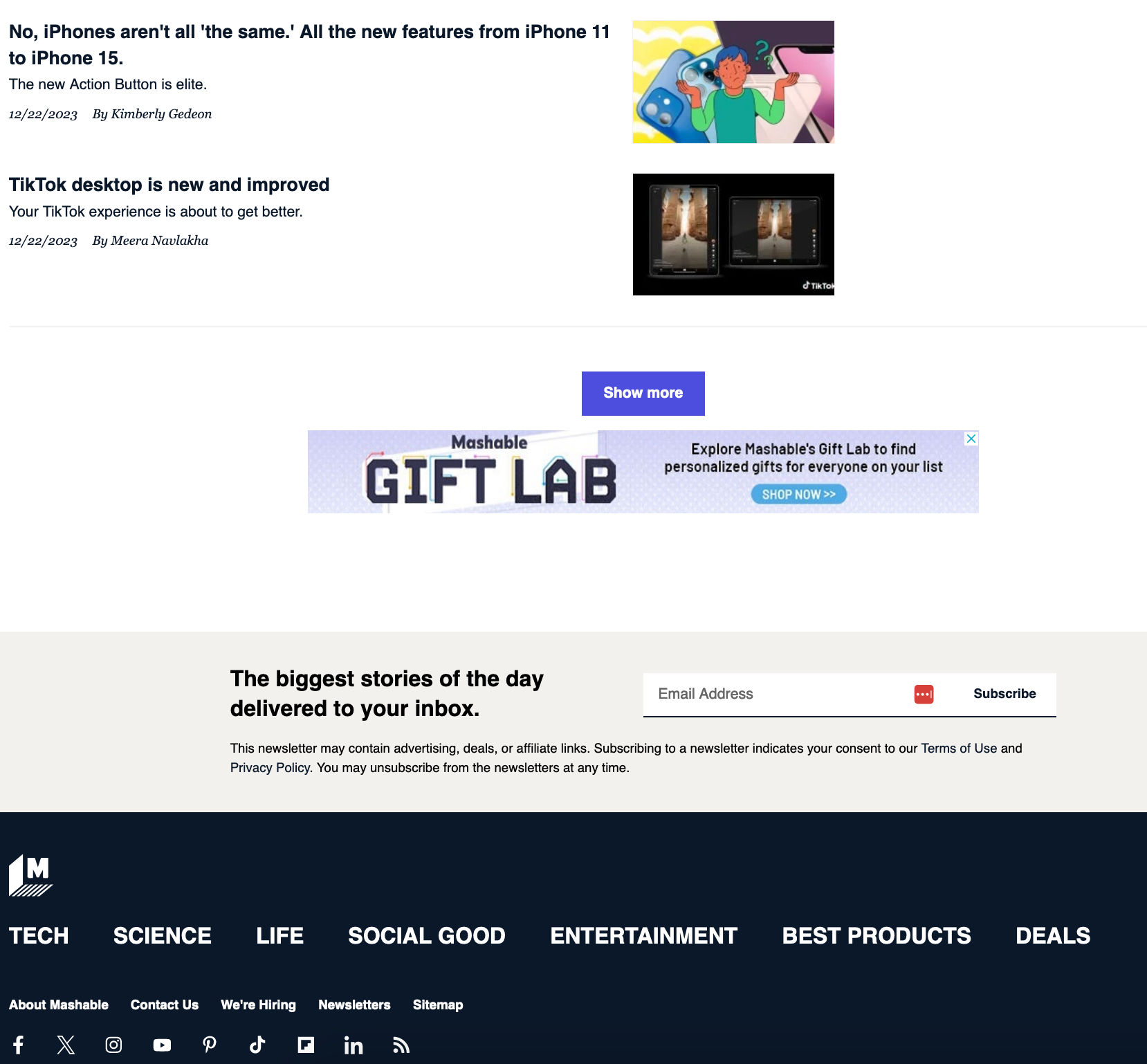
Mashable’s website employs infinite scrolling with a footer. Instead of automatically loading more content, the website gives users control with the “Show more” button.
© Mashable, Fair Use
Accessibility Considerations for Infinite Scrolling
Infinite scrolling presents specific challenges for users who rely on screen readers or keyboard navigation, and these challenges require deliberate design decisions to address. The following points cover the key areas.
The feed Role
The ARIA specification includes a role called feed, designed specifically for infinite scrolling content. When a scrolling container is given role="feed", screen readers understand that the content is dynamic and can update as the user reads. Within a feed, each item should have role="article", which allows screen reader users to navigate between items directly without stepping through every element in each item.
This pairing, feed on the container and article on each item, gives screen reader users a navigation model that is roughly equivalent to the experience a sighted user has when visually scanning a list: they can move from item to item at a summary level, and step into an item when they want to read its full content.
Communicating Loading State
When new content is being fetched and inserted into the page, users who cannot see the loading indicator have no way of knowing that something is happening unless that state is communicated programmatically. Two ARIA attributes are relevant here:
aria-busy. Setting aria-busy="true" on the feed container while content is loading, and returning it to aria-busy="false" when loading is complete, signals to assistive technologies that the region is in a transitional state. Screen readers can use this to inform users that the content is updating.
aria-live regions. An aria-live region announces changes to its content to screen reader users without requiring them to navigate to that part of the page. For infinite scrolling, a visually hidden aria-live region can be used to announce status messages such as “Loading more results” and “12 new items loaded”. This gives screen reader users the same ambient awareness of loading progress that a visual loading indicator provides to sighted users.
Keyboard Navigation
Infinite scrolling implementations frequently break keyboard navigation in two ways. First, focus management: when new items are injected into the page, keyboard focus typically remains on whichever element the user was last interacting with. If that element has scrolled out of the viewport, or if the new content has been inserted above the current focus position, the user may lose their orientation entirely.
Second, at the end of the page: keyboard users navigating to the footer using the Tab key, or screen reader users navigating by landmark, may never reach the footer if new content continues to load before they get there. The TD's existing recommendation to keep the footer accessible applies here; from a keyboard navigation perspective, pausing infinite scroll before the footer, or providing a dedicated route to footer content, is the practical implementation of that principle.
The Load More Button as an Accessibility Preference
The TD already discusses the Load More button as an alternative that gives users more control. From an accessibility standpoint, the Load More button is also the more accessible pattern by default. It requires an explicit user action before new content is inserted, which means:
Focus is not disrupted unexpectedly, as the user has initiated the action.
The insertion of new content can be announced via an aria-live region in a predictable, user-triggered way rather than at unpredictable intervals.
Keyboard and screen reader users have a clear, operable control to advance through content, rather than relying on a scroll-position trigger designed for mouse and touch interaction.
For products where infinite scrolling is a firm requirement, the accessibility considerations above represent the minimum necessary to make the pattern usable for people who rely on assistive technology. For products where the pattern choice is still open, the Load More button offers the same content discovery benefits with significantly less accessibility complexity.