Non-functional requirements (NFRs) specify the quality standards that shape user experience. They define how fast your product should respond, how easily users complete tasks, how reliably it works, and how well it protects user data. While functional requirements describe what your product does, non-functional requirements describe how well it does those things.
You might also hear these called quality attributes (because they describe experience quality) or design constraints (because they guide design choices). All these terms refer to the same concept: the standards that separate frustrating products from delightful ones.
In this video, William Hudson, User Experience Strategist and Founder of Syntagm Ltd, explains how non-functional requirements (also called constraints) impact your design decisions and why you need to identify them early in your process.
Why Non-Functional Requirements Matter in UX Design
Users expect products to simply work well. They expect instant responses when they click buttons. They expect interfaces to make sense without instruction manuals. They expect their data to stay secure without thinking about security at all. These quality expectations shape user satisfaction more than feature counts.
Non-functional requirements define how well a feature or product works, not what it does.
© Interaction Design Foundation, CC BY-SA 4.0
The difference between meeting and missing these expectations shows up immediately in user behavior. Sites that load in one second convert visitors three times better than sites that take five seconds. If you ignore accessibility, your products exclude over one billion potential users with disabilities. Security implementations that create too much friction push people toward less secure alternatives.
Non-functional requirements turn vague quality expectations into concrete targets your team can design and test against. Without explicit standards, different team members guess differently about acceptable performance levels, usability thresholds, and security needs. The result feels inconsistent to users who expected a polished experience.
NFRs also enable you to objectively evaluate design success. Subjective assessments like "the interface feels fast" or "the design seems accessible" provide no measurable criteria. Specific requirements like "search results appear within 1 second" create testable standards you can validate through automated tests, usability studies, and production analytics.
Which Non-Functional Requirements Affect User Experience?
Non-functional requirements are clustered into categories that address different aspects of product quality.
Performance Requirements
Delays trigger user abandonment before they even register consciously. Set specific targets for load times, response speeds, and system throughput. Instead of "the system should be fast," you write "the dashboard loads completely in under 3 seconds." These concrete targets help your team make architectural decisions that support speed from day one rather than patch performance issues later.
Usability Requirements
Interfaces serve users only when people can actually complete tasks efficiently. Specify how quickly users should complete key tasks, how many clicks actions require, or what percentage of users succeed without help. "New users complete their first task within 5 minutes" sets a clear target that shapes your design decisions throughout development.
Accessibility Requirements
Millions of potential users cannot access poorly designed interfaces. Define minimum color contrast ratios, keyboard navigation support, screen reader compatibility, and alternative text for images. These requirements prevent you from accidentally excluding users while often improving overall design quality.
Security Requirements
User data demands protection that balances safety with convenience. Specify authentication methods, password policies, session timeouts, and data encryption standards. The challenge lies in how you balance protection with usability, so legitimate users don’t face barriers that push them away.
Reliability Requirements
Consistent behavior builds trust in ways impressive features can’t. Set acceptable uptime percentages, maximum error rates, and recovery time targets. Users depend on products that behave predictably, so these standards directly affect whether people trust your product for important tasks.
Compatibility Requirements
Device diversity expands every year and multiplies potential compatibility issues. Specify browsers, operating systems, screen sizes, and network conditions your product handles gracefully. These requirements ensure you reach users regardless of their technology choices.
What's the Difference? Functional vs. Non-Functional Requirements
Functional requirements follow the pattern "the system will do X." Examples include "users can search by keyword" or "the system generates monthly reports." These requirements describe capabilities and behaviors you can demonstrate in a feature walkthrough.
Non-functional requirements follow the pattern "the system will be X" or "the system will achieve X quality level." Examples include "search results appear within 1 second" or "the interface maintains 4.5:1 color contrast." These requirements describe attributes you measure through tests rather than demonstrate through feature tours.
You need both types to define complete user experiences. When you specify a search function (functional requirement) without performance criteria (non-functional requirement), you might build search that technically works but frustrates users with slow responses. When you pair "users can search" with "results appear in under 1 second," you define both capability and quality.
Functional Requirements | Non-Functional Requirements | |
The system must do X | The system must be X or achieve Y quality level | |
Example 1 | Users can upload photos | Photos must upload in under 3 seconds |
Example 2 | The user can log in with a password | The login screen must meet WCAG 2 AA contrast standards |
How to Write Requirements That Connect to Real Users
Your team builds better products when they understand who they protect with quality standards. Requirements written purely as technical targets feel arbitrary. Requirements framed around specific user needs give your team clarity, motivation, and direction.
Frame Requirements Around Real People
Write requirements that show how quality affects specific users, not just what the technical threshold is. This approach transforms abstract numbers into user protection.
Rather than: "Login must complete within 3 seconds"
Instead, write: "Sarah processes 200 records per hour during peak times and needs login to complete quickly so she can maintain her workflow without interruption. Target: under 3 seconds."
Rather than: "Interface must support screen readers"
Instead, write: "Elena relies on a screen reader for all work tasks and needs clear navigation labels and proper heading structure to efficiently complete her daily reports. Standard: WCAG 2.2 Level AA compliance."
When you connect technical targets to real people, your team stops asking "why 3 seconds?" and starts asking "how do we protect Sarah's workflow?" Developers picture Elena navigating her daily reports. You consider Bernard in the field with spotty connectivity.
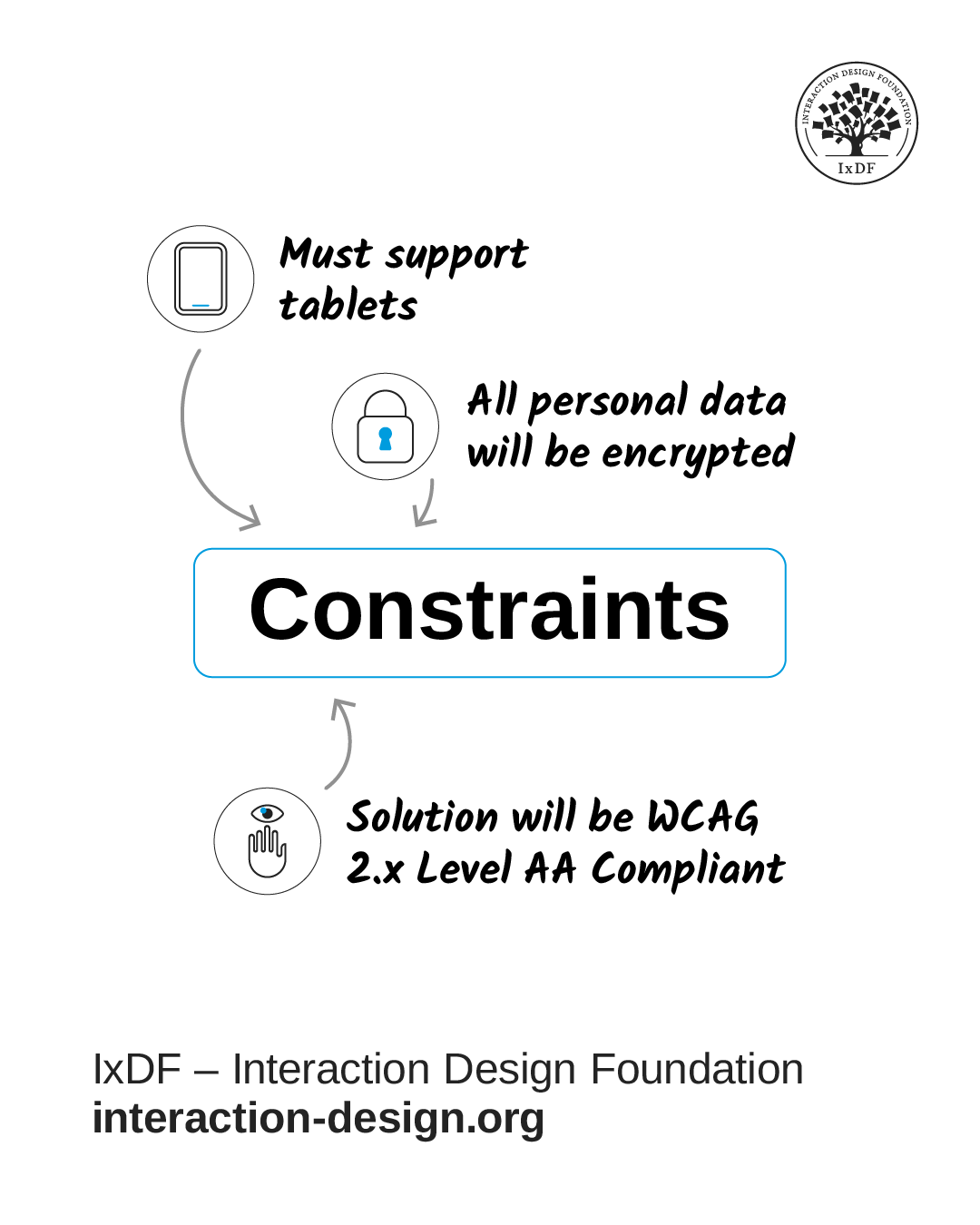
© Interaction Design Foundation, CC BY-SA 4.0
Structure Technical Specifications Consistently
Once you establish the user context, specify the technical criteria your team needs to implement and test. Use this format:
"The [system/feature] shall [quality attribute] [measurable criteria] [under specified conditions]."
This structure provides clear, testable specifications:
"The search function shall return results within 1 second for 95% of queries on 4G networks."
"The checkout process shall work without a mouse through keyboard navigation alone."
"The application shall maintain 99.9% uptime between 6am and midnight in all supported time zones."
"The login page shall lock accounts after 5 failed attempts within 15 minutes."
Define How You Will Verify Each Requirement
Specify test methods for every requirement you write. Performance requirements need load tests that simulate realistic conditions and user volumes. Accessibility requirements need automated audits plus manual tests with users who rely on assistive technologies. Usability requirements need task completion tests with representative users.
When you define verification upfront, you prevent late-stage debates about whether requirements were met. Your team knows exactly what success looks like and how to measure it.
Link Requirements to Business Impact
Connect technical specifications to outcomes stakeholders care about. "Sub-2-second load times reduce cart abandonment by 40%" shows why performance matters. "WCAG 2.1 AA compliance expands our addressable market" links accessibility to growth. These connections help stakeholders prioritize quality work against feature work.
When you explain both the user impact (Sarah maintains workflow) and business impact (40% less abandonment), you build support for the time and resources quality requires.
How to Discover What Quality Your Users Expect
Users rarely articulate quality expectations explicitly, because they assume products will work well. You need to discover these unstated expectations through research and observation.
Start with user research to understand expectations in your specific context. Different user groups prioritize different qualities. For example, healthcare users need reliability and security above speed. E-commerce users abandon carts when pages load slowly. Gamers tolerate longer initial loads if play remains smooth. Your research reveals which qualities matter most to your users.
In this video, William Hudson explains how grounded theory helps you base design decisions on evidence rather than assumptions.
Listen for complaints about existing solutions. When users describe competitors as "clunky" or "slow" or "confusing," they identify non-functional failures. These observations help you set quality targets you need to meet or beat.
Collaborate with stakeholders across disciplines. Security teams understand regulatory requirements and threat models. Operations teams know infrastructure constraints and reliability targets. Customer support hears user frustrations daily. Product managers track competitor capabilities. Combine these perspectives to identify requirements you might miss when you work alone.
Analyze usage data to understand real conditions. Check which devices and browsers people actually use rather than which ones you prefer. Review error logs to find reliability issues. Study analytics to spot where users abandon tasks. This data grounds requirements in reality rather than assumptions.
In this video, William Hudson describes the value of user requirements as a tool to visualize how users achieve their goals with a product to ensure functionality.
When to Address Non-Functional Requirements in Your Process
Identify critical requirements during early planning before you commit to architectural decisions. Performance requirements influence technology choices and infrastructure plans. Security requirements shape data models and authentication systems. Accessibility requirements determine interface patterns. Address these early to avoid expensive changes later. Here's how:
Check designs against requirements at each milestone. Review wireframes for task completion paths. Validate visual designs for color contrast and touch target sizes. Test prototypes for performance and usability. Catch issues while they remain cheap to fix.
Build requirements into your design system so they apply automatically. Component-level standards ensure buttons provide visual feedback within 100 milliseconds, form validation messages appear immediately, and load states show progress for actions that take longer than one second. System-level standards ensure your color palette meets contrast requirements, typography scales appropriately across devices, and layouts adapt to different screen sizes.
Embed quality standards in reusable components. This means you solve problems once rather than repeatedly. Every button your team uses meets accessibility requirements. Every form follows usability standards. Every layout supports responsive design. This systematic approach scales quality across your entire product.
Test requirements continuously throughout development. Run performance tests on each feature. Conduct accessibility audits on each screen. Validate usability with real users regularly. This continuous approach prevents surprises before launch.
Revisit requirements when evidence shows they need adjustment. User tests might reveal targets that are too strict or too lenient. Market changes might shift what constitutes acceptable quality. New devices might require compatibility updates. Stay flexible while you maintain focus on user needs.
Non-Functional Requirements Separate Good Products from Great
Features get users interested, but quality keeps them engaged. Non-functional requirements define the standards that transform feature lists into experiences users trust and recommend.
Start your next project when you identify which quality attributes matter most to your users and business. Write specific, measurable requirements connected to real user needs. Build quality standards into your design system. Test continuously. Make trade-offs consciously.
The standards you set early determine whether users trust your product with tasks that matter to them. Users tolerate occasional feature gaps, but they rarely forgive consistent quality failures. Build the invisible foundation that makes your product feel solid, responsive, and trustworthy even when users cannot articulate exactly why.